

Business Email Migration: Planning Mailboxes, DNS and Handover

Business email migration needs three separate proofs: the required historical messages are available, new messages reach the intended addresses, and staff can use the agreed mailbox arrangement. DNS changes alone establish none of those outcomes. Inventory mailboxes, shared addresses and senders before choosing the tool or moving delivery.
A company wants to replace its hosted email service. The destination accounts exist and the administrator can sign in. Staff still need old quotation threads. Sales uses a shared address that nobody has classified. The website sends notifications through a separate provider. Changing the mail route without those facts can leave a working new inbox and an incomplete business process.
This guide uses one declared scenario: approved messages from an IMAP-based source are imported into Google Workspace, followed by a controlled delivery change. Other source platforms and tools have different capabilities. Examples are fictional and contain no actual mailbox data. Generated photographs illustrate administration and do not prove a real migration or delivery result.
Download the mailbox and DNS workbook or editable CSV registers. Both are ungated. The five public tables provide the planning structure. Store real credentials and restricted message exports separately in approved private systems.
Define what the business must preserve
Start with the tasks that depend on email. Staff may need to retrieve historical quotations, receive new enquiries, reply from a shared identity and find contact records. These are separate requirements. “Move the email” is too broad to tell an administrator which data, addresses and permissions should survive.
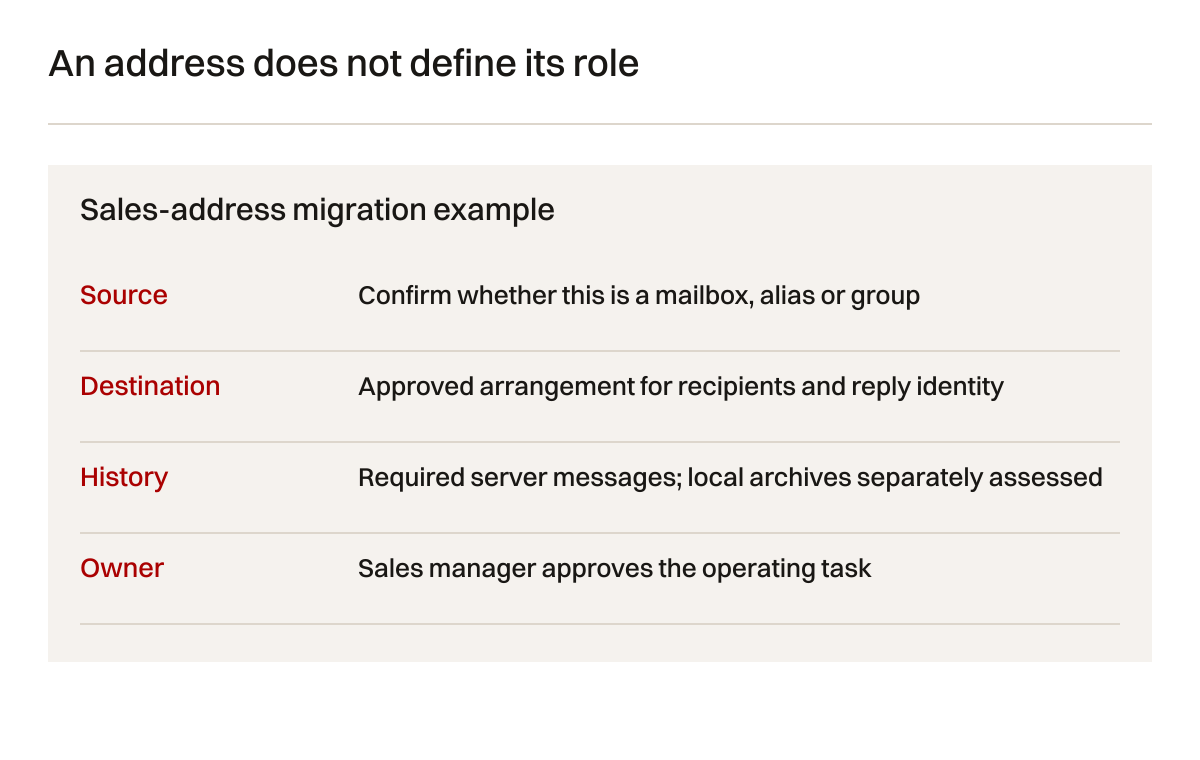
List the source account types and the destination arrangement. Identify individual mailboxes, aliases, groups, delegated access, forwarding addresses and accounts belonging to former employees. A visible address may not have its own stored messages. A shared address may be a mailbox, distribution group or alias. The move needs the underlying arrangement, not just a list of strings.
Agree the historical period and any exclusions. The business may require all retained commercial messages or a defined approved subset. Deleted folders, spam, local archives and messages stored only on a device need separate review. Do not assume the remote IMAP server contains every message a staff member can see in a desktop application.
Google's data import overview describes supported source arrangements. Use it to select the applicable tool path. A source that offers IMAP access is different from a Microsoft Exchange Online migration. Tool availability does not establish that every data type or account relationship will transfer.
Record contacts, calendars, signatures, rules and local archives explicitly. This scenario scopes the IMAP path to approved email messages. It does not promise calendar, contact or client-setting transfer. If those items are required, define and verify an additional route against the actual platform. Do not quietly mark them complete because the inbox import succeeded.
Create the address and mailbox inventory
Ask each operating owner how the address is used. An individual address identifies a user. A sales address may be read by several people. A billing address may forward externally. A no-reply identity may be used only by an application. Their requirements differ even if all addresses share the same domain.
Google's alias instructions state that an alias is not a separate Google Account. Do not choose an alias when the business needs an independent mailbox and access arrangement. Shared work needs a deliberate design rather than a convenience decision made during DNS cutover.
Table 1: mailbox and address types. The fictional examples identify questions to resolve before creating destination accounts.
| Address type | Stored data question | Destination decision | Operating owner |
|---|---|---|---|
| Individual mailbox | Which server and local messages are required? | Named user and approved import | Staff member and administrator |
| Sales shared address | Where are messages actually stored? | Mailbox, group or other approved arrangement | Sales manager |
| Alias | Which account currently receives it? | Confirm the intended recipient | Address owner |
| Forwarding address | Does it retain a local copy? | Preserve or replace approved routing | Business owner |
| Former staff account | What retention and access are authorised? | Agreed archive or account handling | Authorised business lead |
| Application sender | Which service sends from this identity? | Confirm sender and authentication | System owner |
Keep the inventory readable without credentials. The public template deliberately has no password column. An actual import tool may require source authentication material. Follow its current instructions and handle that file through an appropriately restricted route. Do not reuse a broadly shared planning workbook as a credential distribution mechanism.
Verify ownership of the domain and DNS management separately from mailbox administration. A hosting provider may offer both services, but their controls and authority can differ. The migration owner should know who can approve and apply DNS changes and who can inspect message delivery. A missing role can become a practical blocker after the accounts are otherwise ready.
Review compatibility before importing
Use a pilot mailbox that represents meaningful variation. Include several folders, sent messages, attachments and a known recent thread. Where permitted, choose or construct sample records that exercise the tool without unnecessarily exposing private customer content. The pilot should reveal the mapping and usability, not merely count a few easy messages.
Google's current email import instructions describe the IMAP connection and user mapping. They require appropriate administrator authority and source connection information. The documented IMAP path has mapping and batch limits. Verify those against the planned accounts rather than infer unlimited transfer from a successful connection.
At the time of checking, the documented IMAP import can handle up to 100 source users in a batch and does not copy one source user into several destination users through that mapping route. These are tool-specific limits, not general statements about all migration products. Larger or different arrangements need a separate reviewed plan.
Table 2: compatibility and preservation checks. An item outside the declared email import needs its own approved route.
| Item | Pilot question | Acceptance evidence | Limit |
|---|---|---|---|
| Messages | Are required examples copied and readable? | Matched sample threads and attachments | Count alone is insufficient |
| Folders | How does the destination represent them? | Staff can locate agreed examples | Source and destination organisation may differ |
| Sent history | Are required sent records available? | Matched approved sent sample | Local-only archives need separate handling |
| Shared address | Who receives and can reply? | Tested recipient and sender behaviour | Alias creation does not prove shared workflow |
| Contacts and calendars | Is an additional route required? | Separate verified scope if requested | Not promised by this IMAP example |
| Rules and signatures | What must staff recreate or approve? | Named handover task completed | Not inferred from message import |
Match source and destination records using meaningful samples. Compare subject, date, participants, attachments and expected folder context where appropriate. Differences can arise from how the destination organises messages. Record the actual difference and ask whether it affects required work. Do not describe every visible change as lost data without inspection.
Keep import reports and their definitions. Successful, skipped, failed and discovered counts can mean different things. A skipped record may have a reason distinct from failure. Review the tool's current reporting behaviour and sample evidence. A green progress indicator is not a complete acceptance test for the business's historical retrieval tasks.
Plan DNS without treating it as the whole migration
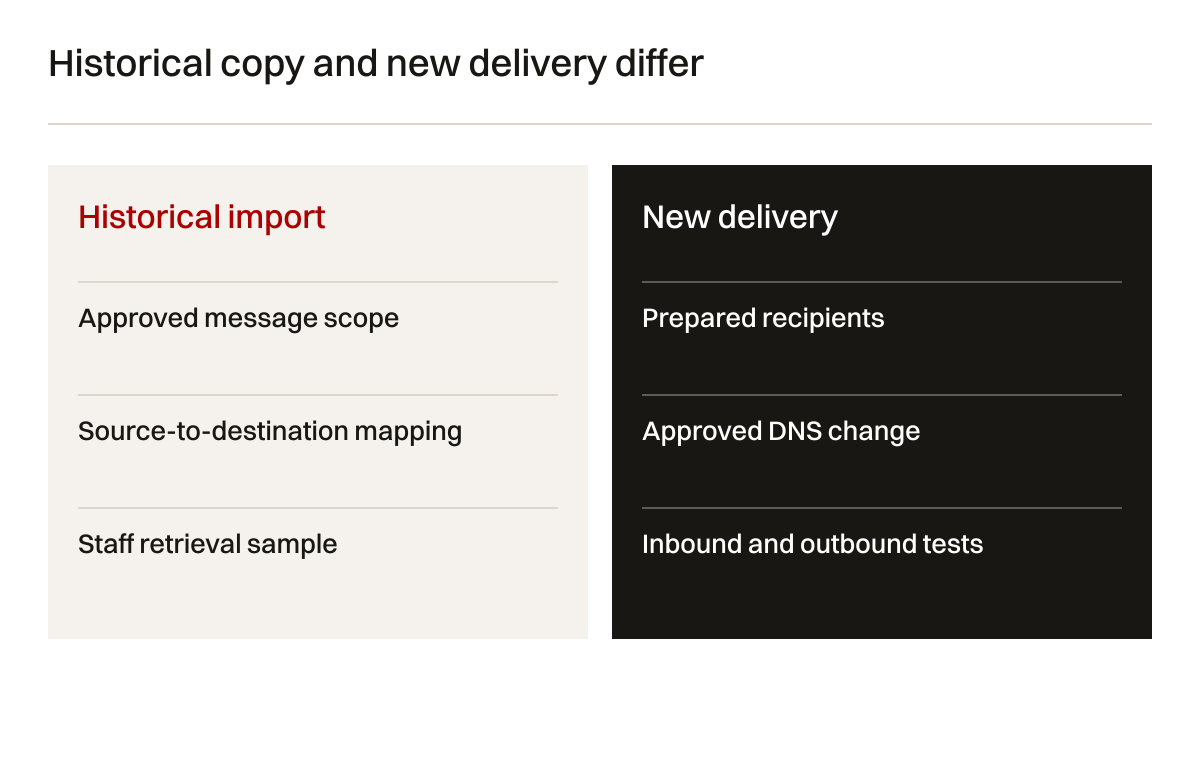
MX records direct incoming mail delivery for a domain. They do not create user accounts or copy historical messages. Prepare destination recipients before changing the route. Identify where the authoritative DNS is managed and capture the current approved record set through a private operating reference.
Google's Workspace MX instructions give current setup details. At the time of checking, the published new setup uses smtp.google.com and warns that recognition can take up to 72 hours. Use the destination account's actual instructions and the DNS provider's required formatting. Do not paste an old example unquestioningly.
Leave unrelated website records alone unless the approved plan requires a change. Replacing an entire DNS zone to change email can disrupt website hosting, verification and other services. Identify the exact records and their purposes. The person making the change should be able to explain each intended edit and the recovery reference.
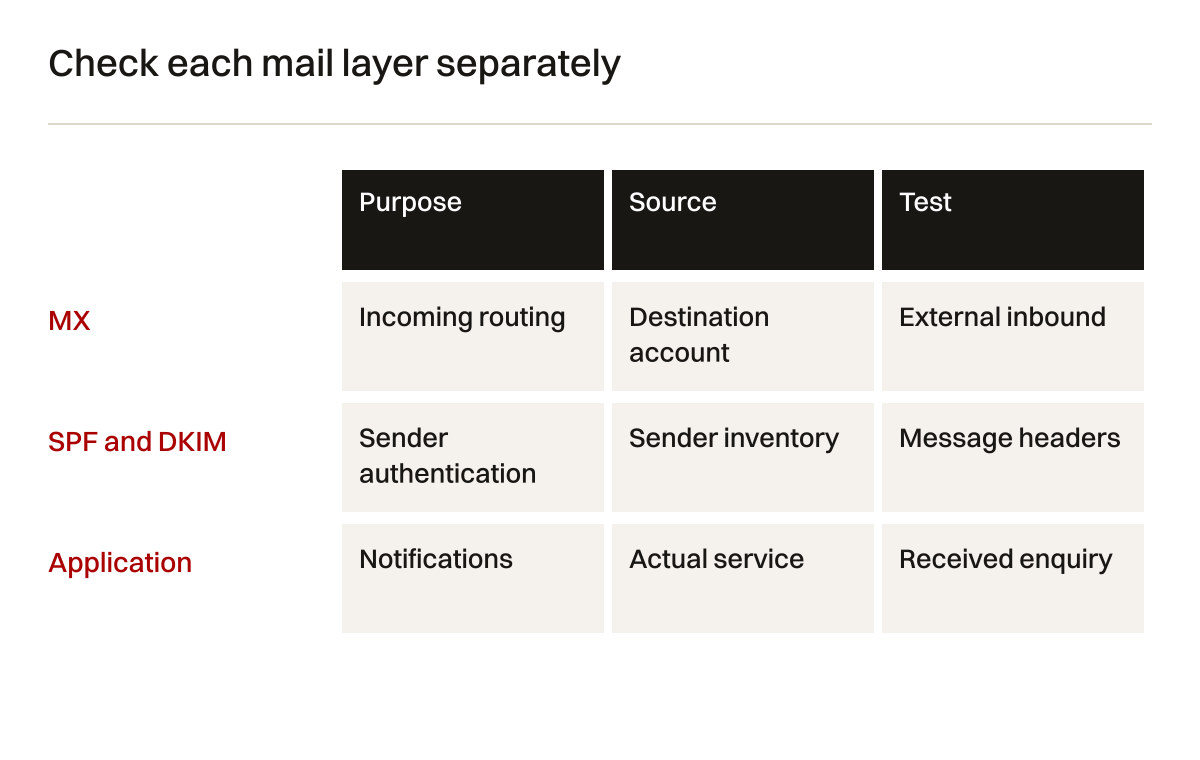
Table 3: DNS and sender records. These describe functions and acceptance questions, not a copy-and-paste configuration for an unknown domain.
| Record or setting | Main purpose | Source of the required value | Verification question |
|---|---|---|---|
| MX | Route incoming mail | Destination provider and account | Does approved new mail reach intended recipients? |
| Domain verification | Establish account control | Destination account instructions | Is the domain verified under business authority? |
| SPF | Identify authorised sending systems | Complete approved sender inventory | Are required senders represented correctly? |
| DKIM | Support signed outgoing messages | Sender account and selector | Do controlled messages show intended authentication? |
| DMARC | Define policy and reporting for authentication | Reviewed domain policy | Have legitimate sender paths been tested? |
| Application settings | Send site or system notifications | Actual service configuration | Do notifications arrive with approved identity? |
Keep record names, values and change authority in the private implementation record. The public article does not need your actual DNS values. A teaching diagram can explain the relationship without exposing account details. The migration workbook stores safe references and test states, while the administrator follows the specific provider controls.
Inventory all legitimate senders
Staff mailboxes may be only one source of messages from the domain. The website, CRM, invoicing system and newsletter service can also send. Moving employee email can expose a previously undocumented sender. If authentication changes omit that service, its notifications may behave differently even while staff messages work.
Use Google's SPF setup guidance for the actual sender inventory. Do not publish several conflicting configurations by treating each service independently. The administrator needs one coherent understanding of what is authorised for the domain, with the platform limits checked before applying changes.
Use the DKIM instructions to generate and publish the appropriate key details for the actual service. Then verify authentication on controlled outgoing messages. The DNS entry and service activation are related stages. Saving a record is not proof that a particular message was signed as intended.
Review DMARC setup with the legitimate sender paths understood. Policy choices can affect handling of messages that fail authentication. Do not copy a strict rejection example into production before assessing required senders and reports. Authentication configuration is ordinary responsible implementation, not a promise of complete email security.
Google's sender guidelines explain requirements for messages sent to Gmail, including distinctions relevant to bulk senders. The business should assess the rules applicable to its actual sending activity. An employee-mail migration does not automatically certify every marketing service or guarantee inbox placement at every recipient provider.
Sequence the pilot, import and delivery change
Prepare accounts, permissions and domain ownership first. Test source connection and mapping in the declared tool. Perform the pilot and inspect the required historical tasks. Resolve compatibility questions before applying the approach to all approved mailboxes. A pilot that excludes the sales address cannot establish the sales team's shared workflow.
Run the approved historical import while the old service remains available under the agreed arrangement. Record start conditions and results. Plan how messages that arrive during the transition will be reconciled. Follow the actual tool's supported repeat or incremental behaviour rather than promise that a second run cannot create any duplicates.
The delivery change is an approval stage. Confirm that destination recipients exist, sender settings are understood and the administrator can make the intended DNS edits. Tell staff which interface to use and what remains accessible at the old service. The business should know the support contact and the limits of the change before it occurs.
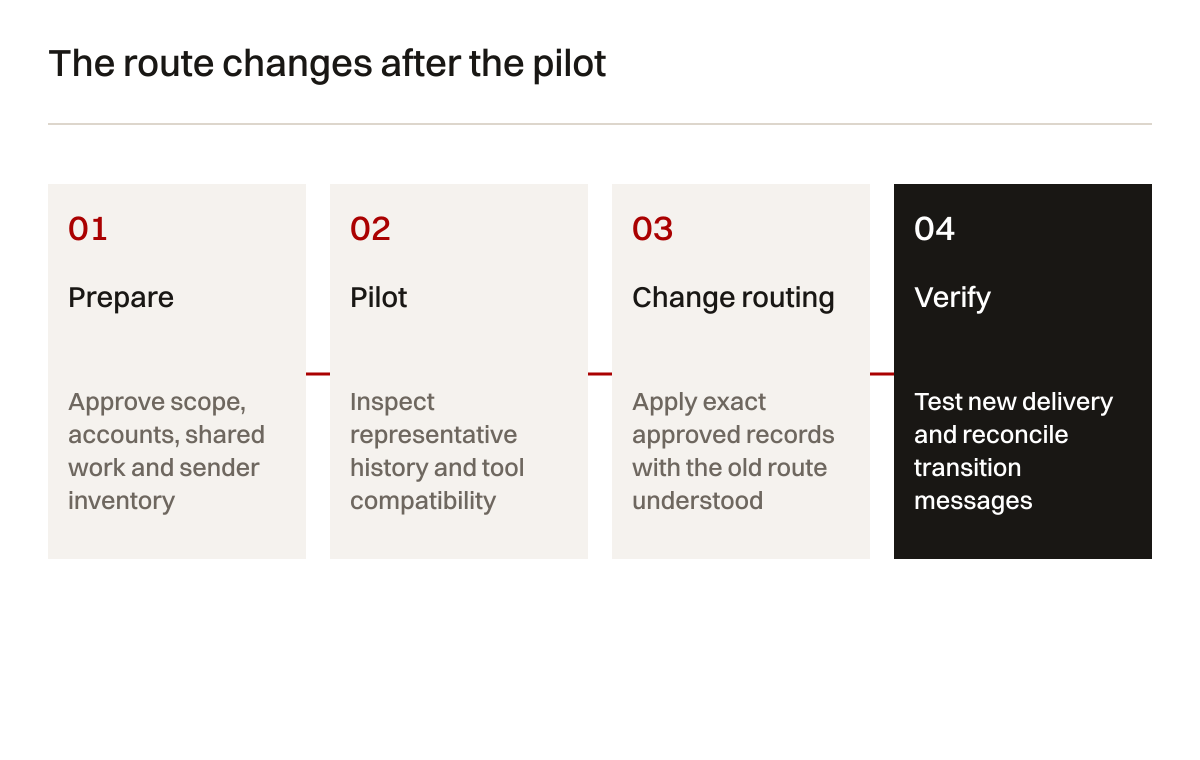
After the change, inspect actual message routes. Test from outside the organisation and between appropriate internal accounts. Check replies and shared identities. Record timestamps and references. Some senders may still use cached routing information; the old service's retained availability and the reconciliation plan matter during that period.
Do not state a universal zero-downtime guarantee. The result depends on source availability, account readiness, routing behaviour, staff clients and external senders. A careful plan can reduce avoidable problems while retaining honest limits. Acceptance should state what was tested and what observation remains due.

Generated illustrative photograph. The laptop view and checklist are not evidence of a completed import or delivered business message.
Test delivery and historical access independently
Give each test a unique reference. The sender records when it was sent. The recipient confirms the intended mailbox or shared route and the visible message. If the business needs attachment handling, include an approved sample. Keep real customer details out of routine controlled tests.
Table 4: migration acceptance tests. Add specific tests for additional approved calendars, contacts or client settings rather than assume they transferred.
| Test | Controlled input | Expected evidence | Owner |
|---|---|---|---|
| External inbound | Message from an approved outside account | Intended destination receives reference | Mail administrator |
| External outbound | Message to a controlled outside recipient | Recipient confirms and headers can be inspected | Mail administrator |
| Reply identity | Reply from agreed shared arrangement | Correct authorised public sender identity | Sales or office manager |
| Website notification | Fictional website enquiry | Correct recipient and retained context | Website and mail owners |
| Historical retrieval | Approved old thread and attachment | Staff can find and open required records | Mailbox owner |
| Transition reconciliation | Messages around routing change | Required records located or exception logged | Migration owner |
An inbox receipt does not settle every sender question. Inspect relevant authentication results and the intended identity for the controlled messages. A successfully delivered website notification can still use an unexpected reply address. A message in spam is different from a missing message. Record each observed condition precisely so the next investigation starts from facts.
If a test fails, identify the layer before changing settings. The recipient may not exist. A shared address may route to the wrong account. An application may use obsolete credentials. A sender may use old MX information. A client may show cached content. Avoid broad changes that alter several layers before preserving the failed test evidence.
Define rollback as a limited operating decision
Rollback is not a magic reversal of every migration event. Returning MX records to the old route can affect future delivery. It does not remove messages already received at the destination or automatically merge histories. Staff may have replied from the new system. Different services can now contain different records.
Before cutover, agree who can decide to return routing and under what condition. Record the old approved values privately. Confirm that the old service remains usable under its contract and account arrangement. Define how messages received at each service will be found and reconciled. A rollback plan that assumes a cancelled source account still works is not usable.
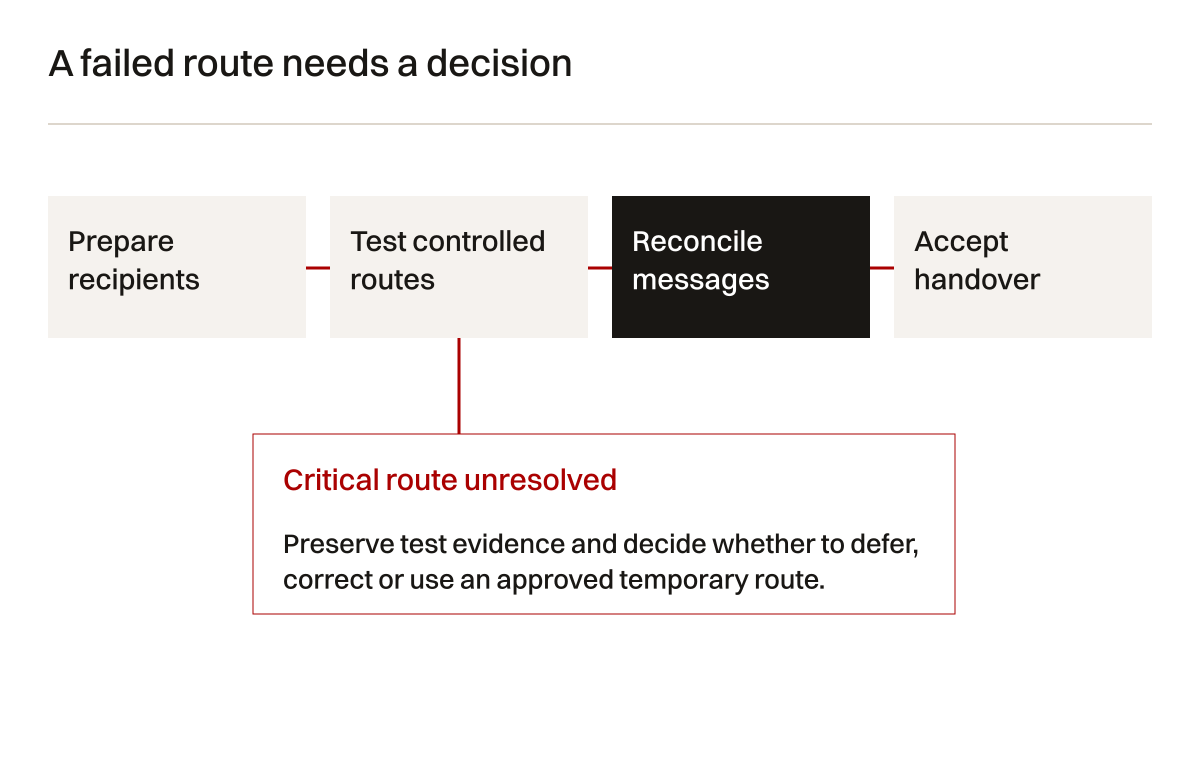
Keep stopping conditions practical. If a critical shared address cannot receive messages, the business may need to defer cutover or use an approved temporary route. If a few historical records need review while new delivery works, the decision may differ. The business owner should understand the consequence of each unresolved item before accepting it.
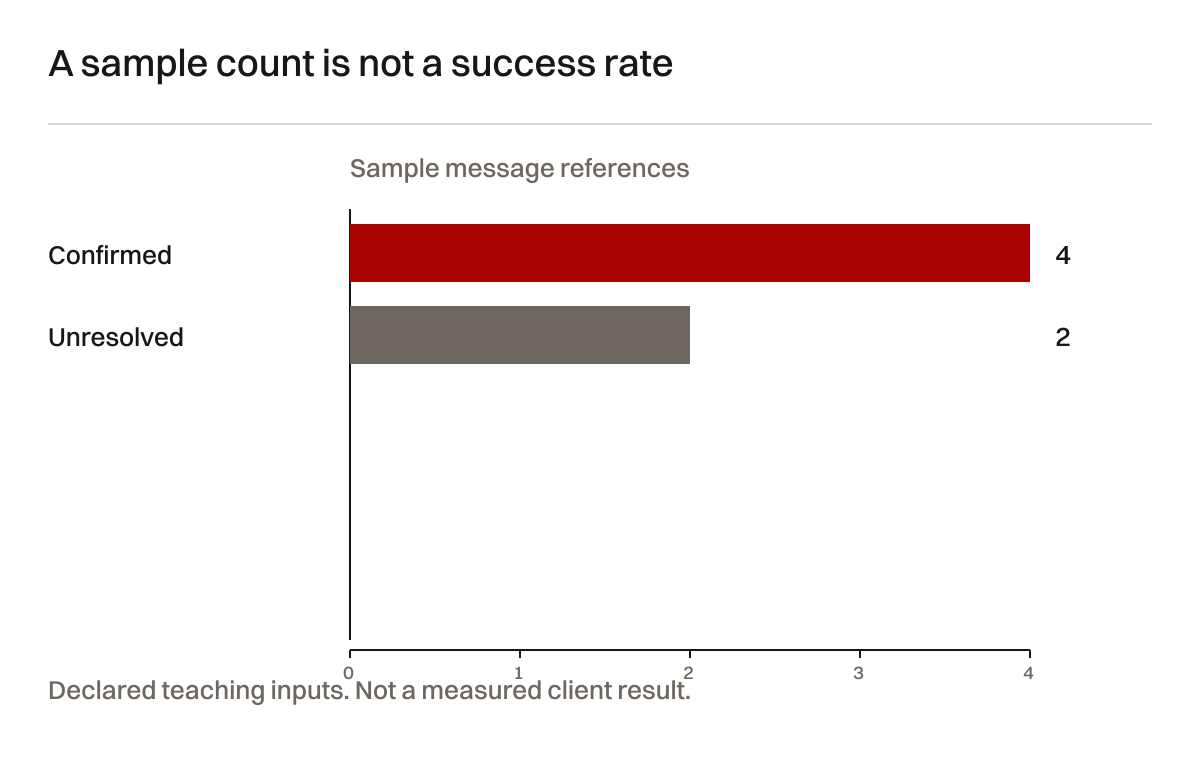
Use a synthetic reconciliation example to explain the record problem. In a fictional six-message transition sample, four references are confirmed at the intended destination and two need investigation. Four divided by six is about 66.7%, but that is not a migration success rate. The sample is deliberately small and unweighted. One missing tender message could matter more than several routine notifications.
Hand over the actual staff tasks
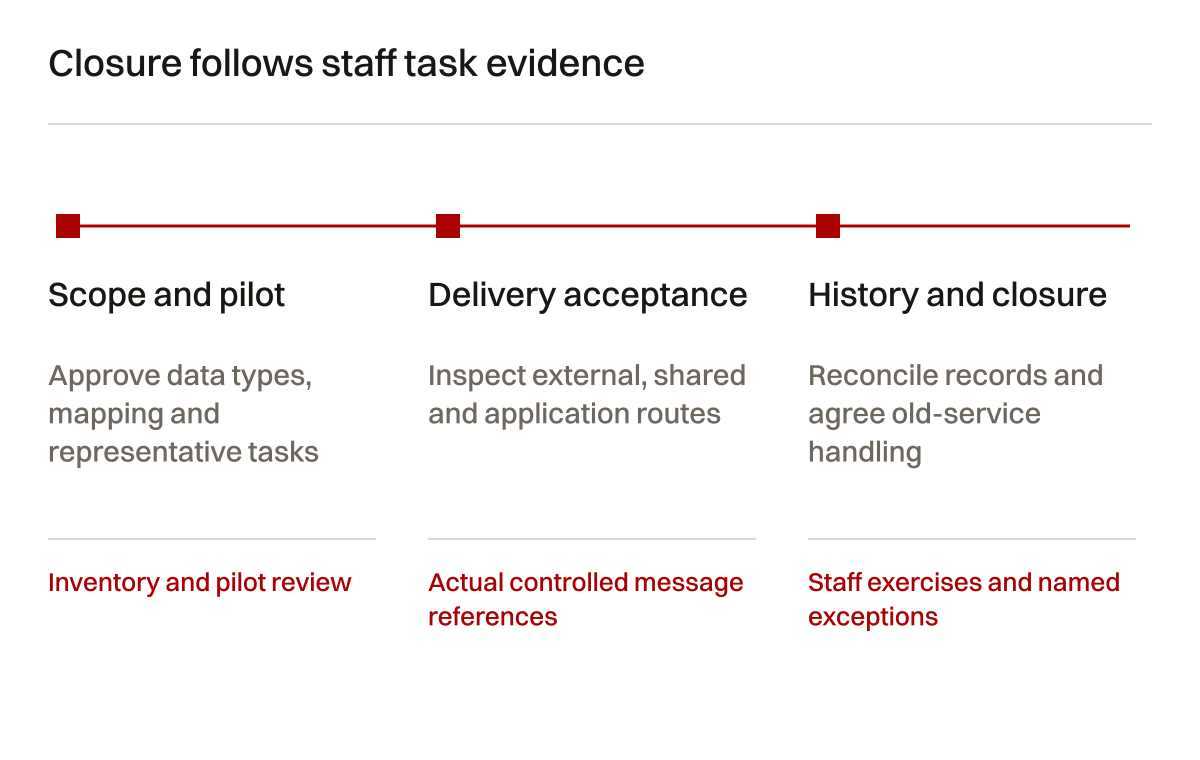
Staff training should cover the agreed interface, sender identities, historical retrieval and support route. Ask a representative user to perform the tasks. Attendance at a briefing does not prove they can find an old quotation or reply correctly from the sales arrangement. Keep the exercise realistic without exposing actual customer threads unnecessarily.
Table 5: staff and operating handover. Completion requires task evidence rather than a general announcement that accounts are ready.
| Handover item | Staff task | Administrator evidence | Remaining question |
|---|---|---|---|
| New account | Sign in through approved route | Named user access works | Recovery responsibility verified? |
| Historical messages | Locate agreed example | Import and sample review recorded | Local archives still outside scope? |
| Shared identity | Read and reply appropriately | Recipient and sender tests pass | Who owns future membership changes? |
| Device or client | Use agreed supported setup | Relevant client test recorded | Unsupported clients identified? |
| Application sender | Receive required notification | System-specific delivery evidence | Credentials and billing owner known? |
| Support and closure | Report a defined issue | Named contact and old-service decision | Reconciliation or deletion still pending? |
Document the old-service retention decision. The business may keep it available while reconciliation remains open or retain an approved export for a defined purpose. Do not announce deletion or cancel billing because a progress bar reached its end. Any removal of material needs the appropriate authority and an exact target.
Keep recurring responsibilities visible. The mailbox provider, DNS administrator and website maintainer may be different parties. Name who handles new users, shared-address membership, authentication notices and application changes. A migration that leaves those tasks unowned has only moved the uncertainty into a new account.
Work through a fictional small-company migration
The company has four individual mailboxes, one sales mailbox and two aliases. Its website sends enquiries through a separate service. The business approves historical email import from the IMAP source and agrees that calendars, contacts and local archives need separate assessment. The inventory identifies a staff desktop archive not present on the server.
The administrator creates approved destination users and designs the sales arrangement with the office manager. A pilot copies representative required messages. The user finds the sample quotation thread and attachment. The team records a folder-display difference and confirms whether it affects work. The local archive remains an explicit open task, rather than being hidden under a general “mail moved” status.
Before DNS changes, the administrator reviews the sender inventory and prepares the required records using current provider instructions. Website notifications receive their own test. The business approves the route change with the old service still available. Staff know the new sign-in route and the person handling problems.
After cutover, controlled external inbound, outbound, shared reply and website messages are inspected. Transition references are reconciled. The sales coordinator performs a historical retrieval exercise. One unsupported desktop setting remains to be recreated under an agreed handover task. Closure identifies that limitation and the old-service decision.
This fictional sequence illustrates acceptance rather than a guaranteed outcome. An actual migration may involve larger volumes, legal retention requirements, unavailable source accounts or a different destination platform. Resolve those conditions from the actual environment before committing to a tool or timetable.

Generated illustrative photograph. It represents a staff task exercise, not verified account access or a real message delivery.
Questions about business email migration
Inspect one message from source to staff task
Choose an approved sample quotation thread with an attachment and a reply. Record its source location and the staff task it supports. The requirement may be that the coordinator can retrieve the attachment and identify the latest response. That is more precise than expecting every folder and interface detail to look identical after import.
Before copying the sample, confirm whether it exists on the IMAP server or only in a local desktop archive. Staff can easily see both in one application without realising that they have different storage locations. If the thread is local only, the declared server import cannot be accepted as its preservation route. Assign a separate approved export or import task and test that route.
After the pilot, locate the destination thread using an agreed search and inspect the expected messages. Open the permitted attachment. Check dates and participant identities sufficiently to establish that the right record was found. Record any changed organisation or display. A folder becoming a label may be acceptable to the task, while a missing attachment is a different problem.
Ask the staff member to repeat the retrieval using the handover instructions. An administrator finding the message does not prove the coordinator understands the new interface. If the user needs a saved search, a revised folder convention or a short task note, include that in the handover. The exercise should produce a practical instruction rather than a long tour of every menu.
Next, send a controlled new reply using the approved identity. Confirm which address the external recipient sees and where their response arrives. Shared work can fail at this point even when historical import succeeded. The coordinator may be able to read the sales messages while replying from an individual address. Whether that is acceptable depends on the business's approved arrangement, not the convenience of the administrator.
Record the ownership of future changes. If a sales colleague joins or leaves, who can update recipient access and verify the reply identity? If the website's delivery service changes, who reviews authentication and notifications? A migration handover needs these operating decisions because the original mapping is unlikely to remain unchanged forever.
Compare import counts without hiding exclusions
Keep the source scope next to any count. A total for selected folders after an approved date differs from all retained messages. A source application can also display conversations while a tool reports individual messages. Do not divide two unlike totals and call the answer a completeness rate. Understand the definitions first, then reconcile the task-critical samples and investigate unexplained differences.
The exception log should name whether a record was deliberately excluded, skipped under the tool's rules, failed or remains unlocated. Those states need different actions. An approved exclusion does not require a retry. A failed required item needs investigation. An unlocated item requires a search and source check before anyone decides that it was lost.
Keep these reviews private and limited to authorised people. Historical commercial messages can contain personal details, confidential drawings and agreements. The public planning template only demonstrates the structure of the record. It does not authorise opening staff mailboxes or publishing their contents to prove that a migration worked.
Does changing MX records move old messages?
No. MX changes concern incoming routing. Historical messages need a separate approved import or preservation route. Accounts must also exist at the destination. Verify historical retrieval and new delivery through distinct tests, then reconcile records around the change.
Can an alias replace a shared mailbox?
An alias is not a separate account in the cited Google Workspace arrangement. Choose the destination according to the actual shared work: recipients, reply identity, retained history and future membership. Do not classify an address by its name alone. Test the agreed behaviour with the people who use it.
Will this IMAP example move calendars and contacts?
The declared scope is approved email messages. Calendars, contacts, rules, signatures and local archives require explicit assessment and a suitable verified route when requested. Other tools may support different data types. A successful email import does not establish those tasks.
Can we guarantee no interruption?
No universal guarantee follows from this workflow. Account readiness, DNS recognition, cached routes, application settings and client behaviour all matter. Keep old-service availability and exception handling within the approved plan. Report actual test evidence and unresolved conditions instead of promising total continuity.
Can we use the same workbook for import passwords?
The public workbook contains planning references, not credentials. If the selected tool requires a private import file with authentication material, follow its instructions and restrict that file appropriately. Do not copy passwords into a broadly shared inventory or retain them in unnecessary exports.
Does email migration improve website SEO?
It concerns mailbox operation and message delivery. A website enquiry path can depend on email, so coordinated testing matters. Search discovery is a separate responsibility on the approved public website. Private mailbox content is not a public search landing page and should not be treated as one.
Bring the mailbox task that must survive
Start with the current provider, address inventory, historical retrieval needs and application senders. Creatif Work can connect relevant implementation with website and integration work and hosting and support. Office-network infrastructure and dedicated cybersecurity operations require a different scope.
The useful outcome is a reviewable plan for records, routes, tests and staff ownership. The platform choice follows those requirements. Start with the problem.
Sources checked for this guide
Official documentation checked on 4 October 2026. Google Workspace pages have moved to current documentation addresses. Tool limits and DNS values need rechecking for the actual account and provider.