

Building the Business Case for a Custom Business App

A custom business app is justified when a valuable workflow cannot be handled adequately by a simpler process change or existing software, and the company can own its operation after launch. Measure the work, compare alternatives and test the uncertain parts first. Count released staff capacity separately from cash savings. Approve a small useful release with clear acceptance and support responsibilities.
The familiar starting point is a spreadsheet that has become the unofficial operating system. Staff copy records into email, chase approvals and ask the same person which version is correct. Software might help. It might also automate a process that nobody has agreed, making the disagreement harder to see.
This guide covers internal web and mobile apps, customer portals and small operational systems. The worked example is a fictional service-request workflow. Its volumes and time assumptions are illustrative, not observed client results. The capacity model is reproducible but is not a return-on-investment promise.
Download the business app decision workbook or the CSV planning pack. The method, formula and acceptance checks are included on the page so the download is optional.
Describe the work problem without naming an app
Write what happens today. Requests arrive through three channels. Someone copies them into a spreadsheet. An approver reviews a screenshot because they cannot access the live file. Another person later updates the status. Describe the steps and the consequences before deciding that a mobile app is the answer.
Name the people affected. A founder may see a reporting problem while a coordinator sees repeated data entry and a field worker sees unclear instructions. Those are related but different tasks. A dashboard can make the founder's information clearer without fixing the underlying handoff.
Agree the boundary. Perhaps the first investigation covers request intake through approval, not scheduling, invoicing and payroll. A boundary prevents every adjacent frustration becoming a requirement. Record exclusions so they remain visible when someone asks why the proposed first release does not replace the entire business system.
Use a short problem statement with evidence to collect. “The coordinator cannot tell which requests are ready for approval without checking three places” is testable. “We need to become digital” is not. GOV.UK's discovery guidance provides a useful problem-first method, although a private company's decision process will differ from a government service.
Map the process as staff actually perform it
Observe normal work with permission. Include a routine request, a missing-information request and an exception. Ask staff to explain their actions, but do not assume a polished demonstration reflects a busy shift. Rework, interruptions and workarounds often reveal the real requirements.
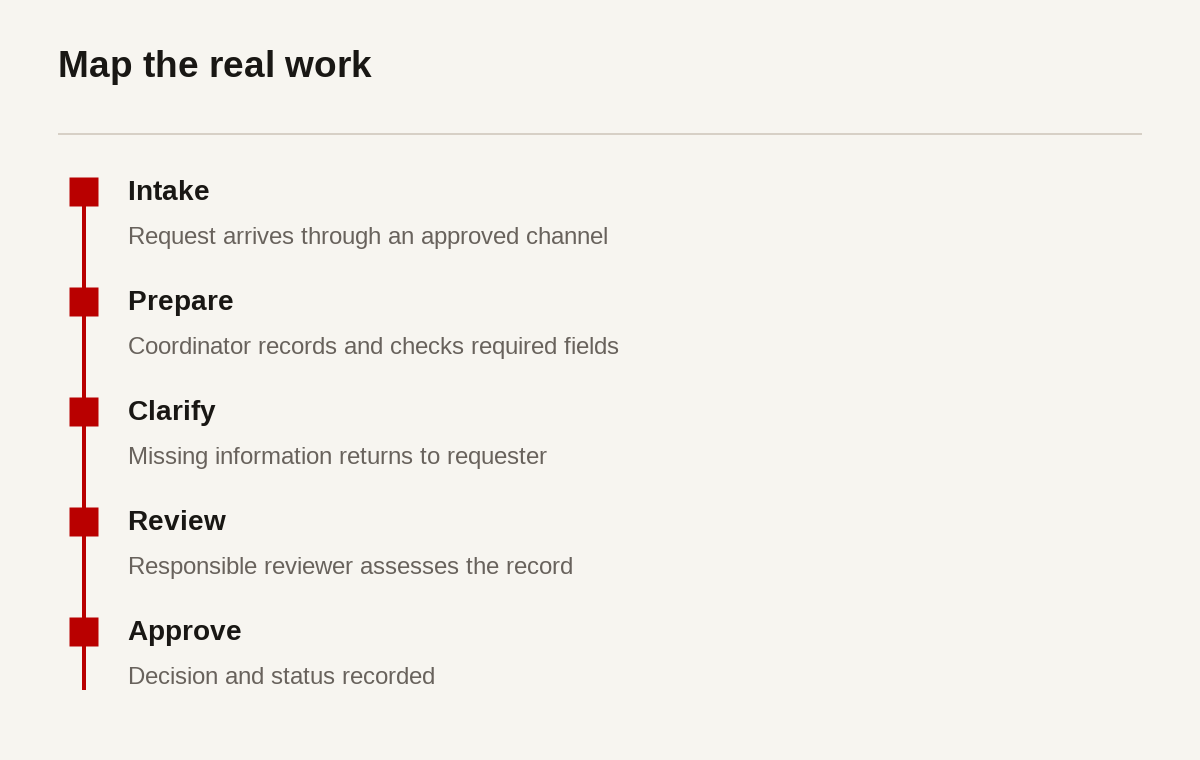
Record where information originates and who changes it. A customer name may arrive in an email while the site code comes from a separate system. Identify the authoritative source for each important field. Otherwise an app may simply make conflicting copies more convenient to create.
Separate work time from elapsed time. A request might wait two days for approval but take only six minutes to review. Reducing entry time does not automatically remove that wait. The process map should show queues and decision ownership alongside active tasks.
| Workflow step | Volume to measure | Active time | Rework to record | Owner |
|---|---|---|---|---|
| Intake | Requests received per period | Time reading and recording | Missing information | Coordinator |
| Preparation | Records made ready | Time checking fields | Duplicate or conflicting records | Coordinator |
| Review | Requests assessed | Actual review time | Clarification loops | Reviewer |
| Approval | Decisions required | Decision work time | Returned approvals | Approver |
| Status update | Records changed | Time updating relevant systems | Stale status correction | Operations owner |
The table is a measurement plan, not baseline data. Keep the sample period and context with the observations. A quiet day and an end-of-month peak may look different. Record that difference instead of averaging it into a number that conceals the operating constraint.
Measure handoffs, delays and repeated work
Start with a manageable set of observations. Count requests, duplicates, clarification loops and active minutes for the workflow in scope. Use existing records only where access and policy permit. Do not install covert monitoring or collect personal content because it is easy to capture.
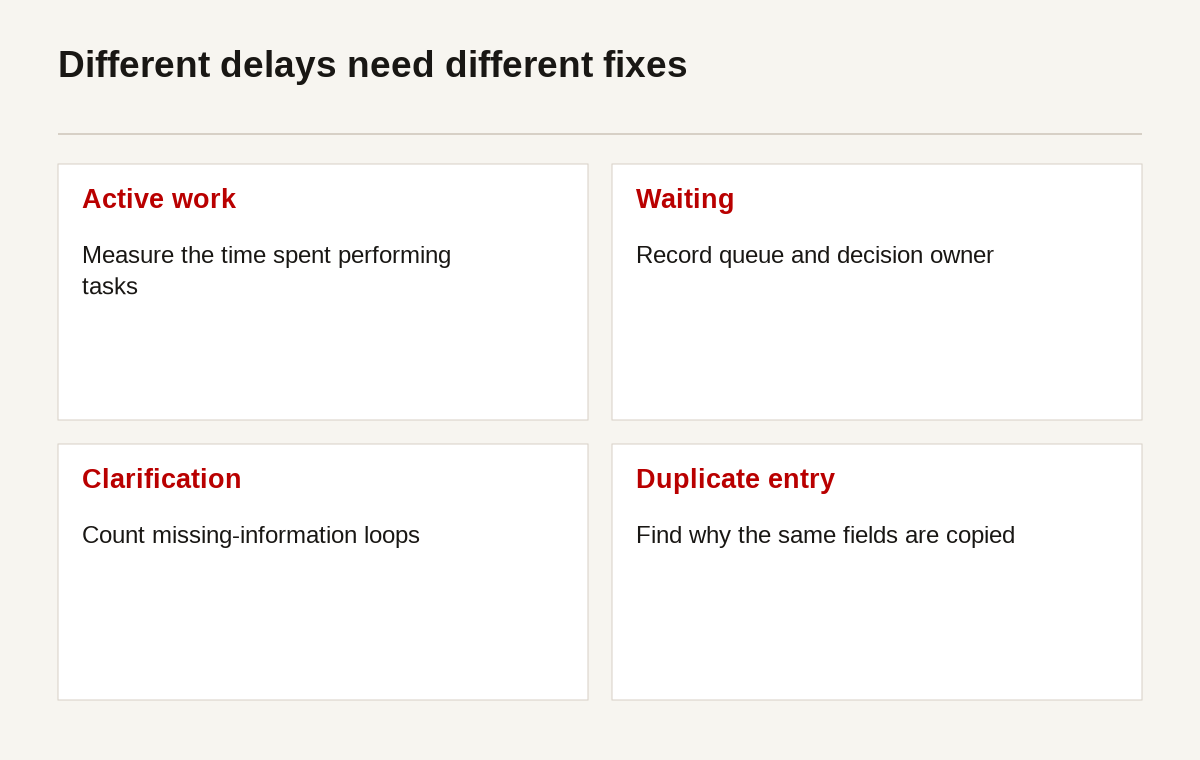
Ask what causes each repeated action. Copying a field may be required because two systems have no connection. It may also persist because staff do not know a shared view exists. The first case might need integration; the second might need training or a process change.
Check whether errors are recoverable. A mistyped note is different from an approval recorded against the wrong job. Prioritise risks by consequence and frequency, not by which feature looks easiest to build. Some rare events need strong controls even if they do not contribute much to a time-saving estimate.
Keep the baseline proportional. You do not need months of observation to test whether a form label is confusing. You do need enough evidence before claiming a repeated saving across the whole year. Mark unmeasured assumptions clearly and give each an owner and a validation method.
Try process-only fixes before procurement
Remove unnecessary steps first. A form with clear required information might reduce clarification without new software. A single approved status list may prevent inconsistent wording. Assigning one approval owner could reduce queue confusion. Test these changes rather than dismissing them because they do not look like a technology project.
Check whether existing tools can support the revised process. The company may already pay for a platform with suitable permissions or workflow features. Accessing that capability still requires careful configuration and testing, but it may avoid maintaining a separate application.
Do not confuse a workaround with a sustainable process. A shared spreadsheet can be adequate for low volumes and simple access. It may be unsuitable where several roles require different visibility, records need controlled changes or offline work matters. The decision depends on the actual constraints.
Define what would count as a successful non-build trial. For example, staff can find the current request and its approval owner without a separate message. Set a review date and check normal work. If the process change solves the problem, stopping the app project is a useful outcome.
Compare buying, configuring and building
List alternatives against the same requirements. Do not compare an existing software licence with only the initial development fee for custom software. Both routes have configuration, migration, training, support and change responsibilities. Include the work the company itself must perform.
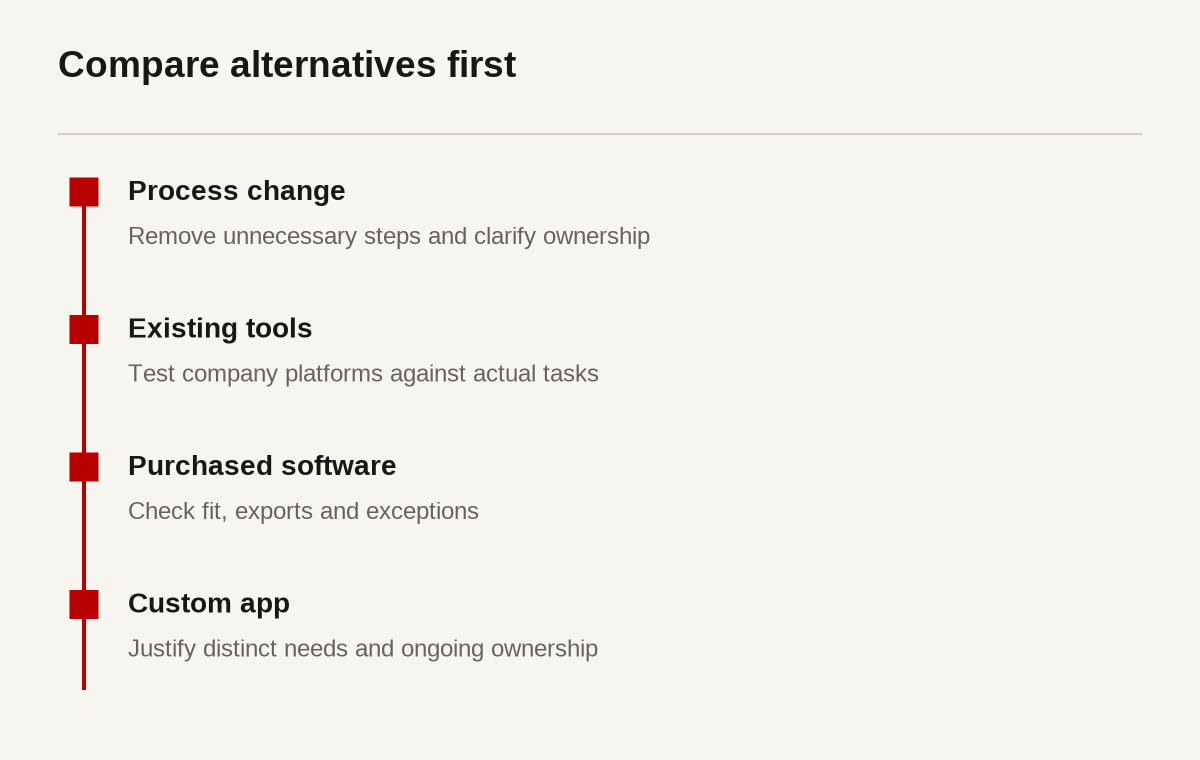
Use actual task trials or vendor demonstrations with your scenarios. A generic sales demo cannot establish whether a tool handles your exception. Ask the vendor to show the workflow with a missing value, a changed approval and an export. Note what was demonstrated and what remains an assertion.
| Option | Fit to examine | Main constraint | Ongoing responsibility |
|---|---|---|---|
| Process change only | Simple coordination problem | Existing tools may limit control | Process owner and training |
| Existing company platform | Required features already available | Configuration and access rules | Platform administrator |
| Off-the-shelf software | Common workflow and acceptable model | Vendor roadmap and export limits | Licence, configuration and review |
| Configured platform | Moderate variation with supported extensions | Extension maintenance | Administrator and specialist support |
| Custom app | Distinct workflow with justified value | Engineering and operational ownership | Security, support and future changes |
Reject options that fail a genuine mandatory requirement. Then compare the remaining trade-offs. Do not turn every preference into a mandatory condition. A custom colour scheme rarely deserves the same weight as the ability to prevent an unauthorised approval or export business records when the contract ends.
Define the users, permissions and working conditions
Describe roles as tasks and authority, not just job titles. A coordinator creates a request. A reviewer can ask for clarification. An approver can make a decision. An administrator manages access. Decide which records each role can see, edit, approve or export.
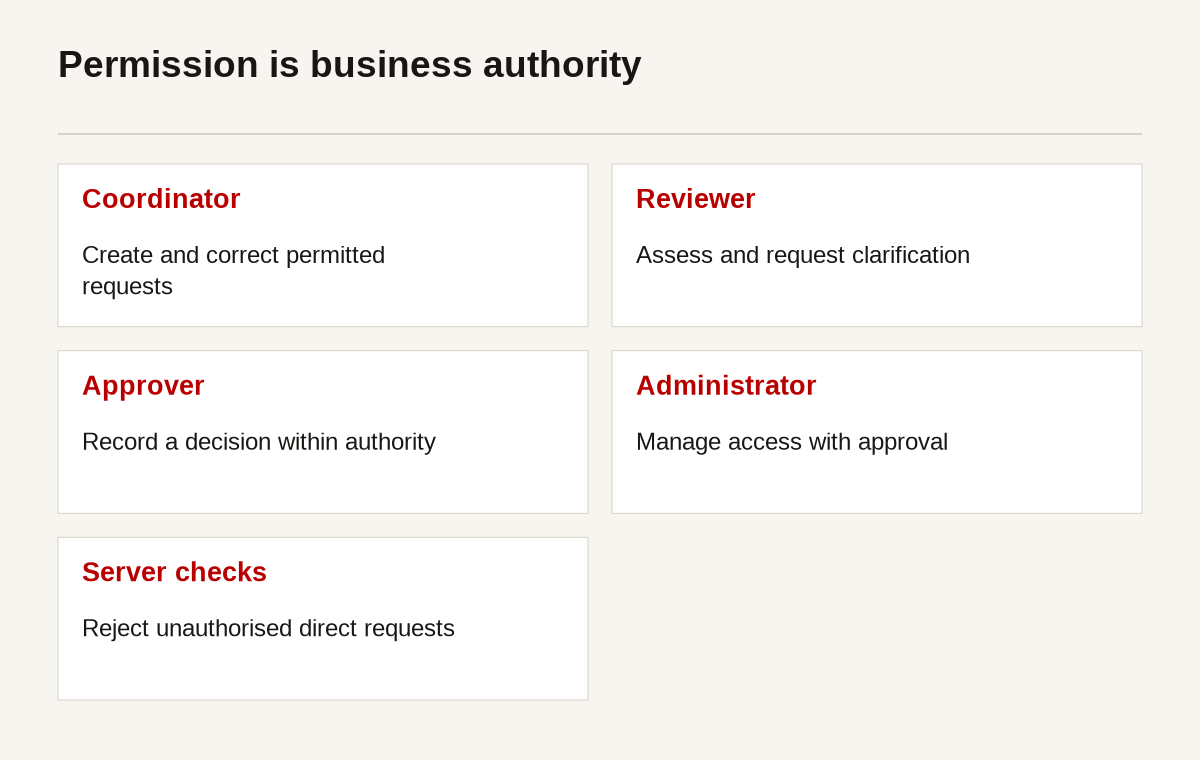
Test permissions on the server, not only through hidden buttons. A user who cannot see an action should also be unable to perform it through a direct request. OWASP's authorisation guidance provides relevant engineering practices. The business must still define the correct permissions.
Consider temporary staff, departed staff and people with more than one role. Specify how access is granted, changed and revoked. Decide who can approve access and how exceptional access is recorded. A shared account can hide responsibility and makes these tasks difficult to control.
| Requirement | Must-have or preference | Possible workaround | Evidence needed |
|---|---|---|---|
| Separate approval authority | Must-have if business policy requires it | None without policy change | Approved permission rules |
| Mobile record entry | Depends on working context | Responsive web form | Real device task test |
| Offline capture | Depends on connectivity | Controlled later entry | Site connectivity and sync trial |
| Existing-system export | Often necessary | Defined manual export | Sample exported records |
| Brand-specific screen styling | Usually a preference | Standard accessible interface | Task comprehension review |
A web app and a native mobile app are not automatically equivalent. Examine devices, network access, camera use, offline needs and distribution. MDN's offline-operation guide explains relevant web capabilities and constraints. A checkbox labelled “offline” is not a tested synchronisation strategy.
Draw the data flows and failure routes
Identify what the app receives, stores and sends. Name each external system, its owner and the source of truth. A diagram with arrows is not enough. Specify what happens if a connection times out, sends a duplicate or accepts a request without returning a response.
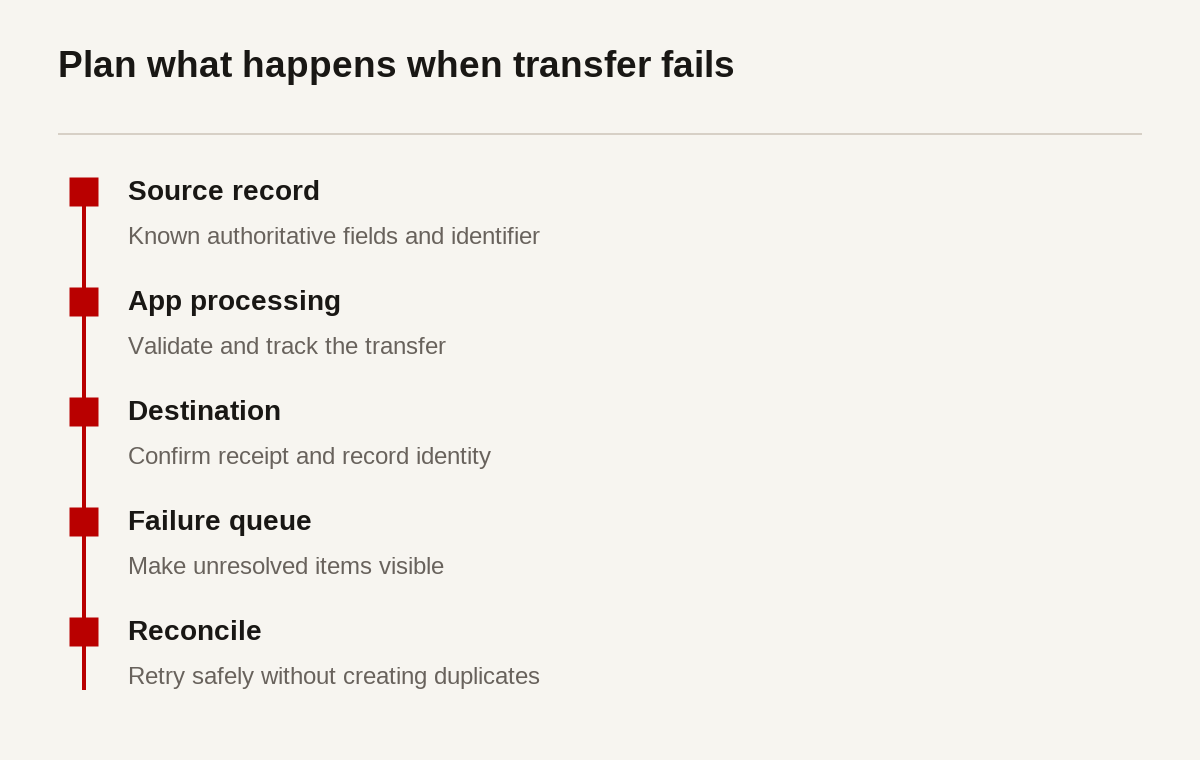
Plan reconciliation. Staff should be able to identify records that were not transferred and retry safely. Avoid a background integration that fails silently while the interface shows everything as complete. Define duplicate prevention and how an operator can tell whether retrying will create another record.
Classify the information involved. Separate public, internal, confidential and personal data where those distinctions fit the organisation. Review retention, access and deletion with the responsible privacy and legal specialists. Singapore's PDPC obligations overview is a primary reference, not a substitute for reviewing the actual workflow and relevant jurisdictions.
Consider exports and exit early. Define the records the company must recover, file formats, attachments, identifiers and documentation. Test an export before approving the system as complete. Keeping a backup is not the same as having a usable migration package someone can understand without the original developer.
Build a benefits model with visible assumptions
Use a simple reproducible calculation before a complicated financial model. In the fictional example, assume 600 requests per month, three minutes of active work avoided per adopted request and 80% adoption. Released capacity is 600 × 3 ÷ 60 × 0.8, which equals 24 hours per month.
These are teaching assumptions. They are not measured results, a forecast for your company or cash savings. The people may use those hours for additional work, better checks or shorter queues. Cash savings require a separate, credible change in expenditure. Do not multiply capacity by a salary and label it money returned to the bank.
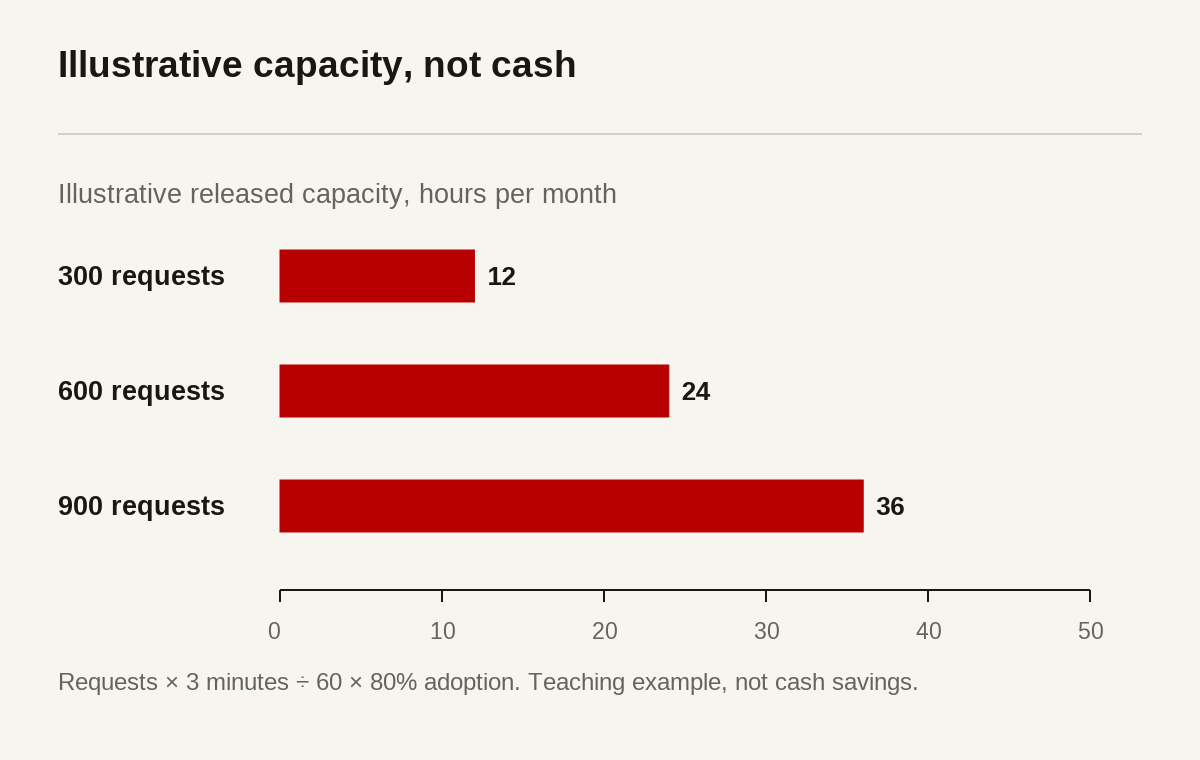
For sensitivity, use the same formula with 300, 600 and 900 requests. At three minutes and 80% adoption, the results are 12, 24 and 36 hours. Keep all other assumptions constant. Download the underlying illustrative CSV. It contains inputs, output and the stated formula so a reviewer can reproduce every row.
| Assumption | Example base | Range to examine | Validation method |
|---|---|---|---|
| Monthly request volume | 600 | 300 to 900 | Count actual in-scope requests |
| Active minutes avoided | 3 | Replace with observed trial data | Compare defined tasks |
| Adoption proportion | 0.8 | Review by role and period | Pilot usage with context |
| Released capacity | 24 hours monthly | 12 to 36 in volume sensitivity | Recalculate formula |
| Cash saving | Not established | Do not infer from capacity | Finance verifies changed expenditure |
Subtract new work where relevant. If the app creates administration, reconciliation or review tasks, include them. Keep implementation, support, training, infrastructure and risk assumptions visible in the decision pack. A capacity model is only one part of the business case, not an instruction to proceed.
Account for security, support and adoption
The first release is not the end of responsibility. Identify who handles incidents, access requests, backups, updates, user questions and future requirements. Decide which tasks the supplier performs and which remain with the company. An unnamed owner is a future support gap.
Ask for a security approach appropriate to the information and risk. OWASP ASVS provides a verification framework for web applications. Use an agreed scope and version, not a vague claim that the app is “OWASP compliant”. Requirements need evidence and testing relevant to the actual system.
Secure development also concerns how software is built and maintained. NIST's Secure Software Development Framework publication provides a primary framework. It does not certify an individual app. Agree development practices, dependency handling, testing and incident responsibilities with the engineering team.
Plan training around tasks. Show a coordinator how to correct a request and an approver how to return one for clarification. Provide a controlled practice environment where appropriate. A long feature tour is not evidence that staff can perform the work under normal conditions.
Check accessibility during design and implementation. W3C's WCAG quick reference identifies relevant criteria. Include keyboard operation, visible focus, readable errors and the actual devices used. Do not wait until the final demo to discover that an essential control cannot be reached by part of the team.
Scope a first release around a complete useful task
A small first release should still complete a meaningful piece of work. Request intake through review may be a sensible boundary. A collection of unrelated screens is not small in a useful way. It can require many integrations without delivering an end-to-end task anyone can rely on.
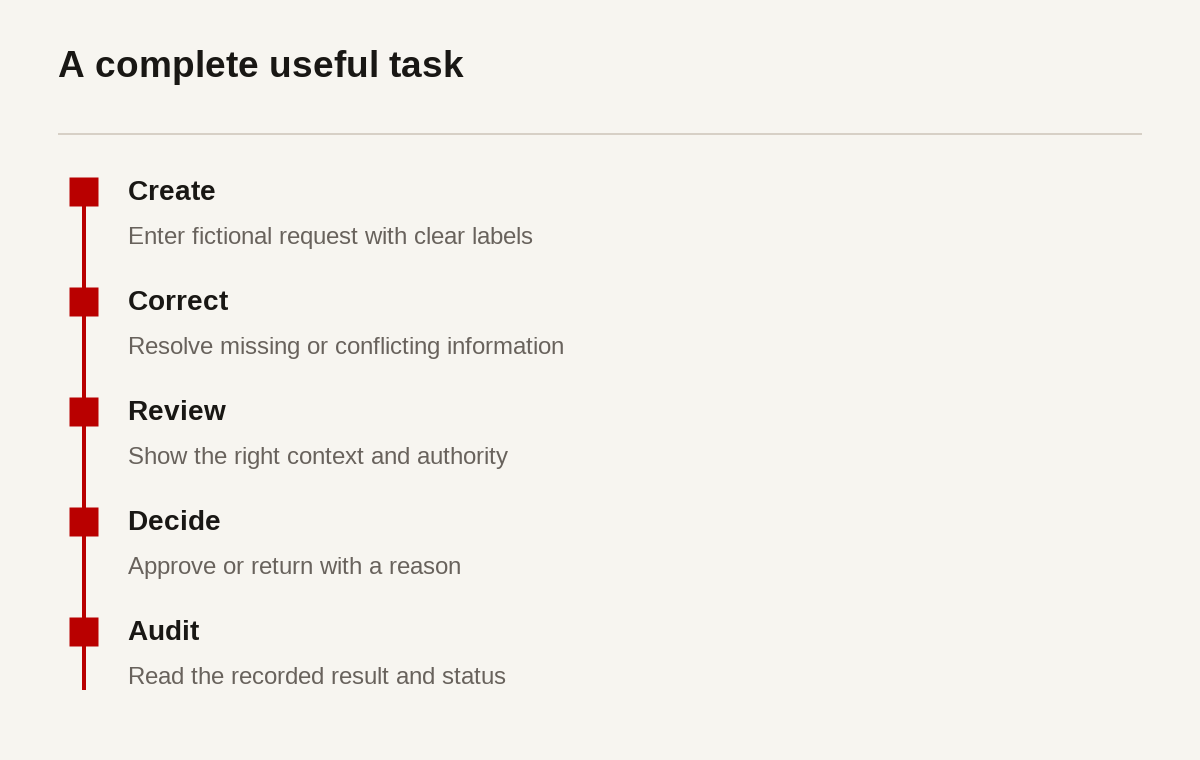
Prototype the uncertain task before committing to production. Use fictional records and label the environment clearly. Test the awkward cases: missing data, conflicting edits, rejected approval and loss of connection. A smooth happy-path demonstration should not hide these conditions.
State exclusions and later possibilities separately. A future scheduling module is not part of the approved first release unless it is explicitly included. Record its dependency on what is learned from the pilot. This prevents a roadmap slide becoming an informal promise that every suggested feature is already paid for or scheduled.
Agree acceptance tests before build work begins. Each test needs a pass condition, responsible reviewer and evidence. “The app looks good” can be feedback, but it cannot verify permission control, record accuracy or recovery. Keep visual review and functional acceptance connected without confusing their purposes.
| Acceptance test | Pass condition | Reviewer | Pilot result field |
|---|---|---|---|
| Create and correct request | Changes persist with correct record identity | Coordinator | Record evidence, not assumed pass |
| Enforce approval permissions | Unauthorised action rejected server-side | Engineering and business owner | Test account and request |
| Recover failed transfer | Failed item visible and retry safe | Integration owner | Reconciliation evidence |
| Export records | Required fields and attachments recoverable | Data owner | Open sample export |
| Complete keyboard task | Required task works with visible focus | Accessibility reviewer | Device and test record |
Plan migration and a controlled pilot
Inspect existing records before importing. Identify duplicates, missing identifiers, inconsistent statuses and obsolete fields. Do not treat migration as a final-week copy operation. Poor data can make a well-designed app appear unreliable from the first day.
Decide what belongs in the new system and what stays in an accessible archive. The company may need historical records without needing to convert every old note into a new workflow. Agree retention and access with the relevant owners. Keep migration mappings and exceptions in a reviewable log.
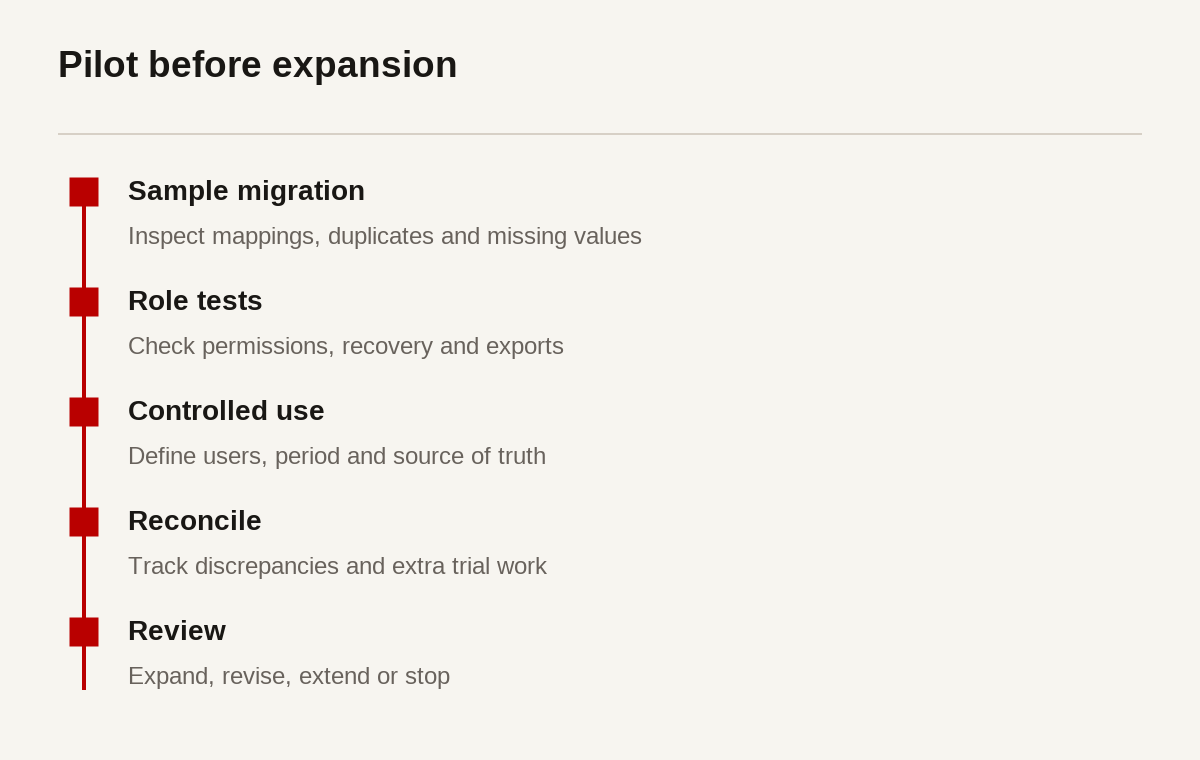
Run a pilot with a defined group, workflow and period. Explain which system is authoritative during the trial. Avoid uncontrolled double entry that creates conflicting records and makes the time comparison meaningless. If parallel operation is required, assign reconciliation and count the extra effort.
Keep a fallback plan proportionate to the risk. Staff need to know what to do if the app or an integration is unavailable. Test the route. A PDF saying “contact support” is insufficient if the work has to continue and nobody knows where the current record is.
Trace one exception through the whole pilot
Use a fictional request that changes after review. The coordinator corrects a site reference. The reviewer has already opened an earlier version. The approver then tries to approve the request. Agree which version the decision applies to and how the interface explains that the record changed. Do not leave this decision to a developer's assumption about what is convenient.
Follow the same record into the destination system. If the connection fails after the destination accepts it, the app may not know whether the transfer succeeded. Ask the integration owner to demonstrate how the record can be identified, reconciled and retried without duplicate creation. A user should not need to guess whether pressing the button again is safe.
Now export the request and its relevant decision history. Check that the identifier, corrected reference, approval state and required attachments can be understood. Decide which history is necessary and how access is controlled. This is a planning scenario, not evidence that any particular app implements these behaviours.
The exercise joins requirements that are often reviewed separately. Version handling, permissions, integration recovery and export all affect the same business record. If any part is unresolved, record the limitation and its consequence before expanding the pilot. One complete exception can reveal more than a feature checklist where every item is marked present but nobody has tested how they interact.
Repeat the scenario when a person changes role. A reviewer who no longer has approval authority should not retain it through an old session or bookmarked action. Specify the expected behaviour with the business owner and ask the engineering team to verify it. The interface should explain the current restriction without exposing information the person is no longer permitted to see.
Finally, ask the support owner how the issue would be investigated. They need enough evidence to identify the affected record and failed step, but should not collect unrelated personal content. Define what is logged, who can access it and how it relates to the incident process. The precise controls depend on the app and data involved.
These checks are particularly useful before a pilot widens to additional departments. A workflow that is understandable among four familiar users may fail when people have different authority or cannot ask the original coordinator for an explanation. Include that change of context in the expansion decision rather than assuming more users simply means more of the same.
Review normal work before expanding
Check the pilot against the original problem. Can the coordinator identify the ready request? Does the approver have enough context? Are returned requests visible? Do staff trust the status because it reflects reality, or because they have quietly started messaging one another again?
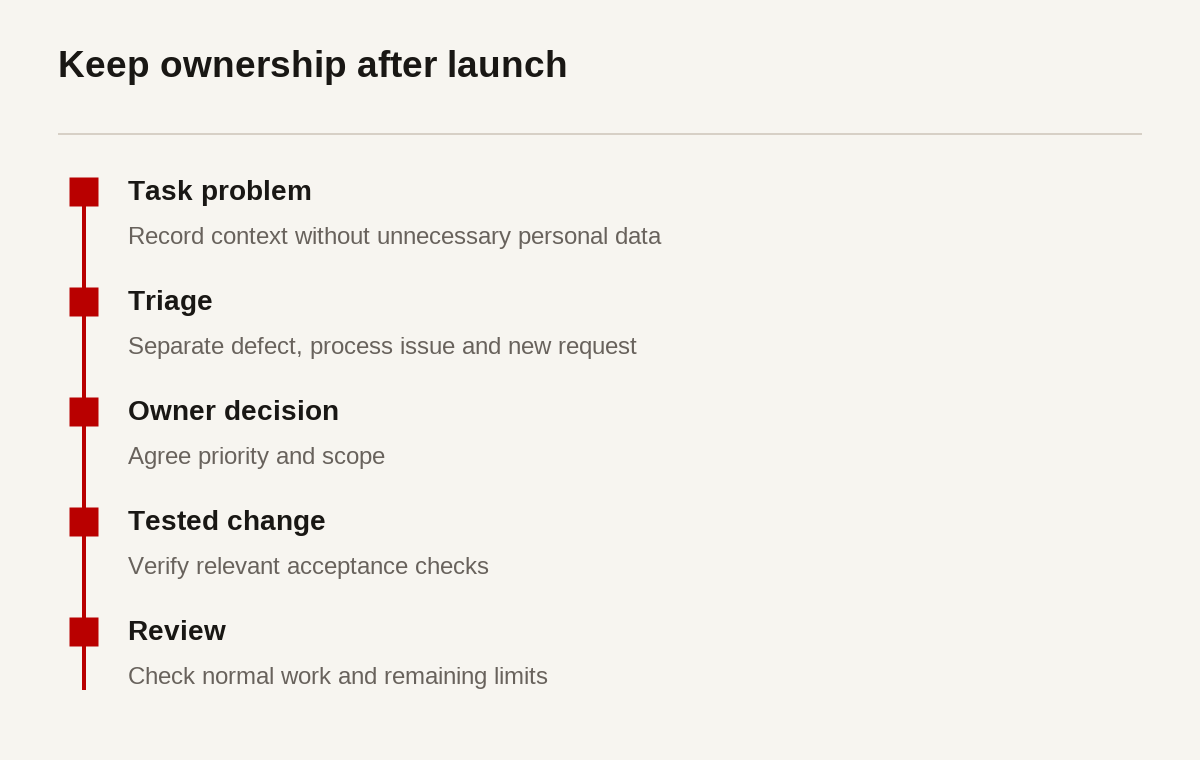
Use support questions as evidence. Several reports about one label may indicate a comprehension problem. A repeated permission request may expose a missing role. Separate defects from new requirements and disagreements about the process. Not every request should become a feature.
Review the capacity assumptions with real pilot data where collection is permitted. Specify volume, task definitions and adoption. Account for the extra work of the trial. Do not compare an experienced old-process user with an untrained new-process user and present the result as a reliable annual saving.
Make the expansion decision explicit. Proceed, change the scope, extend the pilot or stop. The company should be able to stop without losing its records. A business case is a decision aid, not a story written to justify a build after management has already committed.
Put the decision into a short approval pack
The pack should let a director understand the proposed change without attending every discovery session. Include the problem statement, process boundary, baseline evidence, alternatives considered, unresolved assumptions and proposed first release. Attach the permission rules and acceptance tests. Identify the person responsible for each approval rather than leaving the document to “the team”.
Use a decision log to explain why an option was rejected. An off-the-shelf tool might fail a required export test. A custom build might be deferred because the workflow is changing too frequently. A process-only trial might already have solved the main delay. These are specific reasons that can be revisited when conditions change.
For the fictional request workflow, the approval might authorise a prototype and integration trial, not production development. The prototype checks whether reviewers understand the status and correction route. The trial checks whether the destination system acknowledges a request and whether a failed transfer can be reconciled. Neither exercise establishes the full monthly capacity benefit.
Record a stop condition. If the integration cannot be used under the company's agreement, the proposed route may need to change. If staff still require a separate spreadsheet because key information is missing, the first-release scope needs review. A stop condition protects the business from treating sunk investigation effort as a reason to continue regardless of evidence.
Separate decisions that management can make now from decisions needing specialist input. Management can define approval authority. Engineering should assess the integration and recovery approach. Privacy and legal advisers should review relevant data handling and contracts. A business case becomes more credible when it names these limits instead of covering them with a general assurance.
After the pilot, return to the same pack. Replace assumptions with permitted observations, retain remaining uncertainty and explain the next decision. This creates continuity between the original problem and expansion. It is harder for a project to turn into a feature collection when every new request must explain which task, risk or evidence it addresses.
Ask for ownership and exit terms in writing
Discuss rights, access and responsibilities before the final invoice. Confirm who controls repositories, deployment accounts, administrative access and business data. The contractual arrangement depends on the engagement; obtain suitable legal review rather than relying on a generic checklist as a complete contract.
Ask what another competent team would need to maintain the app. That includes installation instructions, configuration documentation, data structure, dependency information and a description of integrations. Secrets should be transferred through appropriate secure routes, not printed in a public guide or left in a shared spreadsheet.
Confirm how support changes are requested and prioritised. A support agreement should distinguish an incident from a new feature. State response arrangements appropriate to the business, and avoid implying that an initial build includes unlimited future work. Clear responsibility is more useful than an optimistic promise.
Test the exit deliverables. Can the company open an export? Can an authorised administrator revoke a user? Can a backup be restored within the agreed scope? Record the evidence and remaining limits. A folder labelled “handover” does not prove that the system can be operated independently.
Questions founders usually ask
Is a spreadsheet always a sign that we need an app?
No. A spreadsheet may be appropriate for a small, low-risk task. The problem may be unclear ownership or inconsistent fields. Investigate the workflow first. An app becomes more compelling when justified needs such as controlled permissions, reliable integrations or specific working conditions exceed what the current route can handle.
Should we build native mobile apps from the start?
Only when the evidence supports that choice. Check device capabilities, distribution, connectivity and work context. A responsive web app may be sufficient. A native app still requires data, permissions, support and migration planning. Choosing a platform does not remove those responsibilities.
Can we count time saved as financial return?
Count it first as released capacity. Cash savings require an actual change in expenditure that finance can support. Better service, reduced rework or faster decisions may have value, but the assumptions need separate evidence. Do not combine them into one impressive number without explaining the calculation.
What should we bring to an initial discussion?
Bring a process example, a few anonymised records you are permitted to share, current tools and recurring errors or delays. Explain who performs the work and who approves changes. This gives the investigation a concrete starting point without committing the company to a platform or a full build.
Start with the work that keeps breaking
Creatif Work examines the process before proposing custom software or a web app. A useful result may be a smaller process change, a configured existing tool or a scoped first release. The evidence should decide which route is justified.
Bring the task that repeatedly stalls or creates duplicate work. We can map its handoffs, test alternatives and identify what needs proving before development. Start with the problem.
References and model limits
Sources were reviewed on 1 October 2026. The service-request example and capacity dataset are fictional teaching material. The model estimates released hours under stated assumptions, not cash savings, client results or a guaranteed return. Privacy, security and contractual choices need review for the actual business.