

Marine Website Design: Vessel, Fleet and Service Information
A marine website should help a buyer connect three things: the work required, the asset or team that can perform it, and the evidence that the company has done comparable work. Separate fleet and service lists rarely make that connection.
The site also needs to distinguish owned, managed, chartered and partner assets. A large number without current particulars can create more doubt than confidence.
For international terminology and vessel-safety context, use the current conventions and guidance published by the International Maritime Organization, then state the flag, class and contract requirements that apply to the actual vessel.
What information should a marine company website show?
Show services, operating regions, vessel or asset particulars, availability enquiry routes, certifications with scope, and project evidence that connects assets to completed work. Keep changing operational status in a controlled system rather than making static pages look live.
| Buyer question | Best page or feature | Evidence to include |
|---|---|---|
| Can you perform this task? | Service page | Scope, limits, equipment, crew and example |
| Which asset fits? | Fleet index and vessel page | Current particulars and configuration |
| Where do you operate? | Region or port coverage | Base, mobilisation basis and local support |
| Is the capability current? | Vessel status and document dates | Revision date and responsible contact |
| Have you done comparable work? | Project record | Vessel, task, conditions and approved outcome |
| How do I enquire? | Contextual form | Dates, location, task and required parameters |
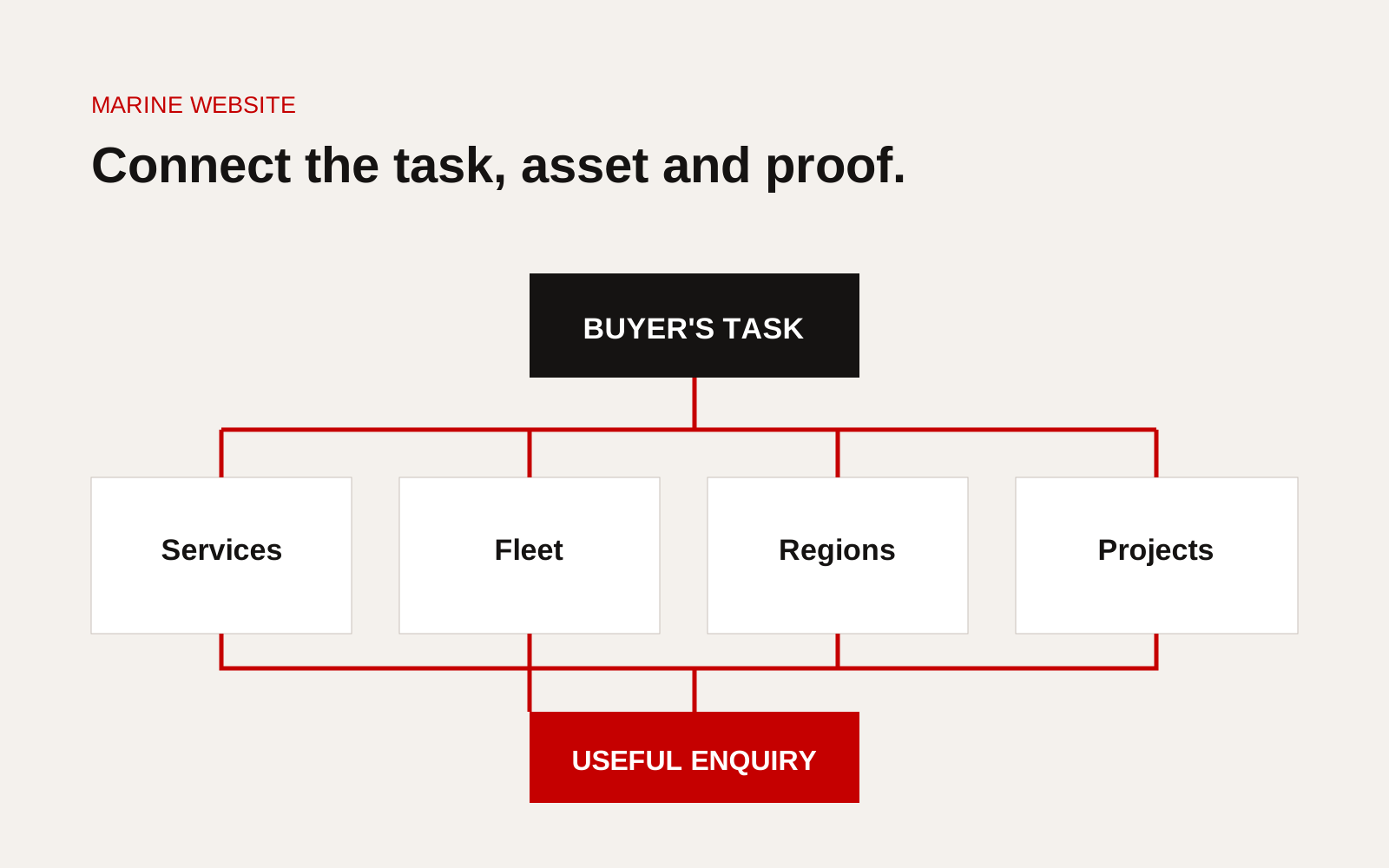
Marine website information architecture linking fleet index, vessel particulars, services, regions and enquiries.
Build service pages around the operation
Name the job in buyer language. A service page should define the task, operating envelope, assets used, client inputs, mobilisation process and evidence available.
Avoid one paragraph that claims worldwide coverage across every marine activity. Break broad capability into decisions such as:
- harbour and terminal support
- offshore supply or personnel transfer
- inspection, survey or subsea work
- towing and anchor handling
- vessel management and technical services
- emergency or time-critical response
- planned maintenance and project support
Each page can then link to relevant vessels and completed work.
Give each vessel a maintained record
A vessel page needs more than a photograph and length. Select fields according to the vessel and buyer, but keep them consistent across the fleet.
Useful content includes:
- name, vessel type, flag and year
- ownership or management relationship
- class and notation with current scope
- principal dimensions and capacities
- propulsion and performance information
- deck, crane, towing or passenger capacity
- accommodation and crew details where relevant
- installed mission systems
- operating limits or applicable notations
- current particulars PDF with revision date
- enquiry route carrying the vessel name
Do not present availability as current unless it is connected to a maintained schedule. "Ask about availability" is more accurate than an old status label.
Connect the fleet index to buyer filters
A fleet index should filter by distinctions buyers actually use, not every specification. Vessel type, region, capacity band or mission capability may be useful. Paint colour and internal business unit are not.
Before adding filters, check that the underlying fields are complete and use consistent units. When data quality is weak, a clear grouped list can be better than an unreliable finder.
Our article on Singapore marine fleet pages explains how to treat vessel data as a maintained operational asset rather than repeated website copy.
Separate public evidence from controlled documents
Publish enough to support qualification, while protecting crew data, security-sensitive arrangements, client information and controlled manuals. A public page can show certification identity and scope; the current certificate can be supplied through an approved prequalification route where appropriate.
Use a document classification:
| Class | Examples | Website treatment |
|---|---|---|
| Public | General particulars, approved service scope | Visible and searchable |
| Request | Selected certificates, equipment schedules | Gated by a clear contact process |
| Controlled | Manuals, security plans, crew records | Kept outside the public site |
| Operational | Availability, defects, live position | Shown only through approved live systems |
Make project pages do technical work
Project pages should state the client problem, vessel or equipment used, location, duration, constraints and approved result. If the client cannot be named, describe the operation precisely enough to remain useful.
Link each project back to the service and vessel. This lets a charterer move from a claim to supporting evidence without searching the whole site.
Design enquiries for the task
A generic form creates another clarification cycle. Ask only for information needed to route the request:
- service or vessel of interest
- port, field or operating area
- required dates and duration
- task and cargo or personnel details
- key operating parameters
- attachment where useful
- urgent contact route for genuine time-critical work
Do not ask for sensitive project detail before explaining how it will be handled.
Marine website review checklist
- Services match the tasks buyers procure
- Every asset relationship is accurately labelled
- Vessel fields and units are consistent
- Particulars show a revision date
- Certifications state scope, issuer and status
- Projects connect service, asset and outcome
- Region pages explain real operating coverage
- Public and controlled information are separated
- Enquiries carry task context
- A named owner maintains fleet data
Creatif Work designs marine websites around qualification and operational evidence. Our website service connects fleet records, service pages and project proof, while custom software can support the controlled workflow when availability, documents or approvals need more than a public content system.