

Business IT Setup: Domains, Email, Hosting and Connected Systems

Business IT setup starts by identifying what the business must control: its domain, DNS, mailboxes, website hosting and connected records. Treat these as related systems with separate owners and tests. A domain transfer does not move email history, and a website migration does not prove that enquiries still arrive.
A company can have five suppliers and still depend on one person's personal account. The website works until that person leaves. An annual invoice arrives, but nobody knows which account renews the domain. A contact form says the request was sent, while the commercial team receives nothing. Buying another tool will not resolve these gaps.
This guide is for founders setting up a company, consolidating providers or preparing a move. It explains the decisions before account changes, the checks during a migration and the evidence needed for handover. It covers business web systems and integrations. Office networks and a dedicated cybersecurity service require a different scope.
The company, addresses and records in the worked examples are fictional. Photographs are generated illustrative scenes. The dependency diagrams describe planning choices rather than universal vendor instructions. Use the business IT workbook or editable CSV pack. Its five registers are also explained through the tables below.
Find the account behind the service
Begin with a task that the business already relies on. A buyer visits the website, sends an enquiry and receives a reply. Trace the accounts supporting that task. The domain registrar records the registration. DNS points names towards services. Hosting supplies the website. A form handler processes the request. An email provider carries the message. A person decides what happens next.
These services can sit with different providers. That is not automatically a problem. It becomes a problem when their boundaries are invisible. A founder may believe that the website developer owns email because both use the same domain. The developer may have changed only the website's address records and never held mailbox access.
Ask for the actual account name and the authorised business contact. Check that someone can sign in through the approved route. A screenshot from last year is weaker evidence than a current access check. Record the date, account role and person who performed the check. Keep secrets in the private credential system, not in the planning workbook.
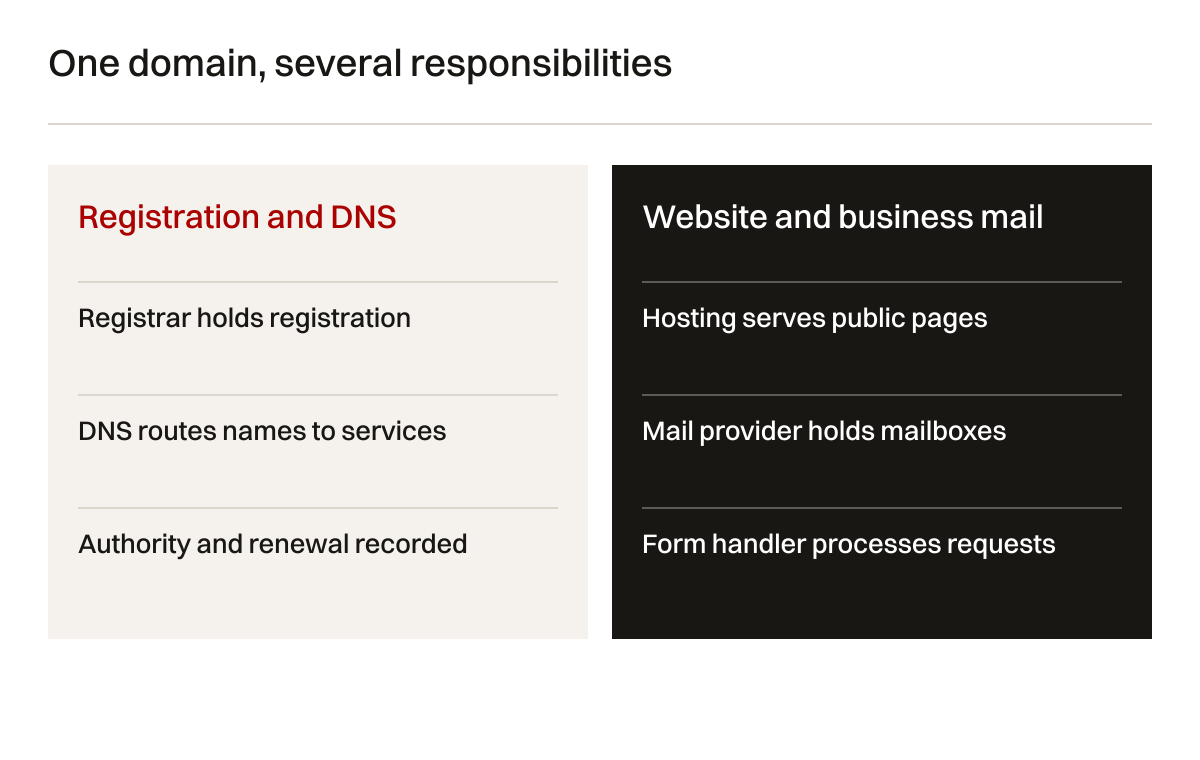
Table 1: account and ownership register. Example responsibilities must be confirmed against actual account authority.
| System | Business decision owner | Administrator | Evidence to retain |
|---|---|---|---|
| Domain registration | Authorised company representative | Registrar account holder | Current access, registration details and renewal route |
| DNS zone | Business systems owner | Named DNS administrator | Export, nameservers and approved record changes |
| Business email | Operations lead | Email tenant administrator | Mailbox inventory, delegated access and delivery tests |
| Website hosting | Website owner | Hosting or deployment administrator | Release reference, configuration scope and renewal contact |
| Enquiry integration | Commercial lead | Form and integration administrator | Field mapping, received test record and failure route |
| Shared business records | Process owner | Platform administrator | Export format, access roles and retention decisions |
An inventory should also identify missing access. Give each gap a consequence. Missing DNS access could prevent a mail routing change. Missing hosting access could prevent recovery. A former employee's mailbox could receive the only renewal notice. These are concrete operating problems, not reasons to purchase every available subscription.
Understand what each move actually changes
A transfer between registrars changes where the domain registration is managed. It is different from changing the nameservers, moving the website or copying mailbox history. Some providers combine these operations in a guided interface. That does not make their effects identical.
Check the current ICANN domain transfer guidance and the chosen registrar's instructions. Transfer eligibility and restrictions depend on the registration and applicable rules. Do not assume a transfer can happen immediately because both accounts are accessible. Country-code domains may have different registry requirements.
For a new company, establish ownership before linking the domain to email and hosting. For an existing company, document the current working configuration before changing it. If a transfer is unnecessary, leave it outside the move. Consolidating invoices is useful only when the resulting account arrangement remains understandable and recoverable.
Table 2: domain, email and hosting distinctions. These actions can happen together, but each needs its own acceptance evidence.
| Action | What changes | What does not automatically move | Relevant test |
|---|---|---|---|
| Registrar transfer | Registration management | Website files, mailbox history or application records | Domain appears in the authorised receiving account |
| Nameserver change | Authoritative DNS service | Missing records are not invented | Required names resolve to approved destinations |
| Website hosting move | Website runtime and stored components | Business mailboxes at another provider | Public pages, files and enquiry processing work |
| Mailbox migration | Selected historical mail data | Every calendar, contact or permission | Agreed records and sending behaviour are checked |
| MX record change | Incoming mail destination | Old messages or staff devices | External messages reach the intended mailbox |
| Business-system integration | Data or event flow between tools | Process ownership or user adoption | A test record reaches the right state and owner |
The distinction is especially important during provider departure. A supplier may offer to transfer the domain but hold no mailbox export. Another may export messages but have no authority over DNS. Ask for a component-level handover. A single statement that everything has moved gives the business little evidence to inspect.
Read DNS as a dependency record
DNS contains several record types with different purposes. A and AAAA records relate names to IP addresses. CNAME records relate one name to another. MX records direct incoming email. TXT records can carry verification and email-related information. The Cloudflare record reference describes these distinctions for its platform.
In a fictional setup, the root website points to a hosting destination. The www name points to the approved website name. MX records point to the selected email provider. Separate TXT records support domain verification and sending authentication. The exact values belong to the chosen providers. The teaching example deliberately avoids values that a reader might copy into a live account.
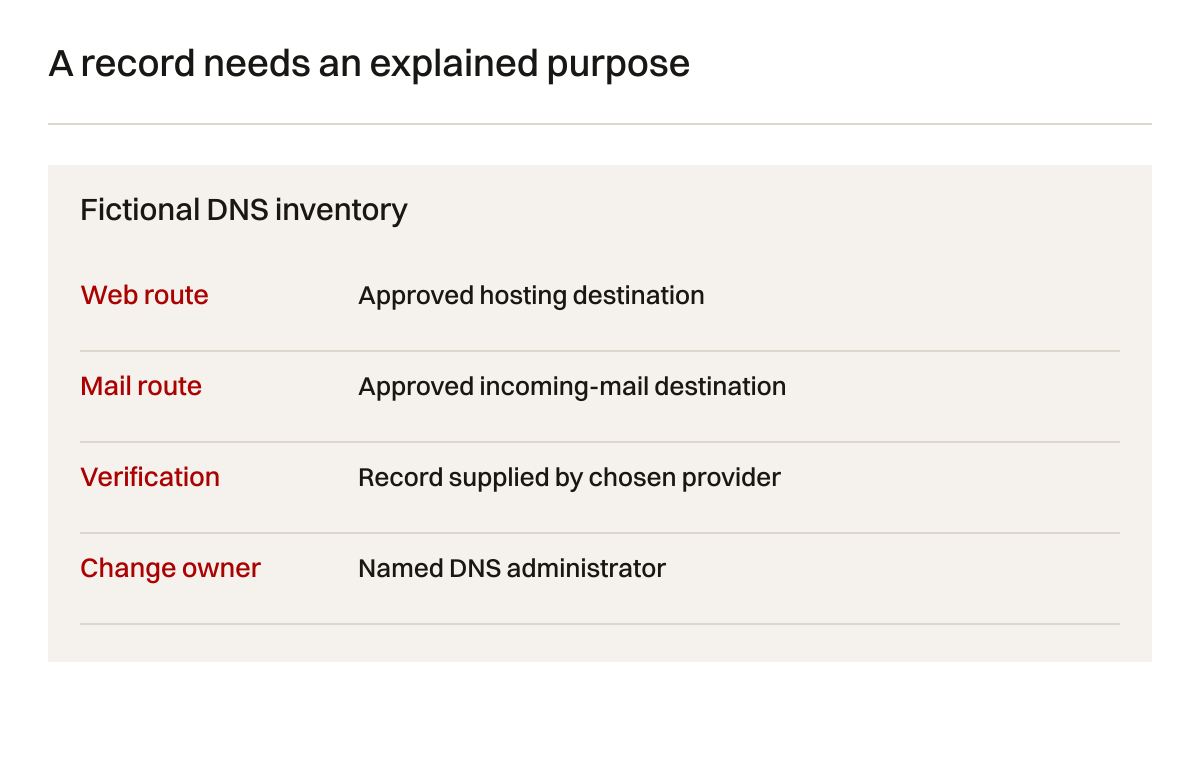
Export the existing zone before a move. Cloudflare's import and export documentation describes its supported record workflow. An export is a useful record, but check provider-specific settings separately. Proxy behaviour, forwarding features and account permissions may not be represented as ordinary DNS records.
Ask who uses every unfamiliar record. A marketing email service, quotation tool or document-signing platform may depend on it. Removing a record because its purpose is unclear reverses the correct order of work. Investigate first, then decide whether it is obsolete. Record the business owner who approved removal.
Plan for cached answers
A DNS change is not an instant global switch. Resolvers and clients may retain earlier answers. The record's time to live describes caching behaviour, but the whole change still depends on the previous configuration, the provider and the requesting system. Cloudflare's TTL guidance explains the meaning of TTL in its DNS service.
A lower TTL can be part of a planned change. It does not erase copies already cached under an earlier value. Schedule the preparatory change early enough for its intended effect. Do not promise a precise worldwide completion time from one dashboard notification.
The acceptance record should identify where and when a result was observed. One successful lookup proves the answer seen by that resolver at that moment. It does not prove that all customers use the new destination. Keep the old service available for the agreed transition period where feasible. Confirm how requests arriving there will be handled.
Consider a founder moving website hosting while email stays with its current provider. The safe plan changes only the relevant web destinations. It preserves MX and other approved email records. If the nameservers also change, the receiving zone must contain those records before cutover. These are two different change plans even though the public website ends at the same place.
Specify mailboxes before selecting a plan
List the people who need individual mailboxes and the shared addresses the company uses. A personal mailbox, alias, distribution group and shared mailbox answer different needs. The choice affects who can receive, reply, search history and continue work when staff change.
An alias commonly adds another address to an existing destination. It does not automatically create a shared working queue. A distribution group can deliver messages to several people, but copies in separate inboxes do not establish who is handling the request. A shared mailbox can support a common address with delegated access. Platform details and licensing need checking before purchase.
Microsoft's shared mailbox documentation distinguishes reading access from permissions to send as the shared address. That distinction belongs in the acceptance test. A staff member who can open the mailbox may still be unable to reply with the intended sender identity.

For the fictional company, two employees handle enquiries at a shared address. Each signs in through their own approved account. The commercial lead owns assignment and follow-up. The account administrator owns access. Nobody shares a single password merely because the address contains the word sales.
Also list staff devices, mail clients and existing forwarding rules. Ask which rules are genuinely required. A forgotten forward to a personal account can keep copies outside the intended business workflow. Changing the provider is a useful time to review that arrangement, with the business owner deciding the approved route.
Define what a mailbox migration preserves
Historical messages and future routing are separate workstreams. Copying old mail does not direct tomorrow's messages to the new provider. Changing MX records does not copy yesterday's inbox. A migration plan needs both, plus a clear definition of what happens to contacts, calendars, archives and shared records.
Microsoft describes several mail migration approaches. Its IMAP migration guidance states that this method moves mail folders rather than contacts, calendar items or tasks. Read the current limitations for the actual scenario. Do not describe an email-only method as a complete staff workspace migration.
Select a pilot account with representative history. Include the kinds of folders and attachments the company needs. Record agreed exclusions, skipped items and how staff will find older records. A count comparison can help, but counts alone may hide different folder structures or duplicated items. Review actual sample messages and attachments through the receiving account.
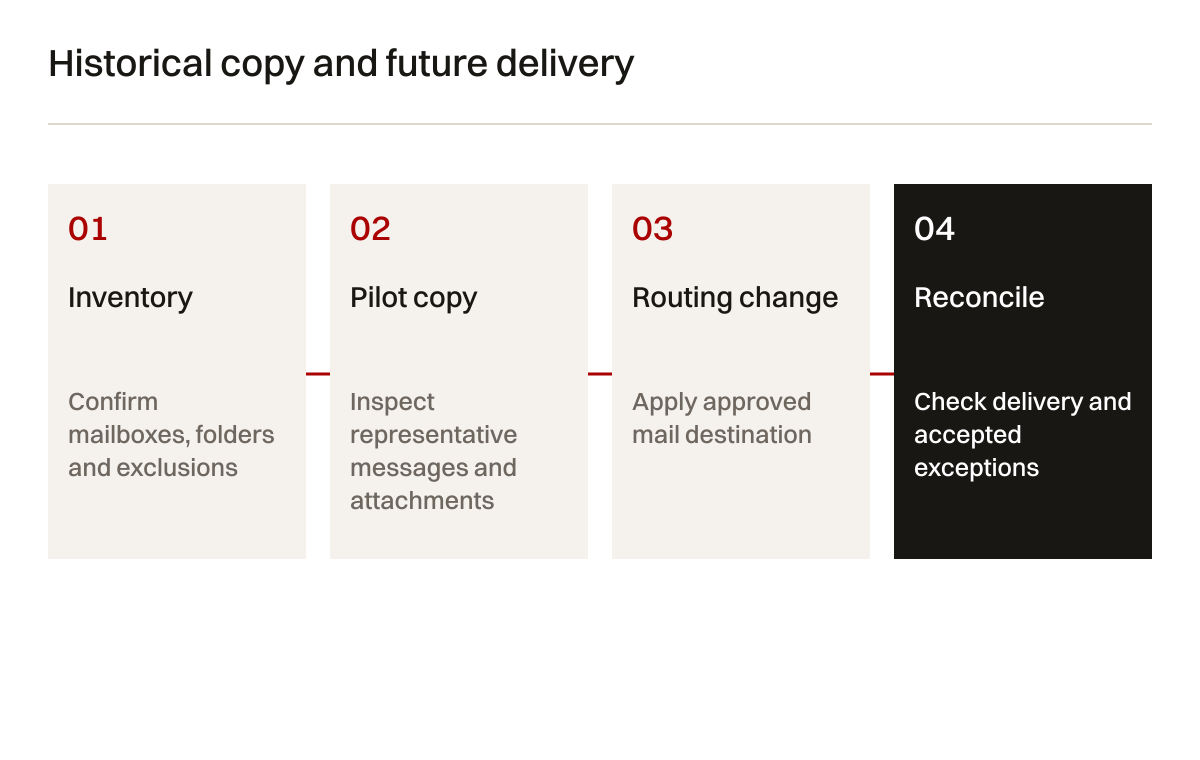
The business decides which records must be retained and who can approve disposal. The implementer explains technical limits. If a required archive cannot move through the selected method, record an alternative before closing the source account. An unresolved exception is more useful than a completed checkbox that quietly excludes important history.
Test mail in both directions
An internal message can succeed even when external delivery is wrong. Use clearly labelled tests from an independent external account. Send to a personal mailbox and each important shared address. Confirm receipt, reply identity and the expected staff access. Then send outward and check where the reply returns.
Website enquiry messages need their own test. They may be sent by a transactional service rather than the mailbox provider. Marketing messages may use another sender. Collect all legitimate sending systems before changing authentication records. A record that describes only staff email may omit a system the company still uses.
The test route should record a reference rather than real customer details. Use a fictional request and harmless attachment if attachments are supported. Confirm the message in the receiving system and the business process. A provider delivery notification is evidence of one technical stage, not proof that somebody will follow up.
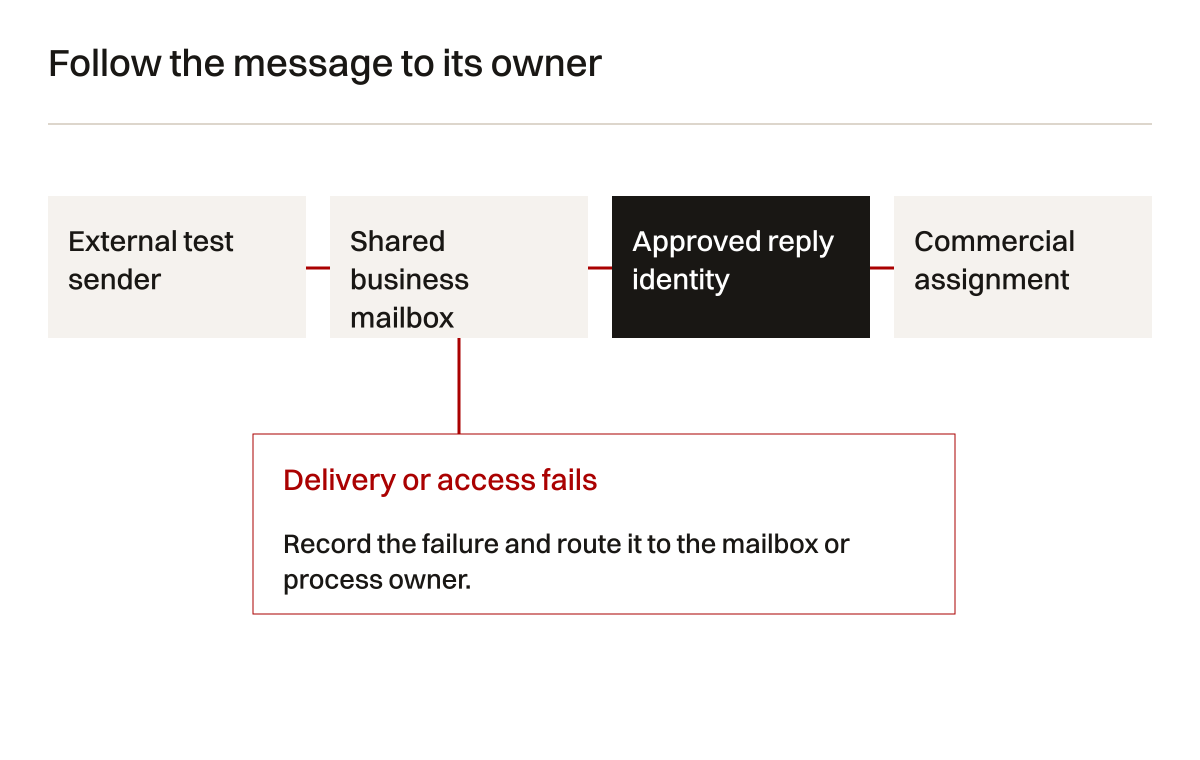
Table 3: migration acceptance tests. Match the tests to actual scope and record exceptions separately.
| Test | Starting condition | Evidence of acceptance | Remaining limitation |
|---|---|---|---|
| External incoming mail | New routing active | Marked message appears in correct mailbox | Other senders can have different delivery conditions |
| Shared-address reply | Named staff delegate | Reply uses approved identity and reaches sender | Client configuration still needs staff checks |
| Historical sample | Agreed folders copied | Selected messages and attachments open | Sample does not establish every item moved |
| Calendar requirement | Supported method selected | Required calendar workflow demonstrated | Unsupported historical data needs another route |
| Website enquiry | Public form active | Received record and assigned owner confirmed | Later staff response is a separate process |
| Old-service retirement | Reconciliation reviewed | Business approves remaining exceptions | Retained archives need ongoing ownership |
Keep an agreed fallback route while testing. If incoming mail reaches the old system, somebody must still watch it. If the receiving system cannot meet the approved requirement, the decision may be to defer routing rather than improvise changes while staff are working. A documented pause protects a specific task.
Match hosting to the website's behaviour
Hosting requirements follow the application. A simple informational site, a content-managed site and a customer portal need different runtime, storage and administrative capabilities. Ask what creates a page, where uploaded files live and what happens when a form is submitted. These questions expose requirements that a headline storage figure does not describe.
Check deployment, environment configuration, TLS, backups and recovery as separate responsibilities. A managed platform can perform some work automatically while leaving content approval and integration configuration with the business. Ask what evidence is available for each responsibility and what the provider contract actually includes.
TLS can also involve more than one connection. In a proxied setup, the visitor connects to an edge service and that service connects to the origin. Cloudflare's edge certificate documentation concerns the visitor-facing edge. Confirm the origin connection separately against the implemented configuration.
Do not move a production website merely to obtain an attractive account dashboard. First identify the problem: missing access, unsuitable runtime, poor recovery evidence or unsupported deployment. The proposed hosting change should answer that problem. The after-launch maintenance guide explains the ongoing ownership record once the setup is working.
Identify the business record that matters
An integration should have a business purpose that can be tested. An enquiry form might create a CRM record. An approved quotation might create a job. A completed task might notify a customer. Define which system holds the authoritative record at each stage and what data can move between them.
Avoid a two-way synchronisation requirement unless the business needs it. Two systems editing the same field introduce conflict questions. Which update wins? How is a deleted record handled? Can a salesperson overwrite a technical approval? These are business decisions before they are API decisions.
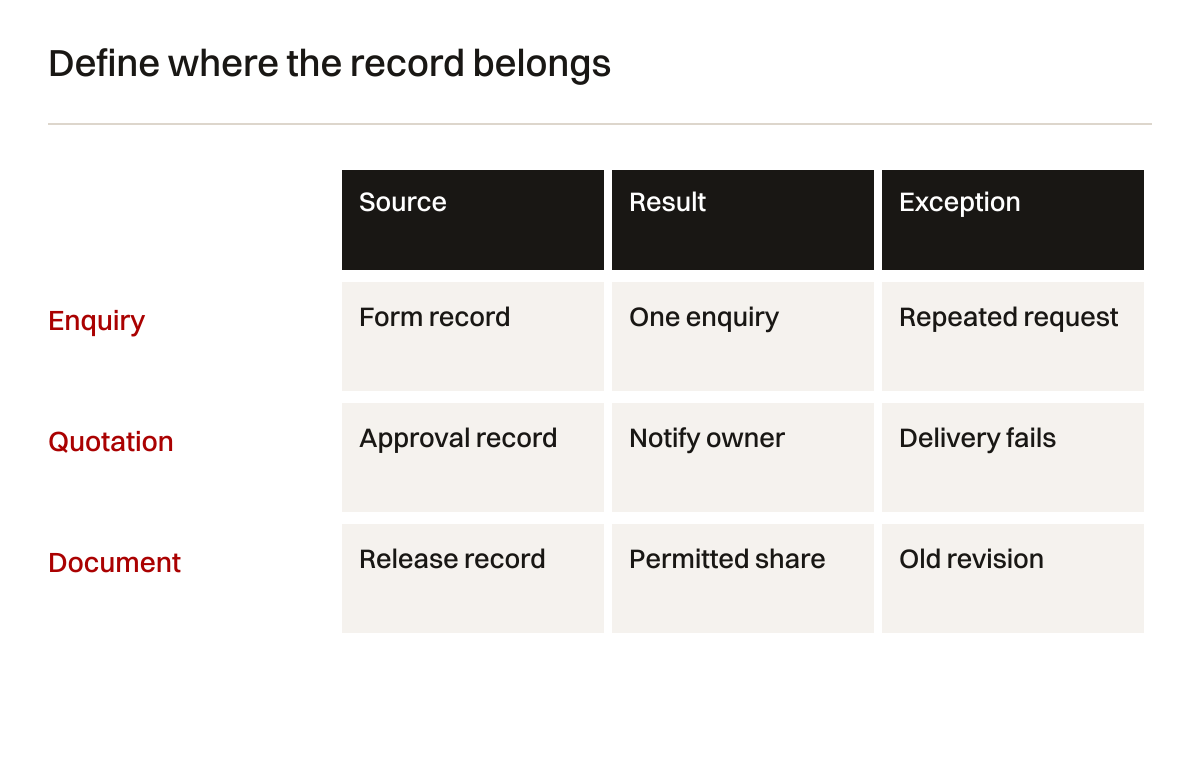
Table 4: integration requirements. This fictional enquiry flow names the expected behaviour without prescribing a vendor.
| Requirement | Source of record | Destination behaviour | Exception to define |
|---|---|---|---|
| New enquiry | Form submission record | Create one commercial enquiry | Repeated submission or temporary delivery failure |
| Contact correction | Approved commercial record | Update permitted contact fields | Conflicting changes in another system |
| Quotation approval | Quotation workflow | Notify responsible staff | Missing approval or withdrawn quotation |
| Customer document | Approved document record | Share with authorised customer | Superseded revision or wrong organisation |
| Integration failure | Delivery log | Alert named operator | No operator available or repeated retry |
Test duplicate requests and interrupted delivery. A connection working once is not enough to define retry behaviour. Keep an observable record of what failed and what someone can do about it. If the provider cannot expose that information, the business needs another way to reconcile records. Silent missing enquiries are harder to discover than an explicit failed task.
Keep subscriptions understandable
The ongoing record should describe recurring charges as components, without invented prices. Domain renewal, email accounts, hosting, storage, transactional messaging and business tools may all renew separately. Some vary with users or usage. Some are billed through a reseller. Record the billed organisation and authorised payer.
Set a review trigger when the company adds staff, opens a new office or changes an application. A tool selected for three users may require a different administrative arrangement later. That does not mean the original choice was wrong. It means the assumptions have changed and someone needs to review them.
Treat cancellation as a task with dependencies. Closing a hosting plan could remove mailbox service if both are bundled. Closing a mailbox could break password recovery elsewhere. Removing a shared drive could invalidate links in quotations. Trace those dependencies before approving retirement.
The workbook should contain renewal dates and billing references, but no full payment-card details. Link to the private account record when needed. A departing administrator should be able to hand over responsibilities without copying sensitive information into a broadly shared spreadsheet. Keep evidence useful and exposure limited.
Work through a bounded setup example
Consider a fictional equipment consultancy with four staff. It has a brochure website, personal mailboxes and one enquiry address. A former provider controls the registrar and hosting. The company wants business-owned accounts and a clearer enquiry record. The chosen scope excludes an office network rebuild.
The first inspection finds that email uses a separate provider. Website files are on the old host. DNS contains a record for a quotation tool that nobody mentioned in the original request. The team records the dependency and asks the commercial lead to confirm whether that tool is still active. It postpones removing the record.
The migration plan separates registration access, website copy and mail continuity. It does not migrate mail history because the business keeps its mail provider. The new website is tested on a controlled address. The form creates a marked enquiry and sends a notification. The commercial lead verifies the actual record and assignment.
During testing, the notification arrives but the quotation tool's callback still references the old website address. That is a specific integration fault. The team changes the approved configuration and repeats the related test. It records the before and after evidence, rather than declaring the whole setup complete because the homepage loads.
The final handover leaves one exception: the old provider must retain a particular export until the business approves its disposition. The exception has a named owner and review trigger. This example shows the method, not a client outcome or a promised migration timetable. Actual scope depends on the inspected accounts and provider terms.
Make handover a demonstration
A handover document should let the receiving team operate the systems. Ask the business administrator to find the domain renewal route, locate the mailbox delegation controls and identify the current website release. Have the commercial owner find a test enquiry and explain how an unassigned request is handled.
Use task demonstrations because possession of a password does not prove operating readiness. A person can sign in and still be unable to distinguish a website record from an email record. The demonstration reveals where instructions need improving. It also establishes which tasks require an experienced implementer.
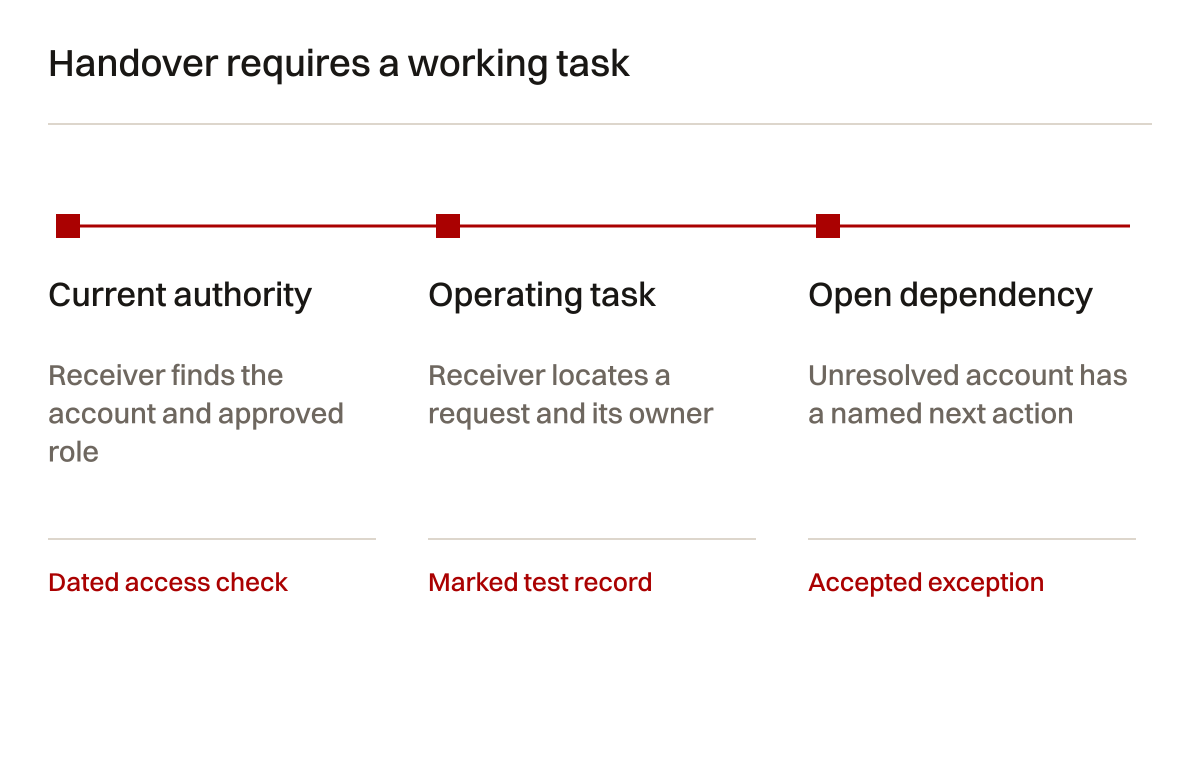
Table 5: handover evidence. A completed row means the named task was demonstrated under recorded conditions.
| Material | Receiving owner | Demonstration | Review trigger |
|---|---|---|---|
| Account register | Business administrator | Find provider, authority and recovery reference | Staff or supplier change |
| DNS record | DNS administrator | Explain retained web and mail dependencies | Service or nameserver change |
| Mailbox inventory | Operations lead | Confirm shared-address access and reply route | Staff role change |
| Website deployment record | Website owner | Identify current release and recovery procedure | Platform or hosting change |
| Integration notes | Commercial process owner | Find failed task and reconciliation route | Workflow or API change |
| Open exceptions | Business approver | Explain unresolved dependency and next decision | Named decision or due date |
Agree what the provider continues to maintain. Domain administration, mailbox support, website changes and integration repairs should not sit inside an undefined phrase such as IT support. State the task, authorised contact and escalation route. Then the business can assess whether the arrangement covers its actual dependence on those systems.
Questions to ask a prospective provider
Ask which accounts will belong to the business and which will remain provider-managed. Ask whether another authorised person can take over the system. Ask what happens to the domain, website files, stored records and subscription relationships when the engagement ends. Request the answer by component.
Ask what the migration method includes. If the proposal says email migration, request a statement about calendars, contacts, shared addresses, archives and excluded items. Ask how the provider verifies the historical copy and future delivery. A supplier who names limitations gives you something concrete to evaluate.
Ask who will investigate a failed enquiry. The form developer, mail administrator and commercial team each own a stage. An escalation route should identify how they work together. A promise that messages will always arrive is less useful than a testable route and an agreed response to failure.
Ask which changes require business approval. Deleting old records, retiring subscriptions and changing customer-facing routing have operating consequences. Make the approver visible in the proposal. Account access allows an administrator to perform a change; it does not automatically provide business authority for every change.
Reconcile the handover inventory
Use a small synthetic inventory to check whether the record itself is complete. In this example, eight business systems are in scope. Six have verified ownership and two await clarification. Six plus two equals eight. This does not measure service quality or predict how long clarification takes. It makes the missing responsibility visible.
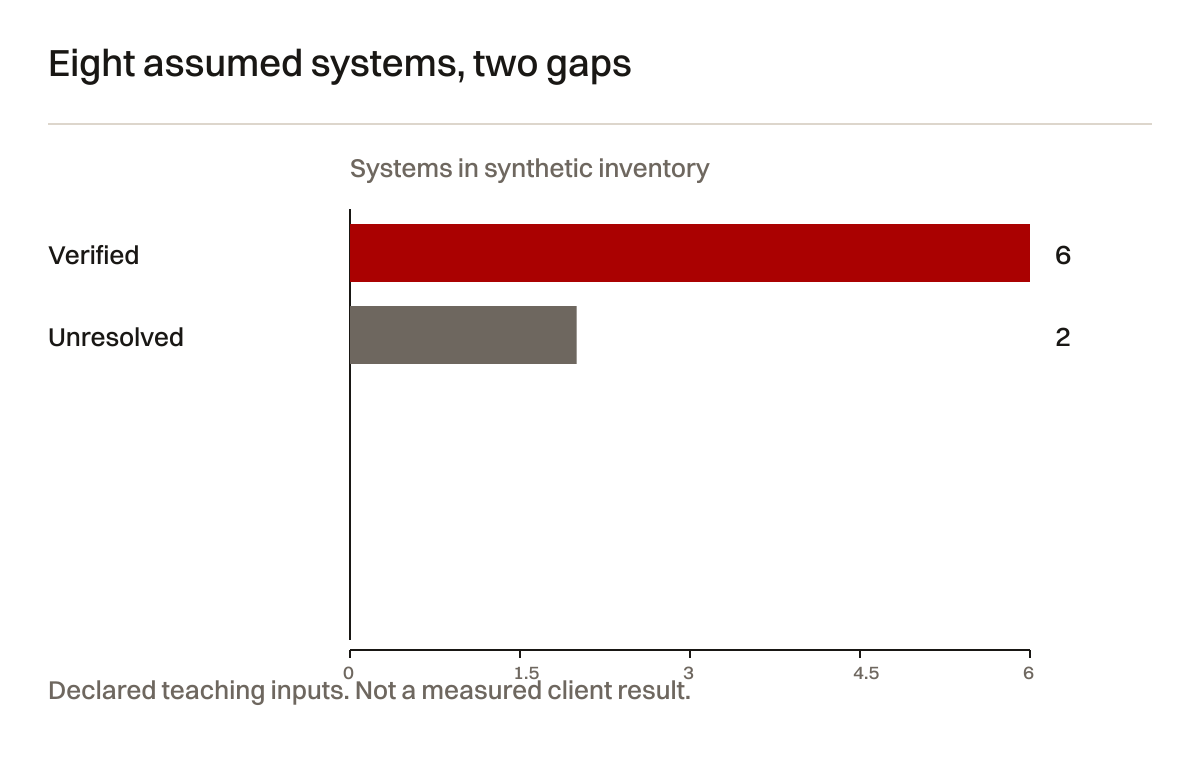
The two unresolved systems are not interchangeable. One is a low-use document tool. The other holds a renewal contact for the domain. The second can deserve attention first because its consequence is different. Keep that judgement in the record rather than interpreting the chart as a universal priority rule.

Ask the receiving administrator to update one harmless reference in the register and locate the evidence behind another. This demonstrates whether the document is usable and whether its private references still work. If the administrator can only read the summary but cannot find the actual account, the handover remains incomplete for that task.
Frequently asked questions
Can one provider manage everything?
Yes, if the arrangement preserves clear ownership and component-level records. One invoice can reduce administration. It can also hide dependencies. Confirm what belongs to the business, what can be exported and who can operate the accounts after a provider change. A single provider still needs separate tests for website behaviour, mail delivery and integrations.
Should the domain move when the website moves?
Only when there is a reason to change registration management. Hosting can often change while the registrar stays in place. Record the intended web DNS changes and retain unrelated email dependencies. Check the registrar's current rules before assuming a transfer belongs in the launch sequence.
Can an email migration have no disruption?
Some migrations can be planned with limited interruption, but that is not a universal guarantee. Source access, historical scope, caching, staff clients and provider limits affect the transition. Define the intended continuity measures and the evidence required to close the move. Keep unresolved exceptions visible.
Does a successful form submission prove delivery?
It proves only the behaviour represented by that success message. Verify the stored request, destination and assigned owner separately. A controlled test should travel through the same route as a visitor request while using harmless fictional details. Later commercial handling remains a distinct responsibility.
What should stay out of the public checklist?
Passwords, recovery codes, access tokens, private mailbox contents and personal payment details. The checklist needs account references, role names and evidence locations. Sensitive values belong in approved private systems with appropriate access. A planning workbook should explain the route without becoming a collection of credentials.
When is the setup finished?
When the agreed tasks work under recorded conditions, authorised owners can operate them and exceptions have been accepted or assigned. That is a defined handover point, not proof that the systems will never fail. Renewals, changes and staff departures will create later review work.
Start with the dependency that is unclear
If the company cannot explain who controls a domain, where an enquiry goes or how records move between tools, begin there. Collect the current account inventory and one example of a failed or uncertain task. The next decision can then follow evidence instead of a general shopping list.
Creatif Work can inspect those dependencies and scope business setup, migration and integration work around the findings. Relevant website operation sits within hosting and support. Connected business processes may require custom software or web application work. The appropriate work follows the problem. Start with the problem.
Sources and limits
Official references checked on 4 October 2026. Provider interfaces, limits and account terms can change. These sources support the stated technical distinctions; the ownership registers and worked example are original planning material.