

Website Maintenance and SEO: What Your Business Needs After Launch

Website maintenance keeps the site usable, recoverable and accurate. Ongoing SEO investigates how buyers discover and assess the business. You need both when the website matters to enquiries, but they are different jobs. Agree who owns each job, what evidence confirms completion and which decisions need your input.
The website launched. Someone received the passwords. A hosting invoice arrives each year. Beyond that, nobody can say who checks the enquiry form or whether the latest service changes reached the public pages. A search report might arrive monthly, yet a buyer still downloads an outdated capability document.
This is an after-launch operating problem. It does not automatically require a redesign. It requires a small set of reliable records and people who can act on them. A visually unchanged website may need urgent maintenance. A technically healthy website may still explain the business badly.
This guide shows founders and managers how to separate those situations. The working examples are fictional planning exercises, not Creatif Work client results. The photographs are generated illustrative scenes. The capacity chart uses declared assumptions, not market averages. Nothing here promises a ranking, sales result, response time or universal support package.
Download the website care and search-review workbook or its editable CSV pack. Use the web tables below without downloading anything. Adapt the records to your platform, business risks and agreed provider scope.
Start with ownership, not a list of plugins
Before buying another monthly package, find out who controls the website. Separate business ownership from a person's ability to log in. A provider may manage a system competently while the renewal address belongs to a former employee. That arrangement can become a problem without any technical failure.
Make an account inventory. Include the domain registrar, DNS management, website platform, hosting account, code repository where applicable, enquiry delivery service, analytics and search tools. Add renewals, billing contacts and the person authorised to approve changes. Store passwords and recovery codes in a suitable private system, never in a public checklist.
Do not assume all these services belong to one account. Moving website hosting does not necessarily move business email. Updating a domain's DNS can affect records used by both. A maintenance provider should identify the dependency before changing it, rather than discover it after messages stop arriving.
For a small firm, one director may own most decisions. That is fine if a second authorised person knows the recovery route. For a larger engineering company, commercial staff may own public descriptions while technical leads approve specifications. The useful distinction is responsibility, not how many names fill a spreadsheet.
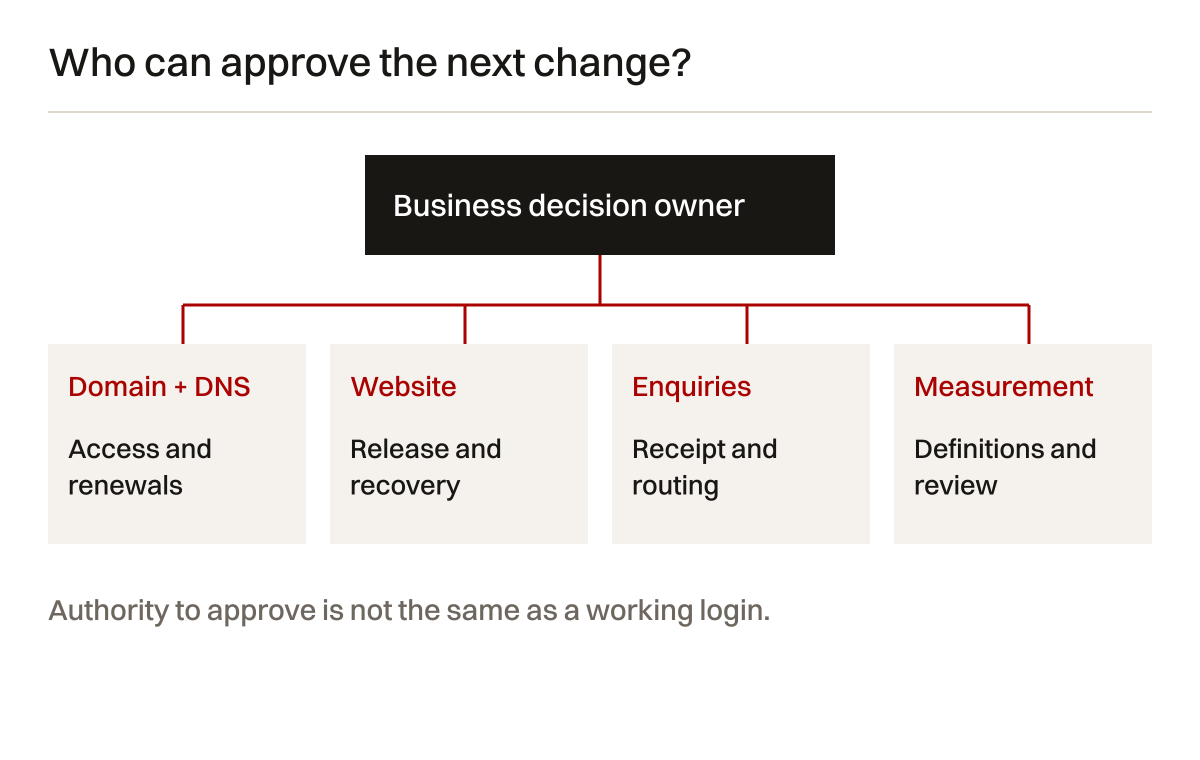
Table 1: suggested responsibility register. These are starting points, not contractual promises or permissions to change accounts.
| Area | Decision owner | Working owner | Evidence to retain |
|---|---|---|---|
| Domain and DNS | Authorised business owner | Named account administrator | Account access, renewal date and approved record changes |
| Website release | Business approver | Developer or platform administrator | Change description, release reference and visitor checks |
| Public claims | Relevant business lead | Content editor | Source, approval and next review trigger |
| Enquiry delivery | Commercial manager | Form and mailbox administrators | Test reference, received request and routing check |
| Search review | Commercial decision maker | Search practitioner | Dated observations, limitations and next action |
| Recovery | Business continuity owner | Website maintainer | Backup scope and a controlled restoration record |
Check access with the people concerned. Do not merely copy an old handover document. Record missing access as a task, with an owner and consequence. If nobody can restore the website, that gap matters more than choosing a new homepage photograph.
Separate maintenance from search improvement
Maintenance concerns the website's current operation. It includes checking agreed visitor journeys, applying appropriate updates, correcting faults and keeping recoverable copies. Search improvement concerns discoverability, relevance and the questions buyers need answered. It can require research, changes to structure, clearer content and later review.
The two overlap. A broken service page is both a usability fault and a discovery problem. A revised product description can create a redirect requirement. A heavy new photograph can affect page experience. The overlap is a reason to coordinate work, not a reason to call every task SEO.
This distinction also prevents inflated reporting. Installing a software update does not demonstrate better rankings. Publishing an article does not demonstrate that the enquiry form works. Keeping a server running does not prove that a customer can complete a request on their phone.
Table 2: maintenance and active search work. The acceptance evidence describes the immediate task. Later commercial outcomes need separate observation.
| Situation | Maintenance responsibility | Search responsibility | Immediate check |
|---|---|---|---|
| Platform update | Prepare, test, release or defer with a reason | Check material changes to public rendering | Visitor journeys still behave as intended |
| Service scope changes | Update approved facts and downloads | Review buyer wording and relevant internal links | Public copy agrees with the approved source |
| Enquiries disappear | Test submission, delivery and handling | Investigate discovery only after the journey is checked | A controlled request reaches the right owner |
| A page address changes | Keep appropriate destinations working | Review redirects, canonical signals and internal links | The old link reaches a relevant usable page |
| Search clicks fall | Check recent faults and releases | Segment observations and test competing explanations | The investigation records evidence and uncertainty |
| A new buyer question appears | Keep existing facts accurate | Assess whether a useful answer deserves a page | The answer is approved and connected to the offer |
Ask a provider which of these responsibilities is included. A maintenance contract may exclude copywriting or search analysis. An SEO engagement may depend on your developer to implement repairs. Those arrangements can work if the handoffs are explicit. They fail when both parties assume the other has finished the task.
For an example of connecting technical information with buyer decisions, read our engineering website planning guide. The question after launch is not how many activities fit in a report. It is which supported change should happen next.
Make an update safe enough to release
An update has two decisions: whether it should be applied, and whether its result is acceptable. An available version is not a completed maintenance task. Record what changes, what depends on it and how the current site can be recovered.
For WordPress websites, check the current official updating instructions against your installed environment. Take an appropriate backup before work. Review relevant compatibility information and test critical behaviour. Do not assume a plugin update is harmless because the button is easy to click.
The depth of testing should follow the risk. A small content correction is different from changing the form plugin, checkout logic or page builder. In a code-based website, a library or framework change can affect routing, generated metadata and rendering even if the visual layout looks unchanged.
Use a separate test environment where feasible. Keep test messages clearly marked. Prevent a test website from confusing real users or collecting unintended live requests. Confirm its indexing and access settings without copying restrictive staging settings into the live release.
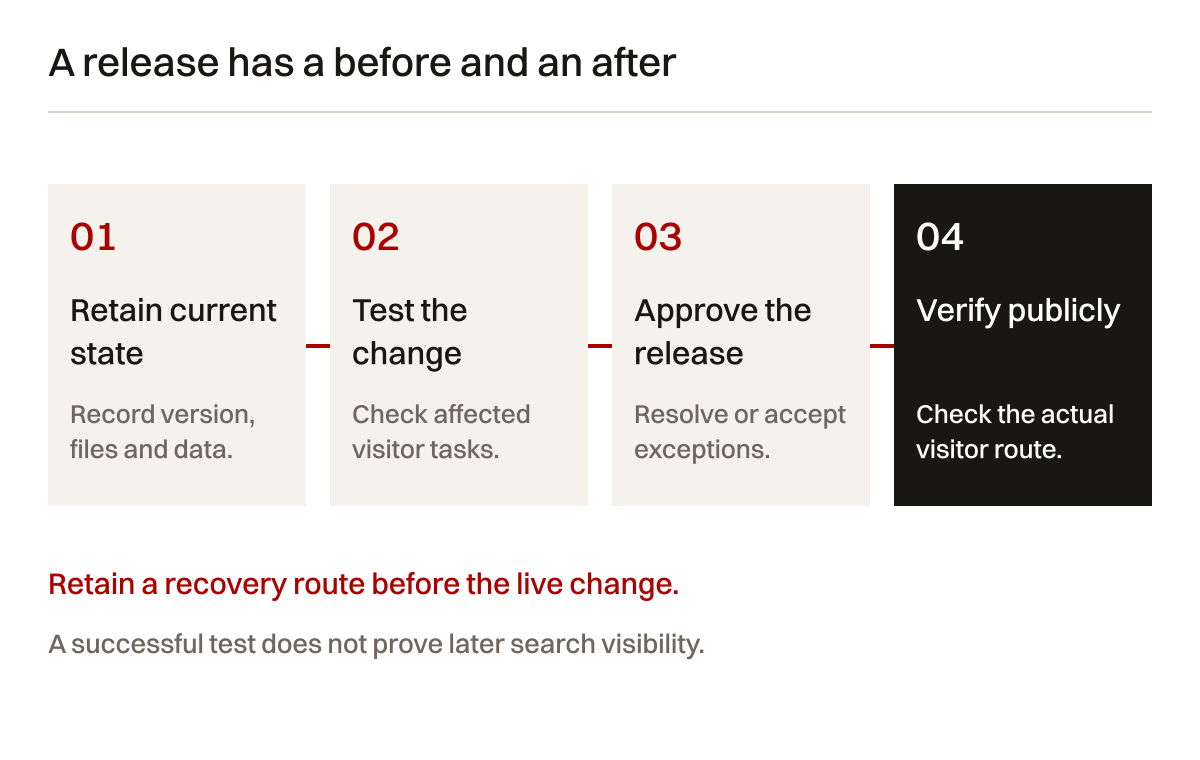
Table 3: update acceptance examples. Choose the tests that match the change. A passed check is specific to its conditions, not proof that every visitor will have the same experience.
| Change | Before release | After release | Stop or review when |
|---|---|---|---|
| Content management update | Confirm recoverable copy and compatibility | Check key pages, editing and media | Critical editing or public rendering fails |
| Enquiry form change | Test required fields and expected delivery | Submit a marked test and confirm receipt | Success appears without a received request |
| Navigation change | Check destinations and mobile interaction | Follow the actual visitor links | Important pages become unreachable |
| Image replacement | Review rights, dimensions and alternative text | Inspect crop, loading and small-screen layout | Important detail or readable content is lost |
| URL change | Approve equivalent destination and link updates | Check response, destination and canonical | Redirect loops or irrelevant destinations appear |
| Measurement change | Define trigger and expected event count | Test consent states and deduplication | Counts change without a real behaviour change |
Keep the previous release reference and a rollback decision ready. Restoring code alone may not restore database changes or uploaded files. Where a change alters stored records, the recovery plan needs to account for those records too. Ask the implementer to explain what a reversal would preserve or lose.
An intentional deferral can be a valid decision. It needs a reason, a responsible person and a review trigger. “We will update later” is not a plan when nobody knows which incompatibility is being investigated or what changes if the issue becomes urgent.
A backup is not a restoration test
A backup notification proves that some process reported completion. It does not prove that the right files were included, that the database matches them or that someone can use the copy. Treat recoverability as a separate testable property.
The WordPress backup documentation distinguishes database and file backups. For a custom website, map the equivalent parts: application code, stored records, uploads, required configuration and third-party dependencies. A repository alone may omit the assets and records the business needs.
Define the business tolerance before setting a routine. Which records cannot be reconstructed? How much newly submitted information could be lost if a copy had to be restored? Which visitor functions should return first? These questions are more useful than assuming one backup frequency suits every website.

Run a controlled restoration in a separate environment. Record which copy was used, what it contained, which instructions were followed and which checks passed. Keep private records protected. Do not send real customer notifications or trigger live integrations from a restored test system.
Look for practical omissions. Media might load from the live server, disguising a missing upload backup. A restored database might depend on a plugin version not retained. A scheduled job might be absent. An email delivery credential might need a private recovery procedure rather than inclusion in a shared archive.
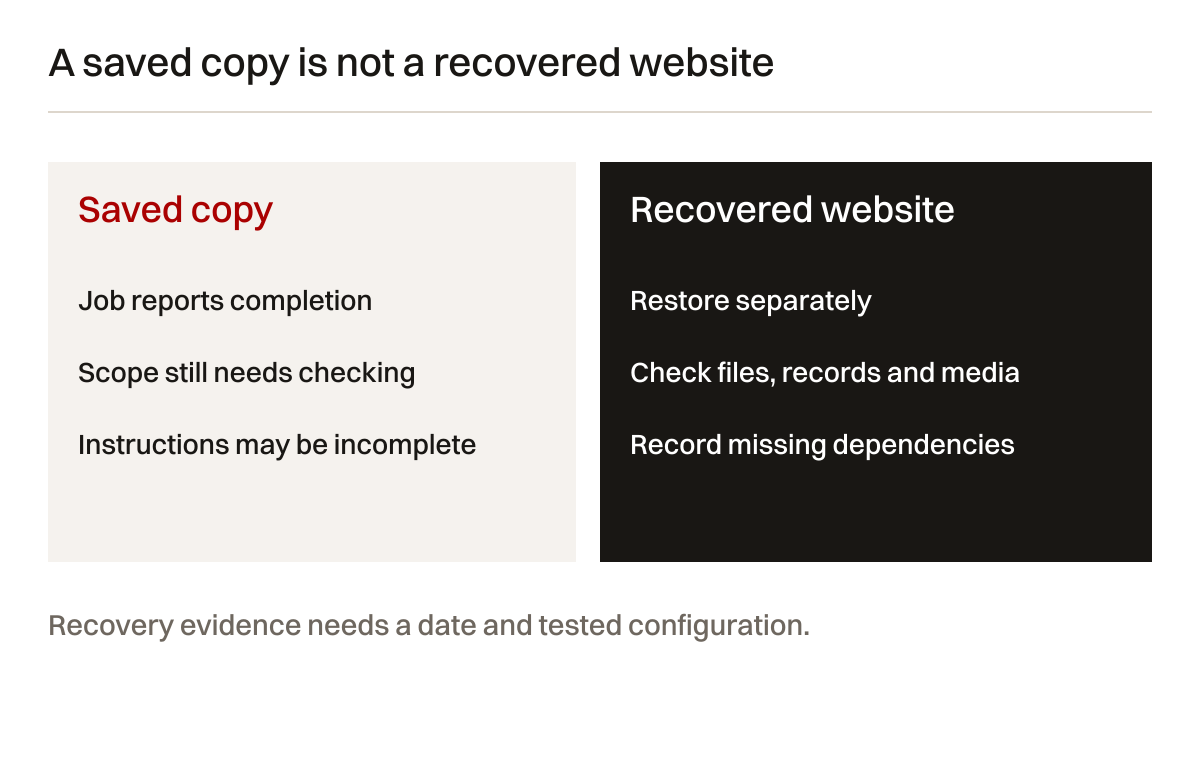
A failed rehearsal is useful evidence. Record the missing dependency, correct the recovery instructions and repeat the relevant tests. Do not hide the failure behind a green backup dashboard. The purpose is to learn while the live website is still available.
Agree when another rehearsal is justified. A new storage arrangement, major platform change or different provider can invalidate assumptions. Do not claim a historical test proves that today's recovery route works unchanged. Retain the date and tested configuration alongside the result.
Test the whole enquiry journey
The contact form is not the whole journey. A request travels through validation, application handling, storage or delivery, mailbox routing and a person's response process. A confirmation message in the browser can appear before the business has usable information.
Write a test reference rather than using a real prospect's details. On the public visitor path, check required fields, error messages and submission behaviour. Confirm the receiving team can find the request. If attachments are supported, use a harmless sample that meets the declared file rules.
Repeat the relevant path on mobile. Check whether the keyboard hides important fields, whether the button remains reachable and whether long filenames or validation messages break the layout. A desktop screenshot cannot answer those questions.

Test the failure path deliberately where safe. What does the visitor see when a required field is missing? Can the business identify a delivery failure without exposing private information? Does repeated clicking create duplicate records? A good test checks that a person can recover from an ordinary mistake.
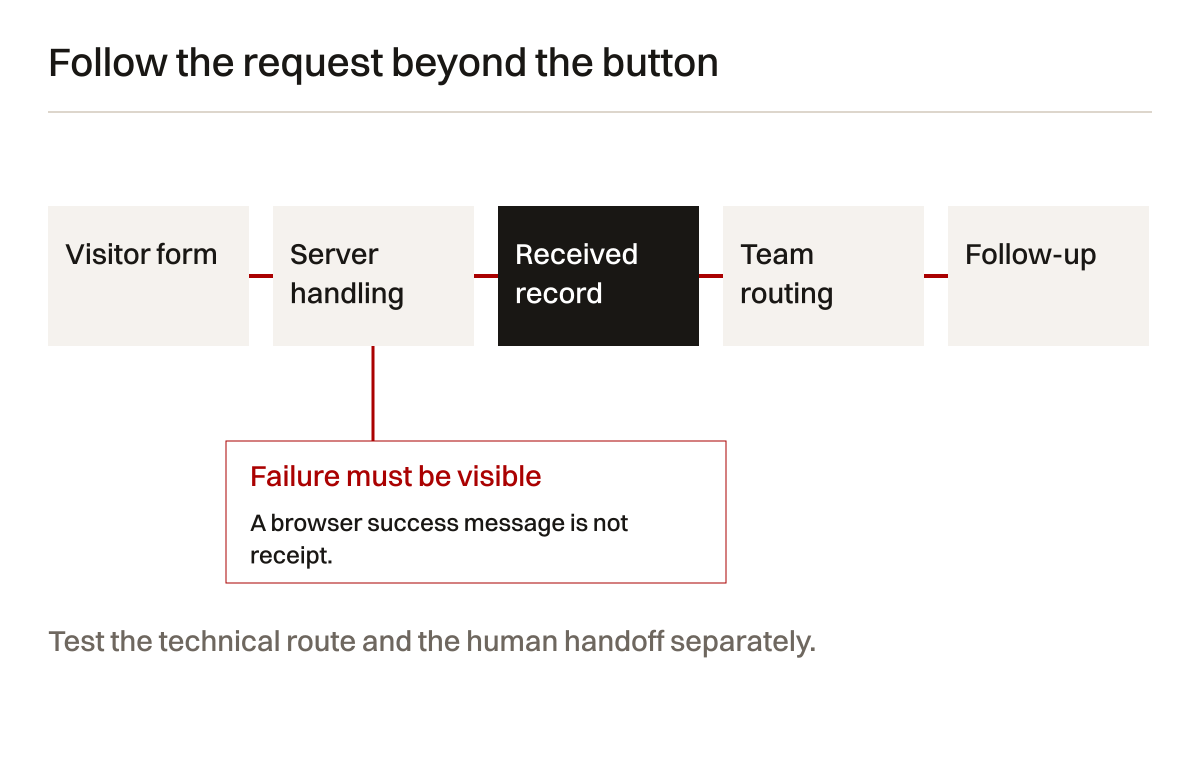
Keep analytics separate from receipt evidence. Google's recommended analytics events include a lead event, but implementing an event does not establish that the enquiry reached a salesperson. Define its trigger precisely. Avoid counting a button click as a confirmed request if that is not what the implementation measures.
Do not place names, email addresses or message contents in shared analytics records. Review permitted collection and consent arrangements with the responsible owner. A maintenance check should not create a new disclosure problem while trying to explain a missing lead.
Then check the human handoff. A received request left unread is not an SEO fault. Define who reviews enquiries, what makes one qualified and what happens if the usual owner is away. These are business responsibilities. The website can support them but cannot substitute for them.
Keep facts, documents and public claims current
The easiest maintenance work to overlook is content accuracy. Old operating hours, superseded specifications and obsolete staff details can remain online long after the software is updated. Buyers do not care that the CMS is current if the capability PDF contradicts the service page.
Create a factual source register. For each important claim, record the approved source, responsible reviewer and event that triggers another check. A certification needs its scope and current status. A service coverage statement needs the actual boundary. A project reference needs publication permission.
Use triggers, not only calendar reminders. A new phone number, service withdrawal, product revision or change of office should prompt affected pages to be reviewed. Calendar checks can catch forgotten records, but they should not be the only route for a known change.
Review downloadable material as part of the website. A revised page with an old PDF attached is unfinished work. Check filenames, revision dates, image rights, contact information and links inside the document. Tell readers which record is authoritative if both the page and document serve different purposes.
For engineering and marine businesses, ask the technical owner to check units, operating conditions and exclusions. An editor should not silently change a technical claim to make a sentence shorter. Where a qualification matters, preserve it. Clearer writing is not permission to broaden capability.
Record stale material explicitly. Choose whether to correct it, replace it or remove it with an appropriate destination. Deleting an old download without checking incoming links can leave procurement readers with a broken resource. Keeping it online without context can leave them with the wrong information.
This is also useful for AI-assisted discovery. A public answer should be specific and supported because people need it to be reliable. Do not add unsupported claims merely because an automated tool suggests more keywords. Accuracy belongs to a named human reviewer.
Check discovery after material changes
When an important page changes, check more than its appearance. Confirm the address, page response, visible main content and links from relevant pages. Review canonical and indexing settings when they are affected. A copy change and a route change have different risks.
Search Console's getting-started guidance explains the distinction between monitoring discovery, indexing and search performance. Use the relevant reports to investigate. A public browser check and a search-tool observation answer different questions.
If the browser displays the new content, you have verified public delivery under those conditions. You have not verified that Google has recrawled or selected it. Retain the dates separately. Do not treat a submitted sitemap as a guarantee that every page will be indexed.
For an address change, check the old address too. An appropriate redirect should take the reader to a relevant destination. Update your own links and investigate unexpected chains. Google's canonicalisation guidance explains canonical signals; they are not a substitute for maintaining usable links.
Avoid making a temporary test setting permanent by accident. A noindex instruction or restrictive access setting might be appropriate on a test environment but harmful on the intended public page. Conversely, private customer screens should not become public search targets. Check the intended audience first.
Use a page inventory to make the checks manageable. Name the important visitor tasks and their entry pages. Include product downloads, contact routes and external links that your business depends on. A list of all addresses is useful, but it does not tell you which failure interrupts the next enquiry.
When a problem appears after a release, record the timing without jumping to a conclusion. The release is a plausible explanation, not proof of cause. Compare the affected pages and observations. A broad search change and one broken template can produce different patterns.
What ongoing SEO, AEO and GEO should investigate
After launch, search work should revisit real buyer questions. Are the right services explained? Can a reader assess whether the business suits the requirement? Is evidence current? Are important pages discoverable from the website itself? These questions give recurring work a purpose.
The labels SEO, AEO and GEO describe overlapping search and answer-discovery work. They do not create three independent guarantees. Google's AI feature guidance says ordinary search fundamentals remain relevant and no special AI markup is required. Eligibility does not guarantee inclusion.
For a practical review, choose a defined set of buyer questions and relevant pages. Look for missing information before commissioning more articles. A precise service boundary, maintained specification table or clear project responsibility can be more useful than another broad introduction to the industry.
Do not infer AI visibility from one screenshot. Record the service, question, date and observed response. Separate that observation from referral traffic or enquiries. A page cited once may not appear in the next response. A browser check is not an account-level performance dataset.
The same care applies to ordinary search reporting. Compare meaningful page and query groups. Explain whether the comparison period is sensible. Search Console clicks, analytics sessions and received requests measure different stages. They should not be presented as interchangeable totals.
A recurring search plan should leave behind decisions. Which page needs revision? What supporting evidence is missing? Who must approve a technical statement? Which change will be implemented? What later observation would strengthen or weaken the explanation? If the report cannot answer these questions, ask for the working record behind it.
AI can help organise notes or suggest questions. It cannot validate a source it has not checked, inspect an account it cannot access or decide that a correlation establishes a result. The person responsible for the work still needs to examine the evidence and state its limits.
Diagnose a fault before commissioning more content
When enquiries decline, the first response should not automatically be a publishing target. Establish whether there is a working visitor journey and trustworthy measurement. Then investigate discovery, relevance and commercial handling. Otherwise new traffic can arrive at the same broken process.
Table 4: symptoms, evidence and the next test. These are investigation prompts, not diagnoses of your website.
| Symptom | Evidence to inspect | Next useful test | Do not assume |
|---|---|---|---|
| No new enquiries | Received records and routing changes | Controlled mobile and desktop request | A traffic problem caused the silence |
| Clicks down on one group | Comparable pages, dates and recent changes | Check affected templates and query mix | One cause explains every page |
| Analytics requests jump | Event definitions and release history | Submit once and check duplicate events | More counted events mean more buyers |
| Old information appears | Public content, downloads and crawl dates | Identify the current authoritative source | Updating a page instantly updates search |
| A page feels slow | Conditions, device and repeat measurements | Compare before and after under like conditions | One score represents every user |
| Restore instructions fail | Copy contents and missing dependencies | Rehearse again after correcting the gap | A green backup status proves recovery |
Google's traffic-drop investigation guidance is useful for structuring search comparisons. Our operating recommendation is to pair those observations with a local change log. This helps the team test explanations without claiming the log contains every possible cause.
Preserve the original observation before attempting a repair. Record the affected address, date, environment and expected behaviour. If several people change the website at once, keep their work distinguishable. It becomes harder to learn when the only record says “optimised the site”.
Choose the next test for the uncertainty it resolves. Repeating a successful form test does not explain a ranking change. Running another keyword export does not explain an undelivered request. The point is to narrow the problem, not to fill a report with tool output.
Measure page experience without chasing a single score
Performance work needs defined conditions. A visitor on a mobile connection may have a different experience from a developer on a fast office network. Save the device, connection assumptions, page version and measurement tool alongside a test result.
The web.dev guide to Web Vitals distinguishes field and lab measurement. Lab tests help investigate a controlled page change. Field observations describe actual experiences where sufficient data exists. Neither should be silently relabelled as the other.
For website care, establish a repeatable comparison. Keep the same representative pages and conditions where practical. Look for a material regression after an update or image replacement. Investigate what changed before claiming that a new layout will improve every visitor's experience.
Optimise images for their actual placement. Preserve a sufficiently detailed source, supply appropriate delivery dimensions and inspect the crop. Avoid making every visitor download a huge original because the desktop hero looks attractive. Equally, avoid tiny covers stretched across a wide screen.
Accessibility belongs in visitor checks too. Use a keyboard to follow important controls. Check focus visibility, form labels, error explanations and meaningful image alternatives. A captioned graph needs its main interpretation in text. Colour alone should not carry the business conclusion.
Keep functional and performance decisions proportionate. Do not remove a necessary specification download simply because it is large. Explain its format and size, and provide a useful page summary. The better decision may be clearer document delivery rather than pretending the document is unnecessary.
Select work within the available capacity
Most businesses cannot do every improvement immediately. Start with faults that interrupt essential tasks, then supported changes that resolve buyer confusion. Keep evidence-dependent work visible, but do not manufacture the missing evidence to make it ready.
Here is a deliberately simple capacity exercise. Assume eight hours of planned work are available in one review cycle. Assign two to a restore rehearsal, one to enquiry testing and one to factual corrections. Four remain for an approved search-content task. Those are example inputs, not recommended hours or a Creatif Work package.
Now add an unexpected three-hour form fault. If total capacity remains eight hours, the team must defer, reduce or separately approve some planned work. A chart showing every task completed would conceal the decision. The business should see what moved and why.
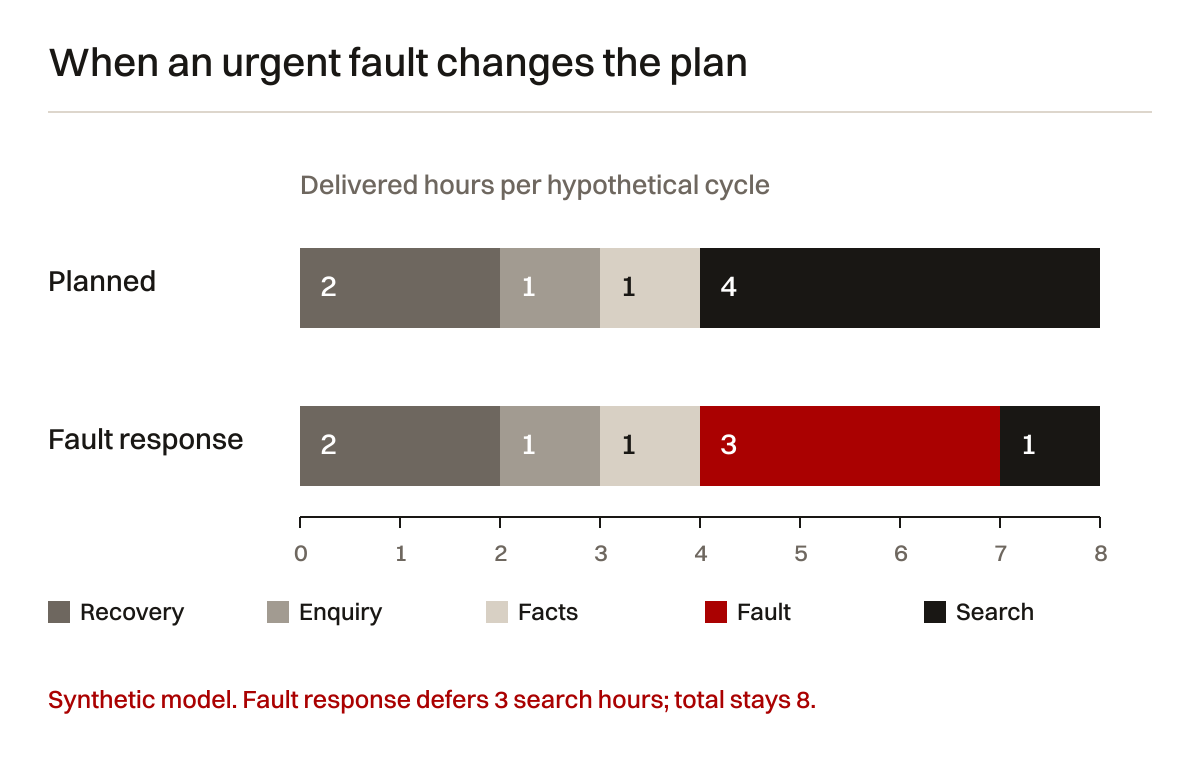
The underlying capacity CSV keeps the inputs inspectable. In the second scenario, two hours of recovery work, one of enquiry checks, one of factual corrections, three of fault response and one of search work still total eight. Three planned search hours are deferred, not delivered invisibly.
This example shows why a fixed activity count can be misleading. It does not estimate your support requirement or the benefit of any task. Your own plan needs actual effort estimates, risk and approval boundaries. Keep uncertainty explicit rather than converting a fictional model into a forecast.
Agree which work can interrupt the plan and who approves additional effort. Record completed work separately from planned work and deferred work. If a task is cancelled because its underlying question changed, say so. A cancelled low-value task can be a better decision than finishing it for the sake of the quota.
Use a first-quarter operating plan
For a recently launched or newly inherited website, the first quarter should establish a baseline, make critical checks repeatable and turn observations into selected work. It need not mean waiting three months to correct a known fault. The phases below describe priorities, not guaranteed durations.
Table 5: suggested first-quarter responsibilities. Use business-specific dates and owners. The sequence is an operating framework, not a promised service schedule.
| Phase | Main question | Working record | Business input |
|---|---|---|---|
| Establish ownership | Can authorised people operate and recover the site? | Account inventory and restoration gaps | Confirm decision makers and recovery routes |
| Confirm visitor paths | Can a buyer find information and send a usable request? | Page inventory and enquiry test | Define important tasks and qualification needs |
| Review current facts | Which public statements need correction or approval? | Claim and document register | Technical and commercial approval |
| Select improvements | Which supported change deserves attention next? | Prioritised backlog with evidence | Agree scope and trade-offs |
| Verify releases | Did the approved change reach the public site? | Release and acceptance record | Approve unresolved exceptions |
| Review observations | What do later search and enquiry observations support? | Defined comparisons and open questions | Decide the next cycle's work |
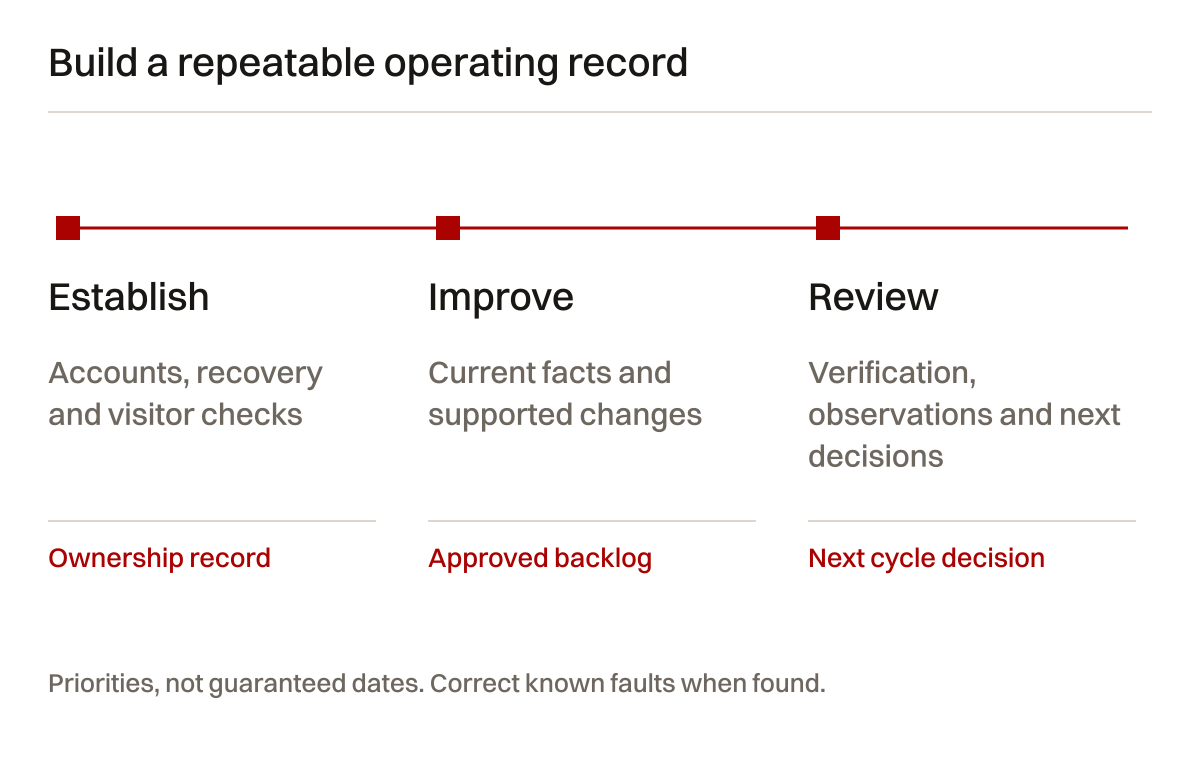
Use a short meeting with a clear record. Review new faults, completed changes, remaining uncertainty and the next decision. The meeting should not require a long slide deck when a dated checklist answers the question. Keep the evidence accessible to the people who need it.
For ongoing operation, choose checks around risk and change. An important release deserves its own verification even if the monthly review happened yesterday. A service withdrawal should not wait for the next content meeting. A quiet month should not require inventing a fault to justify the engagement.
Retain evidence that another provider can use
Handover is easier when the working record is maintained throughout the engagement. Retain account ownership, release references, approved sources, recovery instructions, enquiry routes, measurement definitions and unresolved issues. Explain any third-party licensing or access restrictions.
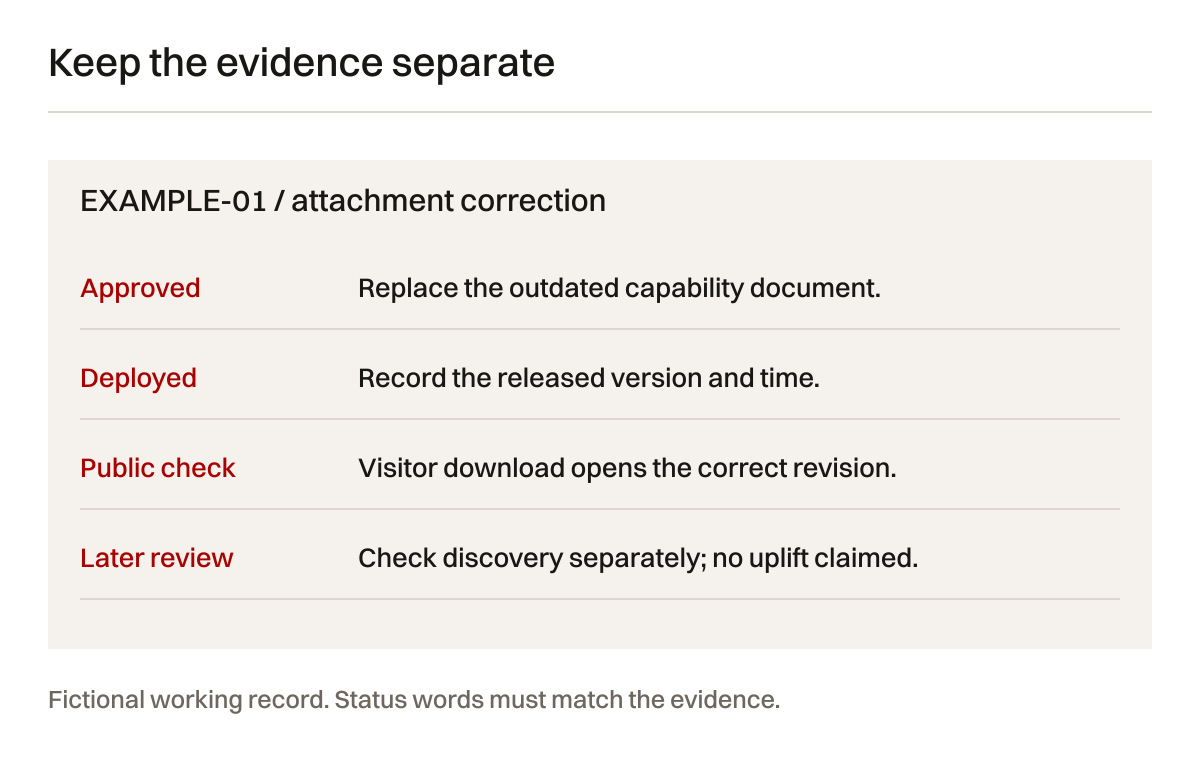
A useful release record names what changed and what did not. For example, a corrected attachment link is not a new lead-generation campaign. A public form test confirms a specific route at a specific time. It does not establish how every historic request behaved.
Record open issues honestly. “Awaiting technical approval” is different from “ready to publish”. “Provider sent instructions” is different from “business verified access”. These distinctions are not administrative decoration. They prevent a future maintainer from acting on an incorrect assumption.
Keep sensitive information out of shared reporting. The handover can identify where credentials are managed without including them. The enquiry check can retain a test reference without copying customer messages. Documentation should make authorised work easier, not widen access unnecessarily.
Questions to ask before agreeing ongoing support
Does website maintenance include SEO?
Not automatically. Confirm the actual responsibilities. Software updates, recovery and visitor checks can be part of maintenance. Researching buyer questions, revising search content and interpreting performance may require a separate scope. Do not infer inclusion from the word “optimisation”.
Is a working website enough for Google and AI search?
A working page is necessary for its visitor task, but it is not a visibility guarantee. Search systems also need useful accessible information and appropriate technical signals. Clear, supported public answers matter. No provider should promise a particular ranking or AI citation merely because maintenance is current.
How often should the website be checked?
Set the routine around the website's role, changes and tolerance for failures. Verify material releases when they happen. Review important facts when their sources change. Agree recurring visitor and recovery checks. A universal calendar cannot account for every website's dependencies.
Can we keep our current website?
Often the first decision is whether a specific problem can be corrected within the current structure. Assess editing constraints, visitor paths and recoverability before replacing the platform. A new website should answer a diagnosed need, not serve as the default response to missing maintenance records.
What should we receive after the work?
An intelligible record of the approved change, implementation, verification, remaining limits and next decision. For recurring search work, retain the underlying observations and source context. Agree access and ownership before the engagement, rather than negotiate them only when the provider changes.
Start with the problem
If nobody can explain who checks your enquiry route, start there. If the site works but buyers cannot understand the offer, start with the relevant pages and evidence. If the reporting does not support a decision, inspect the measurement and analysis before increasing the publishing volume.
Creatif Work can assess website problems, implement agreed changes and connect public content with ongoing search work. Maintenance and SEO should share an evidence record while keeping their responsibilities clear. Read about our hosting and support work, website work or start with a diagnostic. The first conversation should establish what is wrong, what can be checked and whether the current website needs a repair, a content revision or a larger change.
Sources and limitations
Official documentation checked on 4 October 2026. Platform instructions can change. The responsibility registers, test methods and operating sequence are Creatif Work's editorial framework, not vendor requirements or verified client outcomes.
- WordPress: updating WordPress. Relevant to WordPress environments, not instructions for every platform.
- WordPress: backups. Use your actual storage and recovery arrangement.
- Google Search Central: getting started with Search Console. Search observations are distinct from public delivery tests.
- Google Search Central: debugging traffic drops. Competing explanations need investigation.
- Google Search Central: canonicalisation. Signals do not replace usable visitor destinations.
- Google Search Central: AI features. Eligibility is not guaranteed inclusion.
- Google Analytics: recommended events. Event implementation and business receipt are different evidence.
- web.dev: Web Vitals. Lab and field observations answer different measurement questions.
The eight-hour chart is a synthetic planning example with no geography or measured period. Its source is the declared inputs and arithmetic in the linked CSV. The three photographs illustrate working situations and do not depict a Creatif Work client or an actual delivery result.