

Engineering Website Design: From Strategy to Launch

An engineering website should help someone check whether your company can do their job. Start with the buyer's questions, collect the evidence, agree the page structure and test real tasks. Then choose the editing system and build. A better-looking homepage cannot compensate for missing scope, unclear specifications or enquiries that reach nobody.
Your company may have changed considerably since its first website. New disciplines, equipment, sectors and overseas work have appeared. The website still describes the business as it was when the founders wrote its first brochure. A buyer sees the gap, not the history behind it.
This guide is for engineering consultancies, manufacturers, technical suppliers and specialist service companies. They need different information, but they share a practical problem: how to turn knowledge held by a few people into a website that someone else can assess.
We cover the decisions from the first requirements meeting to the first review after launch. The EN+ screens are examples of our published work. The diagrams and worked records are original planning examples, not survey findings or measured client results. The featured image shows a website screen, not evidence of a particular physical installation.
Download the editable engineering website planning workbook. It is free to use, with no email address required. The article contains the essential instructions and checklists, so you do not need a spreadsheet application to follow the process.
Decide what the website must help people do
Begin with the work the company wants to attract. “A more modern site” is an understandable request, but it is not an acceptance criterion. It does not tell a designer which information matters or tell a director whether the finished website is useful.
A manufacturer might need buyers to confirm that a material, part geometry and inspection requirement fit its process. A consultancy might need a project director to understand its responsibility at each project stage. A maintenance company might need an operator to identify coverage, working hours and the information required for assessment.
Write those decisions as tasks. For example: “Find whether we support stainless-steel fabrication and how to send a drawing for review.” Another might be: “Identify our role on a comparable project without confusing us with the main contractor.” These are specific enough to test.
Include existing customers, prospective employees and procurement staff. Do not make every visitor follow the same sales path. A returning client looking for a document does not need a brand introduction. An engineer checking a limitation should not have to submit a contact form first.
Agree the difference between a useful enquiry and any enquiry. It might be a requirement within your scope, an identified project, a suitable location and enough information to begin an assessment. That definition belongs with the sales team before anyone designs a form.
Separate the business goal from the website's job
Winning more work is a business goal. The website can make scope and evidence easier to assess, support discovery and reduce avoidable enquiry friction. It cannot guarantee a tender award, replace an unsuitable capability or fix a sales team that does not respond.
Keep that distinction in the brief. Otherwise a project is judged against outcomes it cannot control while basic failures, such as missing product information, go unnoticed. A useful first requirement is often much smaller: the buyer can find the right service, check relevant evidence and contact the responsible team.
Design for technical and commercial readers
The person who finds your company may not be the person who approves it. A technical reviewer wants operating conditions, materials, standards and limitations. A commercial reviewer may need legal identity, coverage, project responsibility and a document they can forward.
Both need plain language. Plain language does not mean removing technical detail. It means explaining what a capability applies to, defining unfamiliar abbreviations and organising specialist information where it can be found.
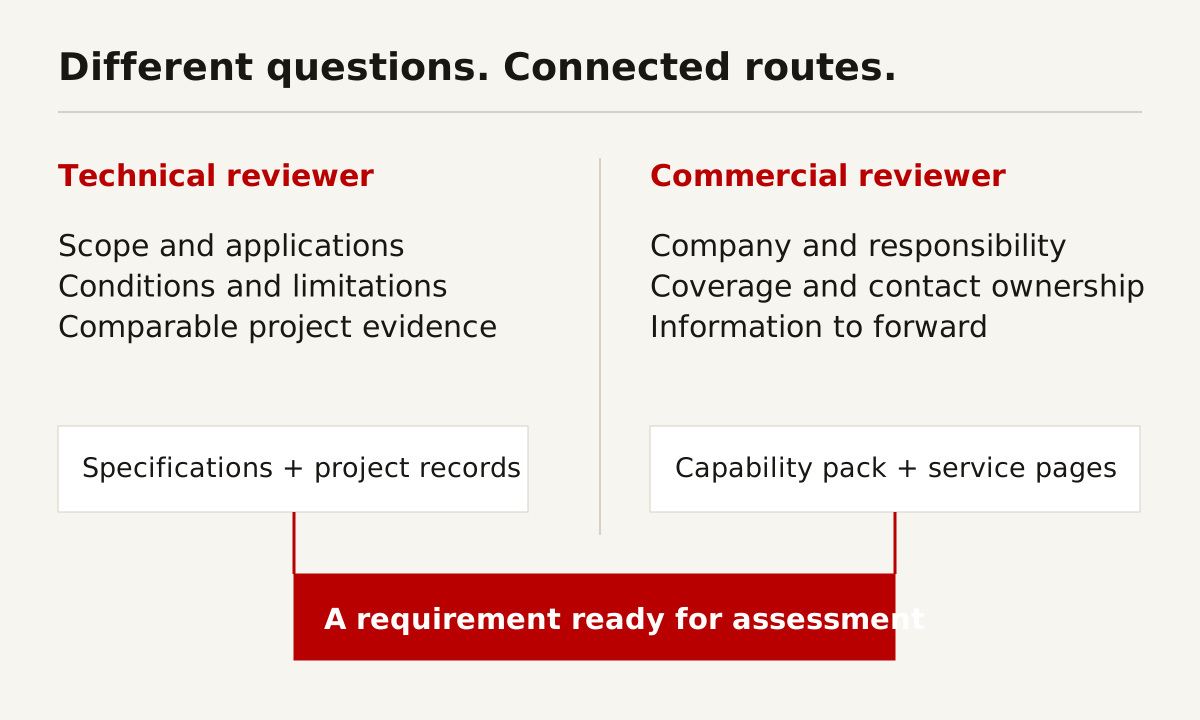
The two routes should connect. A service page can lead to a technical record, a project example and an enquiry. A capability pack can link back to the live page where details are maintained. Avoid splitting the website into disconnected “technical” and “business” halves.
Table 1: buyer questions and the information that supports them. These are planning examples, not findings about every buying organisation.
| Reader | Question | Useful evidence | Next step |
|---|---|---|---|
| Technical reviewer | Does the process fit our requirement? | Materials, conditions, limits and inspection methods | Send a requirement for assessment |
| Procurement manager | Can we identify and qualify this supplier? | Company details, scope, relevant credentials and project responsibility | Request the correct capability pack |
| Project director | Have they handled comparable constraints? | A project record with a defined role and supported outcome | Discuss the proposed scope |
| Operations manager | Who handles the work and what information is needed? | Coverage, operating hours and assessment route | Reach the responsible team |
| Prospective employee | What work would we do here? | Current disciplines, workplace context and vacancies | Read the role and apply |
Do not manufacture a buyer persona from assumptions alone. Ask sales and technical staff what questions arrive repeatedly. Review permitted enquiry records and proposal requests. If possible, speak to a few customers with their consent. Record what they actually asked, not the wording the marketing team prefers.
Use the buyer matrix to decide which information belongs above the fold and which can sit deeper. It also gives you a reason to reject decorative sections. If nobody can explain whose decision a section supports, it probably needs rewriting or removing.
Collect capabilities and proof before designing pages
Build a content inventory before the first visual concept. List services, products, facilities, project records, team expertise, credentials and downloadable documents. For each item, identify the source and the person allowed to approve it.
The inventory should distinguish a current capability from past project experience. Having delivered one project with a partner does not automatically mean the company can offer the same scope independently today. Say who did what and under which arrangement.
Create a claim register alongside the page inventory. Each claim needs a source, conditions, approval and a review trigger. A capacity statement might require technical approval. A client name might require permission. A certification needs its correct scope and current status.
This sounds administrative because it is. It is also how you avoid launching a website full of statements nobody can confidently maintain. A claim with no owner tends to survive long after the underlying situation changes.
Make the gaps visible
Use three states: available and approved, available but awaiting review, and missing. Do not treat an old brochure as approved merely because it is a PDF. Check its date, contact details, specifications and rights before moving it online.
When evidence is missing, narrow the claim or leave it out. Do not use a stock image as proof of your facilities. Do not add a numerical result because a case study looks incomplete without one. A specific, supported description of the work is better than a fabricated performance figure.
For sensitive projects, agree what can be disclosed before writing. An anonymised example can still explain the sector, challenge, your role and an approved outcome. Removing a client's name should not leave behind a description that identifies the project through other details.
Organise services, products and applications
A useful structure follows questions, not the order of an old brochure. The company story has a place, but it should not be the route through which every technical visitor must pass.
For a manufacturer, processes and product families may be the main navigation. For a consultancy, disciplines and project stages may work better. For a technical supplier, applications, product data and support information may carry more value.
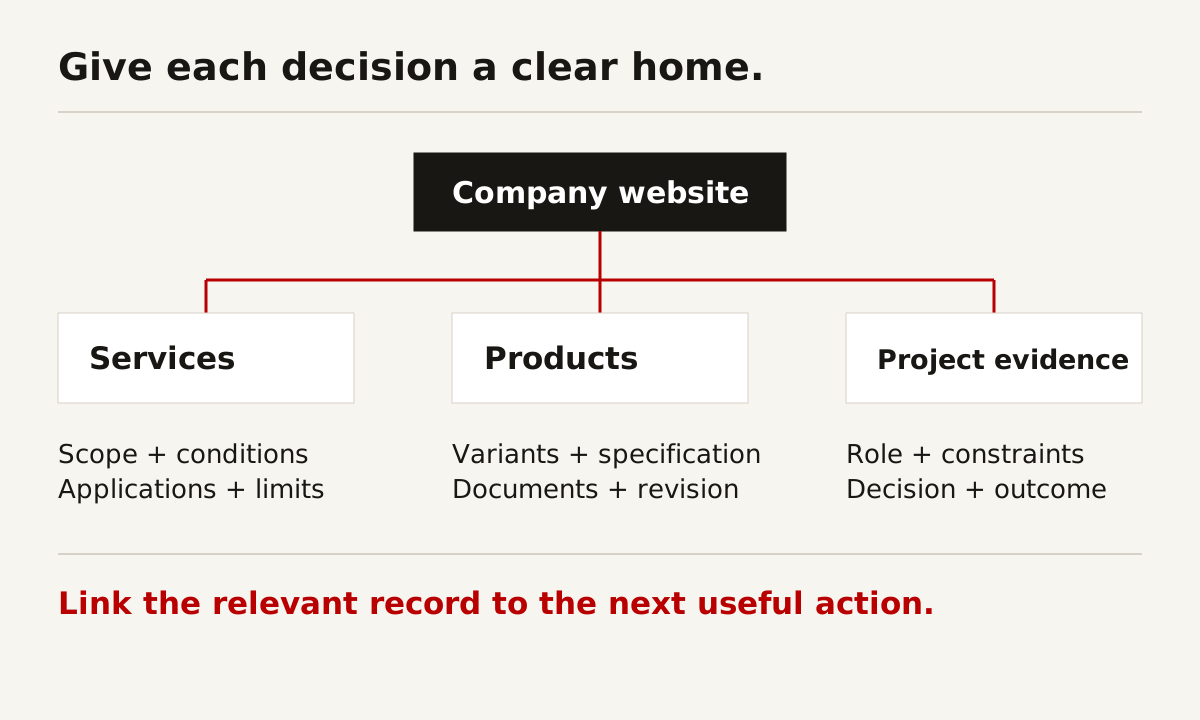
Give each important subject a clear home. Then connect related pages where the relationship is useful. A product page can reference an application. An application page can explain the selection conditions and link to the relevant products. A case study can point to the capability involved.
Avoid making a new page for every keyword variation. “Engineering company in Singapore” and “Singapore engineering firm” are not automatically two different reader needs. Separate pages make sense when the scope, evidence or task genuinely changes.
Table 2: an example content inventory and maintenance assignment. Adapt it to your business rather than treating every row as mandatory.
| Page or record | Job it does | Approval owner | Update trigger |
|---|---|---|---|
| Service page | Defines scope, boundaries and assessment route | Discipline lead | Scope or delivery method changes |
| Product record | Explains selection and specification | Product owner | Revision, variant or condition changes |
| Project record | Shows your role and supported evidence | Project lead and client approver | Publication permission or project facts change |
| Credential record | Explains what the credential covers | Quality or compliance owner | Renewal, expiry or scope change |
| Capability download | Gives a buyer something to retain and forward | Commercial owner | Any linked capability or contact changes |
| Careers page | Explains current roles and work context | Hiring manager | Vacancy or application route changes |
In a structure meeting, try three realistic paths from an external search result. Start on a service page, a product record and a project example. Each should make sense without requiring the visitor to read the homepage first.
Write service pages that make the scope clear
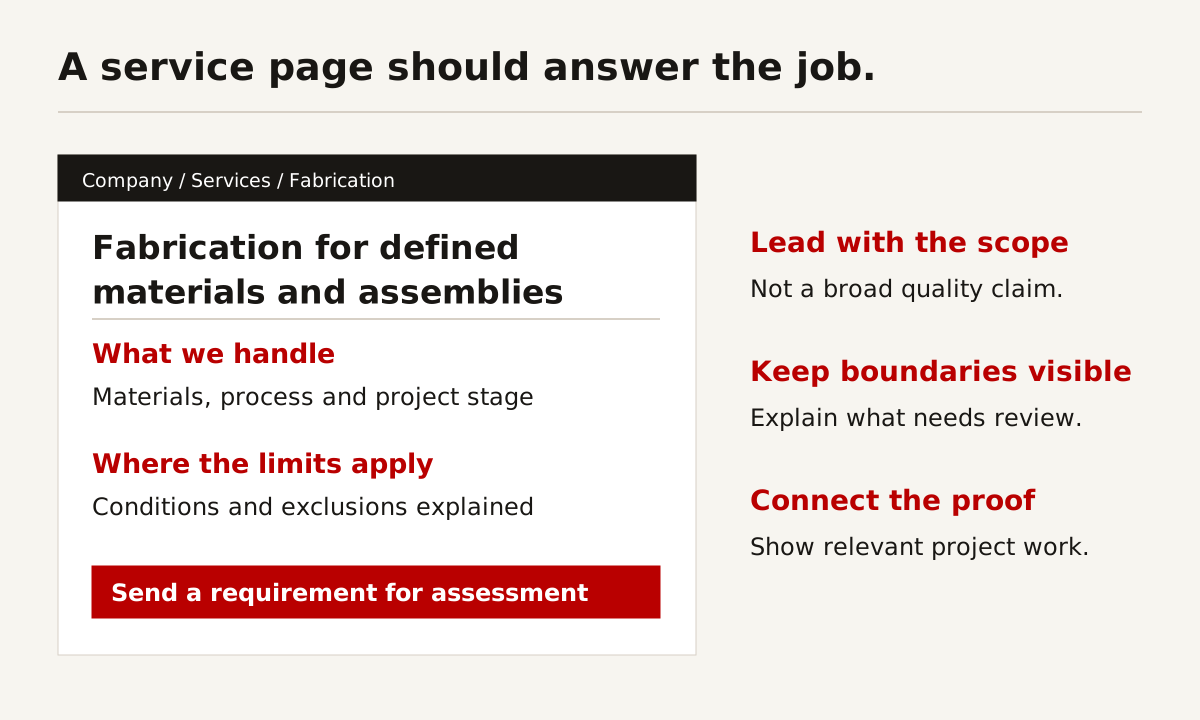
A service page should answer what you do, where it applies, the boundaries and what happens next. It does not need to begin with a long statement about commitment to quality.
For specialist work, explain the stages you handle and the stages you do not. If design review, supply, installation and commissioning are separate responsibilities, make that visible. The buyer should not have to infer a complete turnkey scope from a photograph.
Put relevant evidence near the claim. A credential for one activity should not silently endorse every service. A case study should identify the scope performed. Equipment photographs should be captioned accurately and linked to a capability only when the connection is genuine.
Give the buyer enough information to prepare
List the information that helps you assess a requirement. It might include an application, material, drawing revision, quantity, location or project stage. Explain which items can wait until a controlled sharing process is agreed.
Do not ask a visitor to upload confidential drawings to an ordinary form simply because an upload field is easy to add. The technical and commercial teams should agree the intake process first. If there is a safer channel, explain how to request it.
Write an acknowledgement promise only if the responsible team can maintain it. “We will review the requirement” is different from “We will quote immediately.” Some work needs clarification before any credible quotation can be prepared.
Present specifications with conditions and revision control
A number without context can mislead. A working envelope does not describe every allowable part. An achievable tolerance may vary by feature, material and inspection method. A lead time may depend on stock, approval or production load.
Keep the value, unit, conditions, source and revision together. Use the same terminology in the website, downloadable record and sales material. If one changes, identify the other places that must be reviewed.
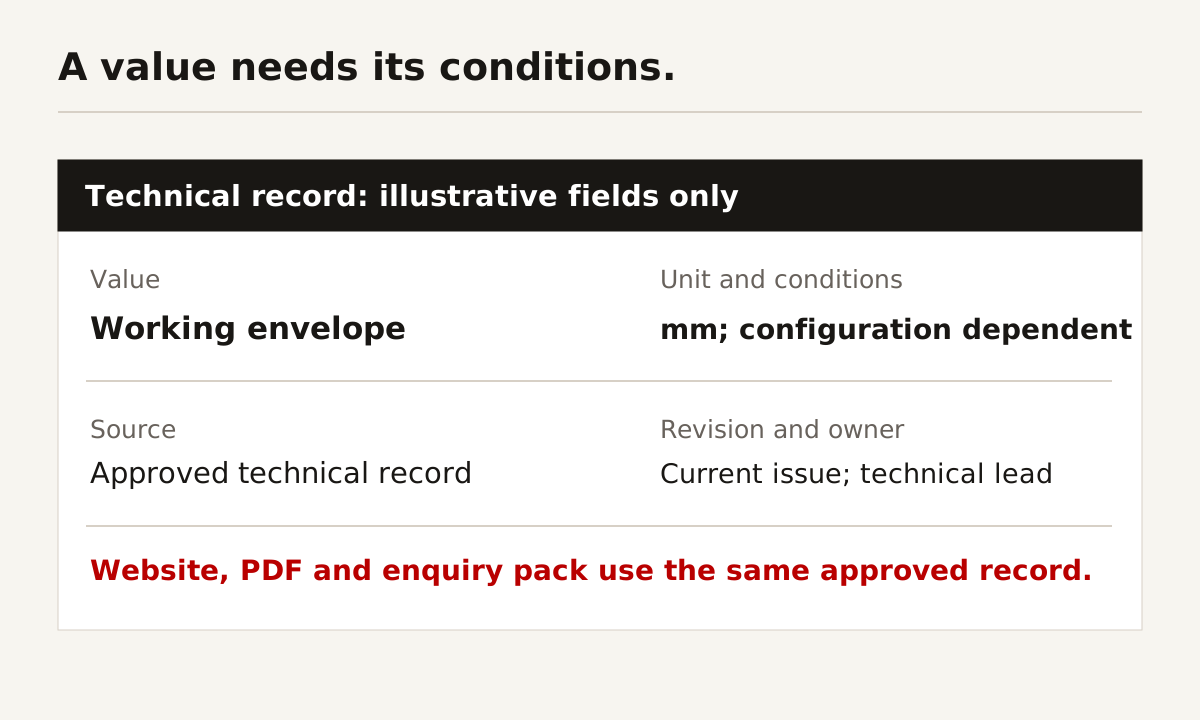
The diagram uses illustrative fields rather than a manufacturer's certified data. It shows the structure of a useful record, not a technical recommendation for a component or process.
For product ranges, decide whether buyers can browse a catalogue or need help filtering. A small, clearly organised range may need no configurator. A larger range with meaningful selection constraints might benefit from filters or a guided finder. Do not add software before defining the data it must use.
Keep essential facts on the page
A downloadable document is useful for forwarding and recordkeeping. It should not be the only place where a buyer can find the application and main limitations. Provide an HTML summary, then the detailed download with a clear title, revision and file size.
Explain acronyms where they first appear. Use an accessible table when fields need comparison. W3C's tables guidance explains the relationship between header and data cells. A screenshot of a spreadsheet does not provide the same readable structure.
If several languages are required, technical review matters as much as translation. A changed unit, ambiguous term or missing condition can alter the meaning. Agree who approves each language version and what happens when the source record is updated.
Build project evidence that explains responsibility
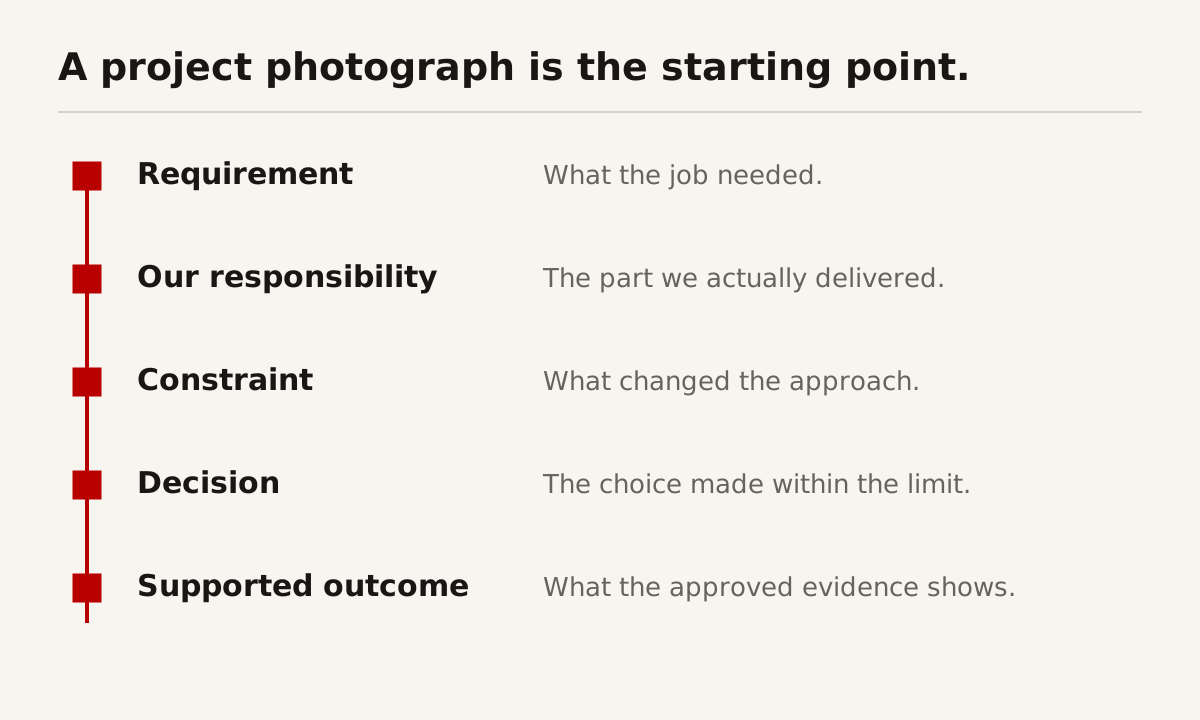
A project gallery shows that work happened. A useful project record explains the requirement, constraints, responsibility, decisions and supported outcome. Those facts let someone decide whether the experience is relevant to their own job.
Begin with your role. Were you the designer, fabricator, supplier, installer or specialist subcontractor? If several organisations contributed, distinguish your work from the overall project. This is particularly important when the photograph shows a much larger installation than your contracted scope.
Describe a constraint that affected the work. It might be access, geometry, delivery sequence, an interface with another system or a requirement to keep operations running. Then explain the decision taken within that constraint.
A real example: EN+ had outgrown its first website
EN+ approached us for a refresh because the website built when the company was new no longer reflected the business. Company information, capabilities, products and project work needed a clearer place. The editing arrangement also needed to suit the people maintaining it.
We rebuilt the site in WordPress, with dedicated sections, reusable product pages and an interactive project map. Routine content changes can be handled by the team. The custom features sit in a maintained plugin rather than being repeated independently across pages.
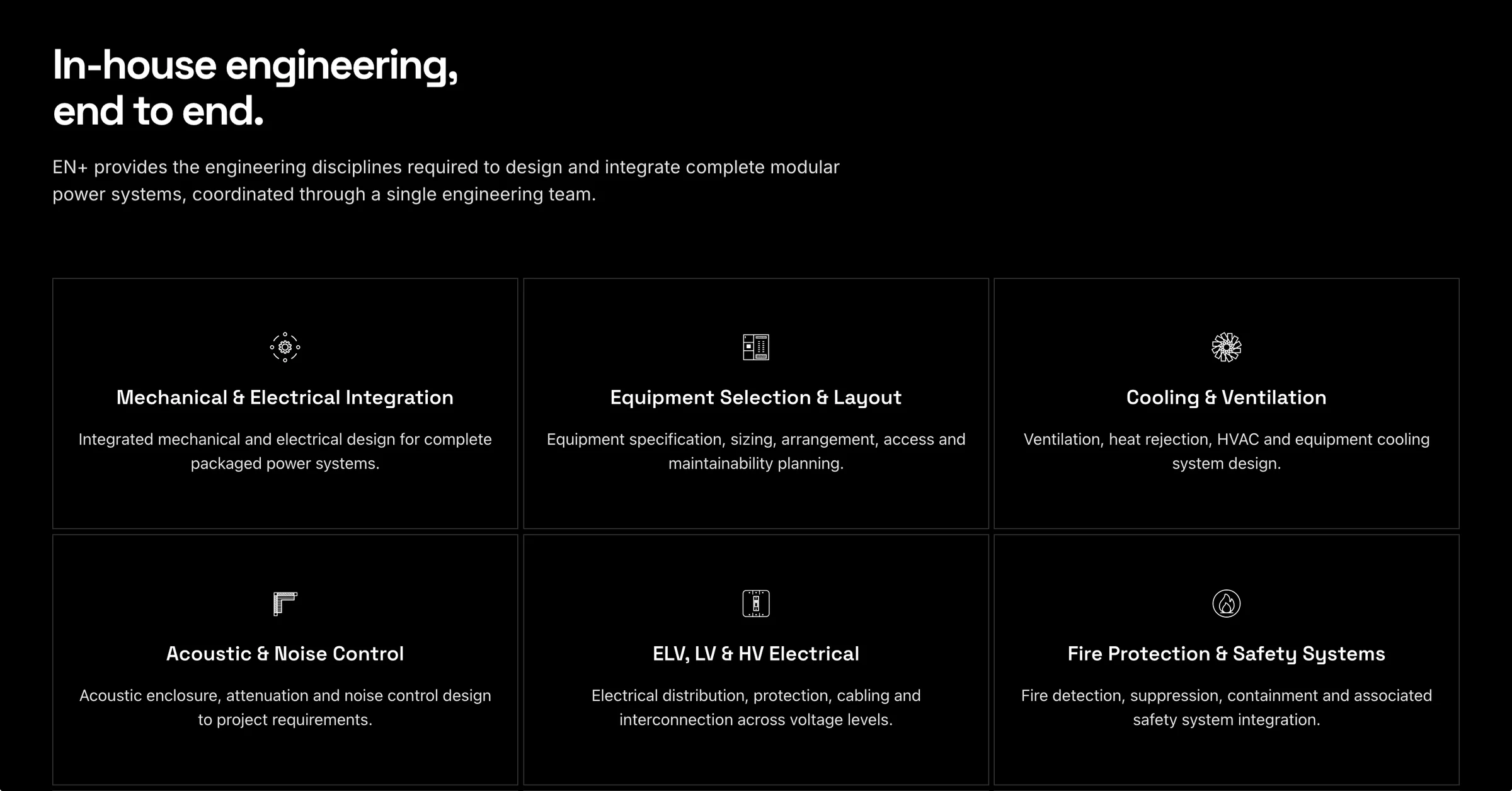
The lesson is about structure and maintainability. It is not evidence that every engineering company should choose WordPress, or that this rebuild produced a particular sales increase. We have not presented a conversion study here. You can read the EN+ website rebuild case study and view the website yourself.
For your own project records, record approval separately from drafting. A technically correct description may still need client permission. Captions, logos, names and drawings all belong in the review, not just the written paragraphs.
Choose an editing system by the team's tasks
Ask who will update the site, how often and which fields they need to change. Then test those tasks in the proposed CMS. A platform name alone tells you very little about the actual editing experience.
Two websites built on the same platform can behave differently. One uses repeatable content fields and sensible permissions. The other makes staff reconstruct a complex layout every time they add a project. Compare the implementation, not just the software brand.
Table 3: editing approaches and the questions to ask. These are selection considerations, not platform rankings.
| Approach | Suitable situation | What to demonstrate | Ongoing responsibility |
|---|---|---|---|
| Structured WordPress build | Staff need repeatable service, product and project pages | Add a record and update approved fields without breaking layouts | Updates, backups, permissions and supported custom parts |
| Headless CMS | Structured content must support several front ends or channels | Edit and preview a record, including linked dependencies | CMS configuration, front-end deployment and integrations |
| Managed site builder | Scope is modest and the team prefers managed tooling | Update real content, export what is available and check limits | Account access, platform constraints and recurring administration |
| Custom application with content tools | Product or workflow requirements exceed an ordinary publishing site | Demonstrate the actual publishing and data-management tasks | Code, data, security, operational support and change process |
WordPress documents roles and capabilities for assigning access. Its block editor documentation explains its content-editing model. Neither replaces a demonstration of your particular build.
Put ownership in the handover requirements
List domain registration, website files, database, CMS access, image rights, analytics access and any maintained custom code. Identify who holds each account and how access transfers if the relationship changes.
Ask what can be exported and what cannot. A design file is not a backup of the working website. A database export is not a complete recovery procedure. Request a documented restore process and a practical editing session before accepting the handover.
Use the capability-statement guide when preparing the material that the website and downloadable pack will share. Maintaining both from an agreed source is easier than resolving conflicting versions later.
Design and verify the enquiry route
The form should help the responsible person begin the next conversation. It should not collect every possible detail or accept sensitive files without an agreed handling process.
Start with the information needed to route and assess the request. Use visible labels, understandable errors and a confirmation that explains what happens next. W3C's forms tutorial covers those accessibility basics.
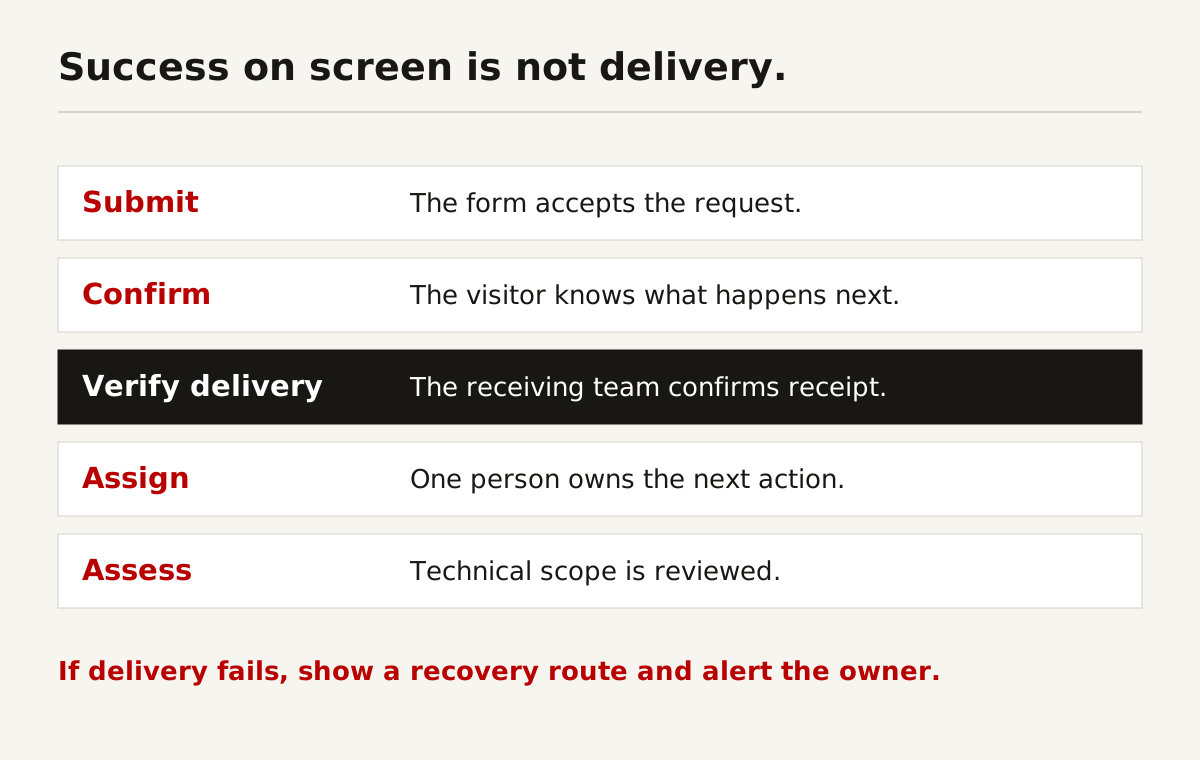
Separate a successful form submission from a delivered enquiry. A browser can receive a success response while a notification fails, is filtered or goes to an unattended mailbox. Test the complete visitor route and confirm receipt with the receiving team.
Include the awkward cases
Test a mobile visitor, an attachment that is too large, an invalid address, a temporarily unavailable service and a duplicate submission. Confirm there is an understandable recovery route. Do not ask users to repeat a long technical description after an avoidable error.
Agree responsibility after receipt. Who acknowledges the enquiry? Who assesses the technical scope? Who follows up if it is incomplete? A shared inbox can work, but only if someone is responsible for the next action.
If personal data is collected, document the purpose, access and retention arrangements. Singapore businesses can use the PDPC's key concepts guidance (PDF) as a starting point. Obtain appropriate advice for your actual obligations and other jurisdictions. This guide is not a privacy compliance assessment.
Build search, accessibility and performance foundations
Search should be considered while the structure is being agreed. Give important services their own useful explanation, use descriptive headings and link related evidence. Do not hide the main capability information in an animation, a PDF or an image containing text.
Google's Search Essentials describes technical requirements, spam policies and recommended practices. Meeting them does not guarantee indexing or a particular position. Clear content and working technical foundations are requirements for discovery, not a promise of commercial results.
For international content, distinguish a translated page from a regional operating claim. A German translation does not mean you have a German office. Google provides multi-regional and multilingual site guidance for language and region handling. Have the technical implementation and the actual business claims reviewed separately.
What the build does for SEO and AI search
A website build can establish readable service information, crawlable pages, suitable metadata, descriptive links and valid structured data. It can also remove technical obstacles that prevent important content from being accessed.
Google's AI features guidance says the established SEO practices remain relevant and no special AI markup or files are required. Eligible content is not guaranteed to appear in an AI answer. Do not buy a website on the promise of automatic placement in AI summaries.
Ongoing work is different from launch setup. New project evidence, changed services, technical maintenance, search-query review and useful supporting content need attention after launch. One-time preparation can give the site a sound base. It cannot keep the information current for the next several years.
Make visuals useful without making the site slow
Use actual work, approved equipment photographs, clear drawings and relevant screenshots. Give each informative image an accurate text alternative. W3C's image guidance explains when concise alternatives, empty alternatives or a fuller explanation are appropriate.
Google's image guidance also covers discoverability and image context. Important images should be available as images in the page, not only as CSS backgrounds. Deliver an appropriate size for the device, reserve the space and load below-the-fold media without blocking the opening content.
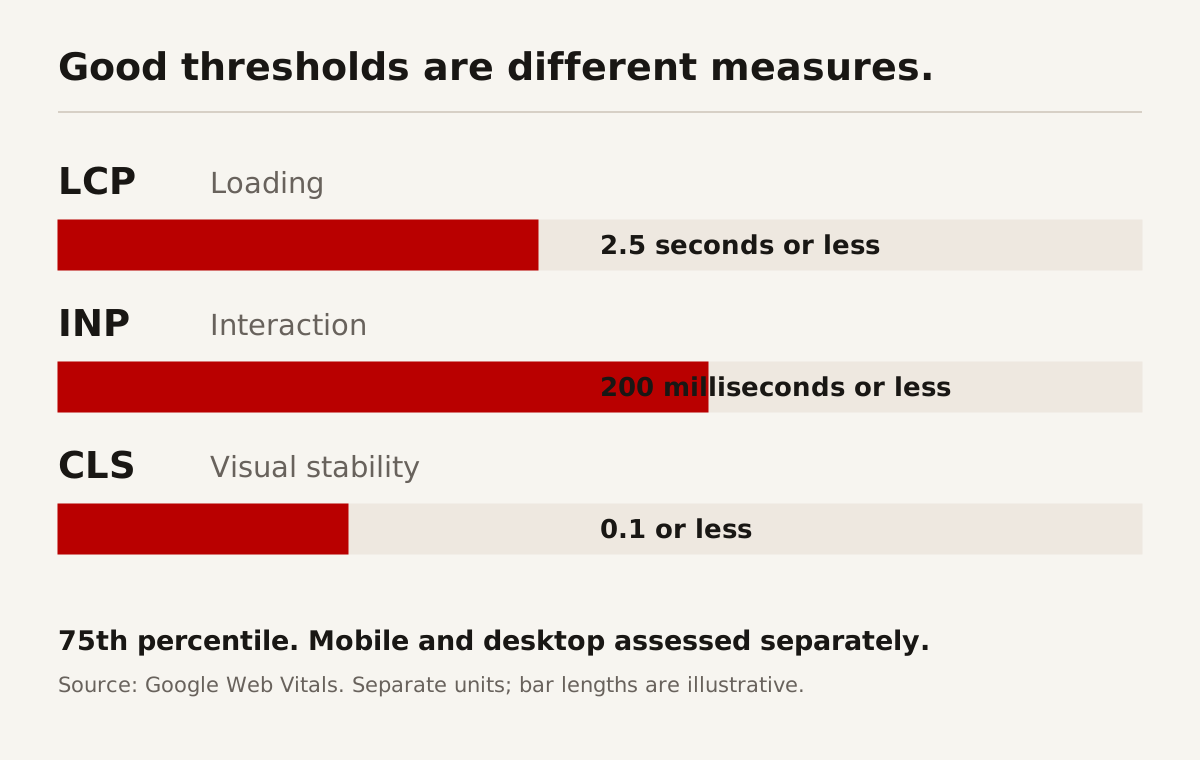
The chart shows published thresholds, not measurements of EN+ or another client. Google's Web Vitals guidance defines good thresholds as LCP of 2.5 seconds or less, INP of 200 milliseconds or less and CLS of 0.1 or less. Assessment uses the 75th percentile, separated by mobile and desktop. These are different units, not values to add or rank against each other.
A development test is useful for finding problems. It is not a substitute for field measurements from real visits. Likewise, an attractive screenshot cannot tell you how the page performs on a phone or whether the enquiry works.
Test buyer tasks before accepting the website
Ask people to perform realistic tasks without directing them to the answer. You are testing the website, not their intelligence. “Find a comparable project and explain our role” is more useful than “Do you like the design?”
GOV.UK's moderated usability testing guidance describes watching participants attempt relevant tasks and learning from their actions. For an engineering site, recruit appropriate or likely users rather than relying exclusively on staff who already know where everything is.
Record success, confusion and assistance separately. If somebody finishes after the facilitator gives instructions, do not count that as unassisted completion. A small test can expose a design issue. It cannot establish a universal conversion rate or prove future sales performance.
Table 4: launch tests and what counts as evidence of completion. Set project-specific targets before testing.
| Test | Pass condition | Evidence to keep | Responsible team |
|---|---|---|---|
| Find a capability | Reader locates the scope and its relevant limits | Task notes and inspected page | Technical and design teams |
| Assess a project | Reader can state your role without guessing | Task notes and approved project record | Project and commercial teams |
| Make an enquiry | Submission, receipt and assignment all work | Test confirmation and receiving-team check | Website and sales teams |
| Update a record | Intended editor changes approved fields safely | Observed editing task | Content owner and developer |
| Use keyboard navigation | Links, menus and controls remain usable with visible focus | Keyboard test record | Developer and reviewer |
| Check search readiness | Important pages are accessible with expected metadata and no accidental blocks | URL checks and rendered page review | Website and search teams |
| Recover the site | Documented backup and restoration method has been verified | Recovery record and ownership checklist | Maintenance provider and owner |
Check mobile layouts with long product names, specifications and real images. Do not test only empty templates. Test the busiest table and longest project title. Review the keyboard path through navigation, downloads and forms.
Keep a defect list with severity and ownership. A broken enquiry route, incorrect capability or missing redirect is a release blocker. A minor spacing preference can usually be handled without postponing a functioning website indefinitely. Agree the difference rather than deciding it in a rushed launch meeting.
Plan migration, launch and the first 90 days
Before rebuilding, inventory the current public URLs and identify pages that should remain. A new design is not a reason to discard every address that customers, search engines and documents already use.
Where an address changes, map the old page to a relevant new destination. Sending every old URL to the homepage is not a substitute for a migration plan. Google's site-move guidance explains URL mapping, redirects and post-move monitoring. Expect a transition, not an instant guarantee that all search performance remains unchanged.
Separate a website change from a domain or email change. Identify the exact DNS records and connected services in scope. A launch should not silently disrupt an unrelated client subdomain or mailbox. Have the people responsible for those services verify the proposed change.
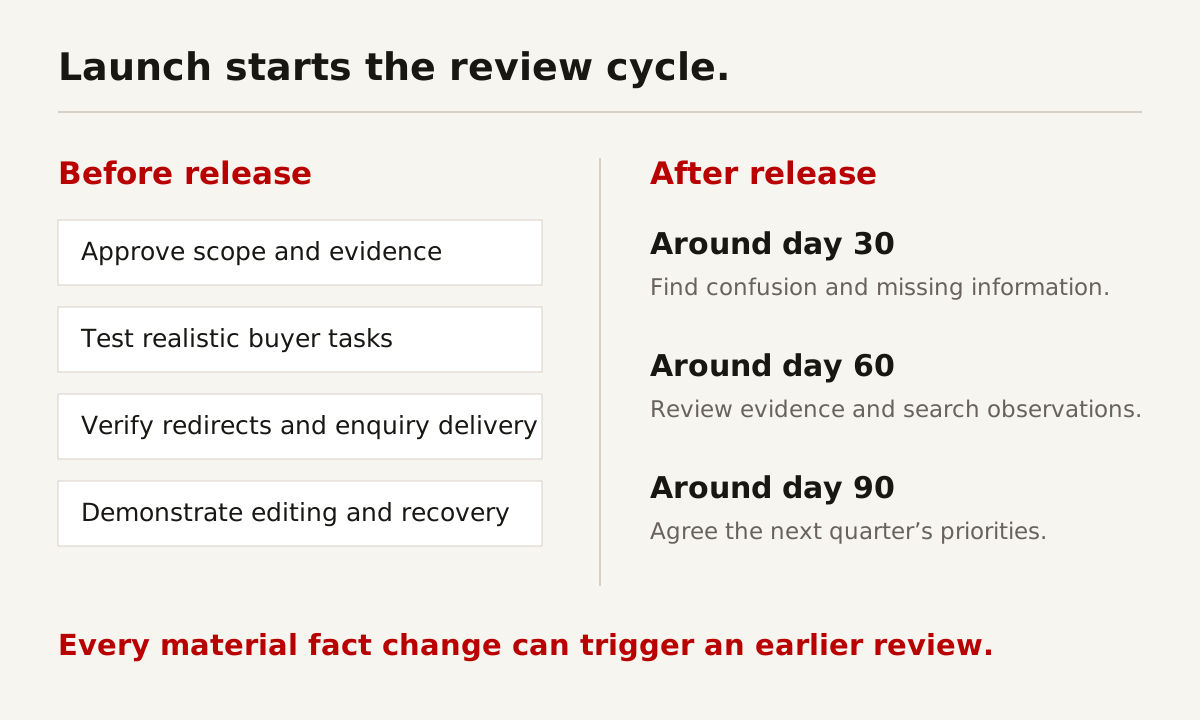
Hand over a working process, not just a login
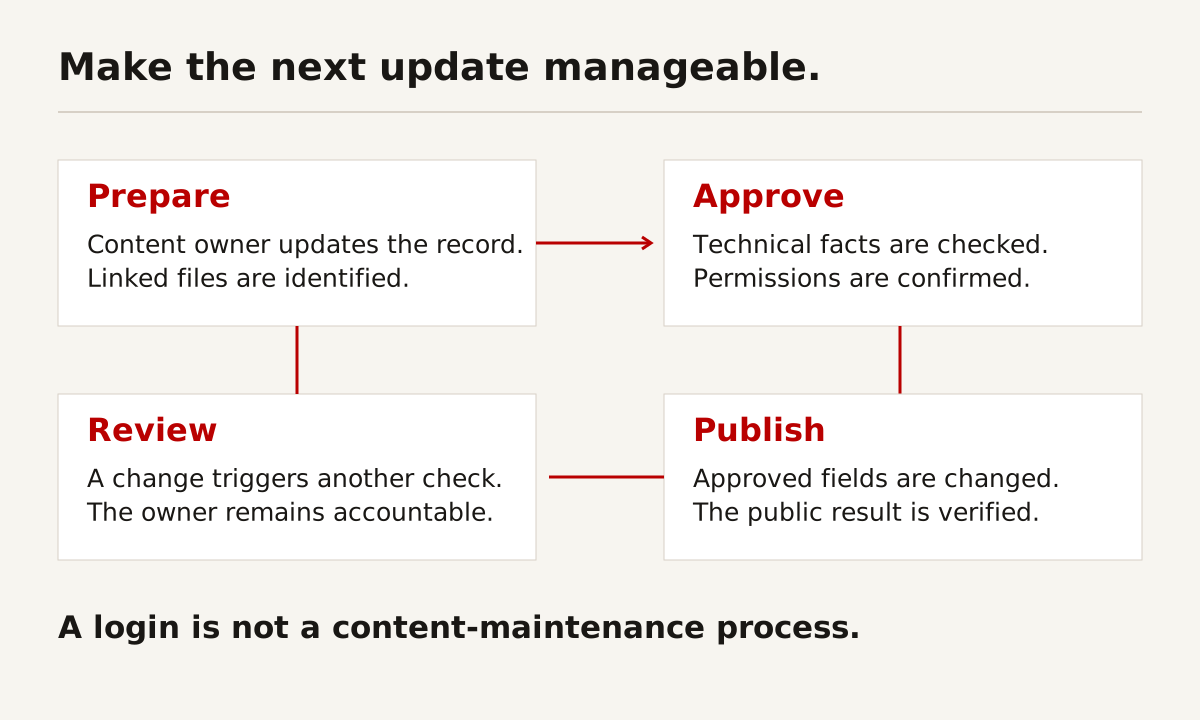
Give editors a short, specific guide for adding a project, changing a specification, replacing a document and requesting approval. Demonstrate the tasks with the team. Confirm which changes need a developer and which do not.
Assign a maintenance owner and a content owner. Software upkeep and factual accuracy are separate jobs. A technically healthy website can still contain an expired credential or obsolete contact. A current service description does not mean its backup process works.
Table 5: a first-quarter review programme. These are suggested checkpoints, not a universal publishing frequency.
| Checkpoint | Main question | Evidence to review | Follow-up owner |
|---|---|---|---|
| Launch week | Can people reach the correct pages and teams? | Public URLs, redirects, enquiries and delivery checks | Website lead and sales owner |
| Around day 30 | What is confusing or missing? | Enquiry feedback, editing tasks and observed visitor problems | Commercial and content owners |
| Around day 60 | What information should be improved? | Current capabilities, project permissions and search observations | Technical and search owners |
| Around day 90 | What should the next quarter prioritise? | Qualified enquiry outcomes, content gaps and maintenance record | Business lead and responsible teams |
| On a material change | Which records became inaccurate? | Service, product, credential or contact change | Owner of the affected record |
For analytics, agree definitions before comparing counts. An enquiry is not automatically a qualified opportunity. A qualified opportunity is not a signed project. Google's recommended analytics events includes lead-stage events, but the business must still agree what each stage means and how it is recorded.
Review search and AI discovery as part of that wider picture. A mention in an answer is not a visit. A visit is not a sale. Use observations to decide what to improve, not to manufacture a neat success story.
Use the workbook to write the brief
The engineering website planning workbook contains six editable sheets: instructions, buyer tasks, page inventory, claim register, launch checks and first-quarter review. Example rows are marked as examples. They are not facts about your company.
Start with buyer tasks and the page inventory. Ask technical leads to complete the claim register. Give the proposed supplier the launch checks so the acceptance criteria are visible before work begins. Keep the review sheet for the people maintaining the site.
For a simpler format, download the same templates as CSV files. The instructions are included as plain text. No macros, external data connections or account sign-in are needed.
Do not complete the workbook by guessing. An unanswered cell can be a useful discovery item. A confidently invented capacity figure or unsupported credential is a publication risk.
Questions to settle before you commission the work
Does every engineering company need WordPress?
No. Choose the editing and delivery arrangement around the team's actual tasks. WordPress, a headless CMS, a managed builder or a custom application can be appropriate in different circumstances. Test editing, permissions, ownership and support before choosing. EN+ is a project example, not a universal platform recommendation.
Should technical information be downloadable or on the page?
Usually both serve a purpose. Put the application, main conditions and useful summary on the page. Provide a controlled document for details that buyers need to retain or share. Keep the revision and source consistent. Do not ask a PDF to do all the work of a readable website.
Is a website rebuild enough for SEO and AI visibility?
It can establish technical and content foundations. It does not replace continuing factual updates, useful project evidence, search review and maintenance. No provider can guarantee that a particular page will be ranked or cited in an AI summary. Agree launch deliverables and ongoing responsibilities separately.
How do we know the finished site is better?
Use the buyer tasks and acceptance criteria agreed before design. Check whether people can identify scope, find evidence, make a useful enquiry and update content. Review commercial outcomes over a sensible observation period, acknowledging the sales cycle and other influences. Do not rely on visual preference alone.
Start with what buyers cannot find
At Creatif Work, we start by identifying the information and workflow gaps. An engineering website may need clearer capability pages, better project evidence, a more manageable editing system or an enquiry route that reaches the correct team. Those are different problems. They should not all receive the same design answer.
We can help turn that diagnosis into a website the team can maintain. Where continued search work is needed, SEO and AI-search services cover the work after the initial build. The objective is clearer information and measurable improvement, not a promise of automatic rankings.
Sources and scope
External guidance was reviewed on 1 October 2026. Technical recommendations and programme details can change. The following are the primary starting references used in this guide:
- Google Search Essentials: search requirements and recommended practices.
- Google AI features and your website: established SEO practices and AI-feature eligibility.
- Google image guidance: discoverable images and page context.
- Google Article structured data: accurate article metadata, aligned with visible content.
- Google multi-regional and multilingual sites: language and region handling.
- Google site moves with URL changes: migration planning and monitoring.
- Google Web Vitals: performance definitions, thresholds and measurement limits.
- W3C images, tables and forms: accessible presentation and interaction.
- WordPress roles and capabilities and block editor: platform-specific editing guidance.
- GOV.UK moderated usability testing: task-based evaluation method.
- PDPC key concepts guidance (PDF): Singapore privacy context, not an assessment of your compliance.
- Google Analytics recommended events: event definitions for measurement.
There is no representative website survey or participant study in this article. Planning diagrams, example records and workbook rows are illustrative. EN+ screenshots show published website work. No revenue, conversion or ranking improvement is claimed for that project here.