

Industrial Website Design: How to Organise Hundreds of Products

Hundreds of products do not require hundreds of disconnected pages. They require a stable data model, useful categories and filters based on real buyer decisions. Design the catalogue around the task, then generate consistent pages from controlled product data.
The alternative is familiar: several menus, inconsistent PDF names, duplicated products and a search box that only works if the visitor knows the internal model number.
How should an industrial website organise a large product range?
Give each product one stable record and organise access by product family, application and the specifications buyers actually compare. Use filters only for complete, controlled fields. Keep model numbers searchable, preserve old URLs and show status when a product is replaced or discontinued.
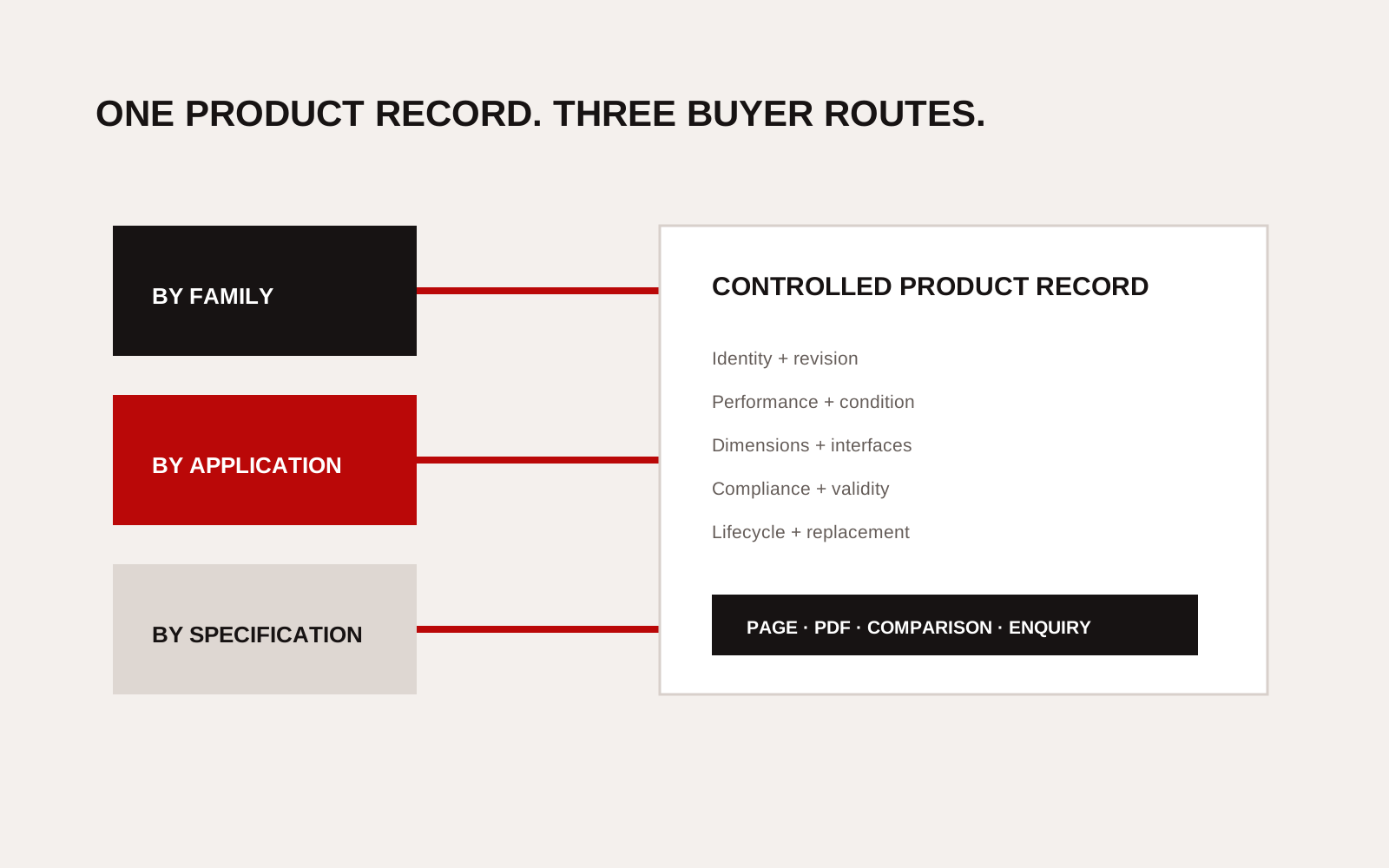
Industrial product website architecture with category, application, specification filters and product comparison.
Begin with a product data model
Before drawing a menu, define the fields shared across the range.
| Field group | Examples | Publication rule |
|---|---|---|
| Identity | Name, model, family, revision | One canonical record |
| Application | Process, medium, environment | Use approved terms |
| Performance | Capacity, pressure, accuracy, speed | Always include unit and condition |
| Physical | Size, mass, material, connection | Use consistent units |
| Compliance | Standard, certificate, scope, expiry | Link current evidence |
| Commercial | Availability, region, enquiry route | Avoid unsupported lead times |
| Lifecycle | Active, replaced, discontinued | Preserve status and successor |
Do not create a filter until most relevant products have a trustworthy value for it. A “pressure” filter with half the catalogue blank misleads the buyer.
Give buyers three routes
Different visitors enter with different knowledge.
- By product family: for buyers who know the equipment type.
- By application: for buyers who know the operating problem.
- By specification: for buyers comparing a defined requirement.
Model-number search supports existing customers and maintenance teams. It should accept common formatting variations and old identifiers where safe.
Keep category depth under control
Use the smallest hierarchy that separates meaningful choices. A category should exist because its products share a buyer task or comparison pattern, not because the internal organisation has a department with that name.
Test the structure with five enquiries from sales. Ask whether a new visitor can find a suitable group without knowing the company's terms. If every path relies on “Other”, the model is not ready.
Google's Search Essentials requires pages to be crawlable and helpful to people. Important products should have normal links and stable URLs. Do not hide the entire catalogue behind a form or a client-side filter that search engines and assistive technology cannot operate.
Build comparison from controlled fields
A comparison table is useful when it answers a real selection question. Limit it to the fields that vary and influence choice.
| Buyer question | Useful field | Required context |
|---|---|---|
| Will it handle the duty? | Rated range | Medium and condition |
| Will it fit? | Dimensions and connections | Drawing revision |
| Can it integrate? | Protocol or interface | Version and option |
| Is it approved? | Standard or certificate | Scope and validity |
| Can it be maintained? | Access and service item | Interval assumption |
Do not compare a tested value for one product with a nominal value for another. Label the source and condition.
Treat PDFs as outputs, not the database
Product PDFs remain useful for offline review and controlled submissions. They should be generated or maintained from the same source fields as the page. Show the document revision and page update date.
When a file changes, retain a stable public URL or redirect the old one to the current product record. Do not leave search results pointing to an unlabelled obsolete sheet.
Plan discontinued products
Deleting a discontinued page breaks saved links and hides the route to a replacement. Keep a clear status page with:
- last supported version;
- replacement product, if one exists;
- compatibility notes approved by engineering;
- document archive policy; and
- service or parts contact.
Do not imply that a successor is a direct replacement unless the technical team has approved that claim.
Run a catalogue governance check
Assign owners for technical data, compliance documents, translation and publication. Review high-risk fields more often than descriptive copy.
Every quarter, sample products across families and check:
- model and revision;
- unit consistency;
- filter accuracy;
- certificate status;
- page and PDF agreement;
- replacement links;
- mobile table behaviour; and
- enquiry routing.
Our guide to engineering website buyer checks shows how product data fits wider qualification. The engineering sector page explains the evidence buyers look for beyond the catalogue.
Creatif Work plans industrial websites from the product model and selection task, not a menu copied from a brochure. If the range has grown faster than the structure, start with the problem.
Migrate the catalogue without losing trust
Before rebuilding, export every live product URL, title, model number, document link and status. Match each old record to a new canonical product, a successor, an archive page or a deliberate removal. Do not make that decision from page traffic alone. A low-traffic sheet may be important to a small installed base.
Create redirects only after the mapping is approved. Test old model links from search results, distributor pages and saved PDFs. Preserve queryable legacy identifiers on the successor page where the relationship is technically valid.
Run a sample migration by family before moving the full catalogue. Ask sales, service and engineering to find parts using model, application and specification routes. Check that filtered results do not exclude products with missing data. Record each missing field rather than filling it with marketing inference.
After launch, monitor failed searches, no-result filters, old URL requests and enquiries that name unavailable products. These signals show where terminology, data completeness or lifecycle information still needs work.