

Construction Website Design: Pages a Main Contractor Needs

A main contractor website is often organised like a company brochure: history, services, a project gallery and a contact form. That may be enough for someone who already knows the firm. It is weak for a client, consultant, subcontractor or candidate trying to decide whether the contractor fits a specific job.
The website does not need to reproduce a prequalification submission. It should make the first review faster and give the reader a clear route to current, controlled evidence.
What pages does a main contractor website need?
A main contractor usually needs pages for markets and capabilities, completed projects, project delivery, safety and quality, sustainability, people and careers, company credentials, news or updates, and clear contact routes. The exact sitemap should follow the work the contractor pursues and the evidence buyers repeatedly request.
A smaller contractor may combine several subjects. A regional or multidisciplinary contractor may need separate pages by sector, geography or client type. Page count is not the starting point. The decisions the site must support are.
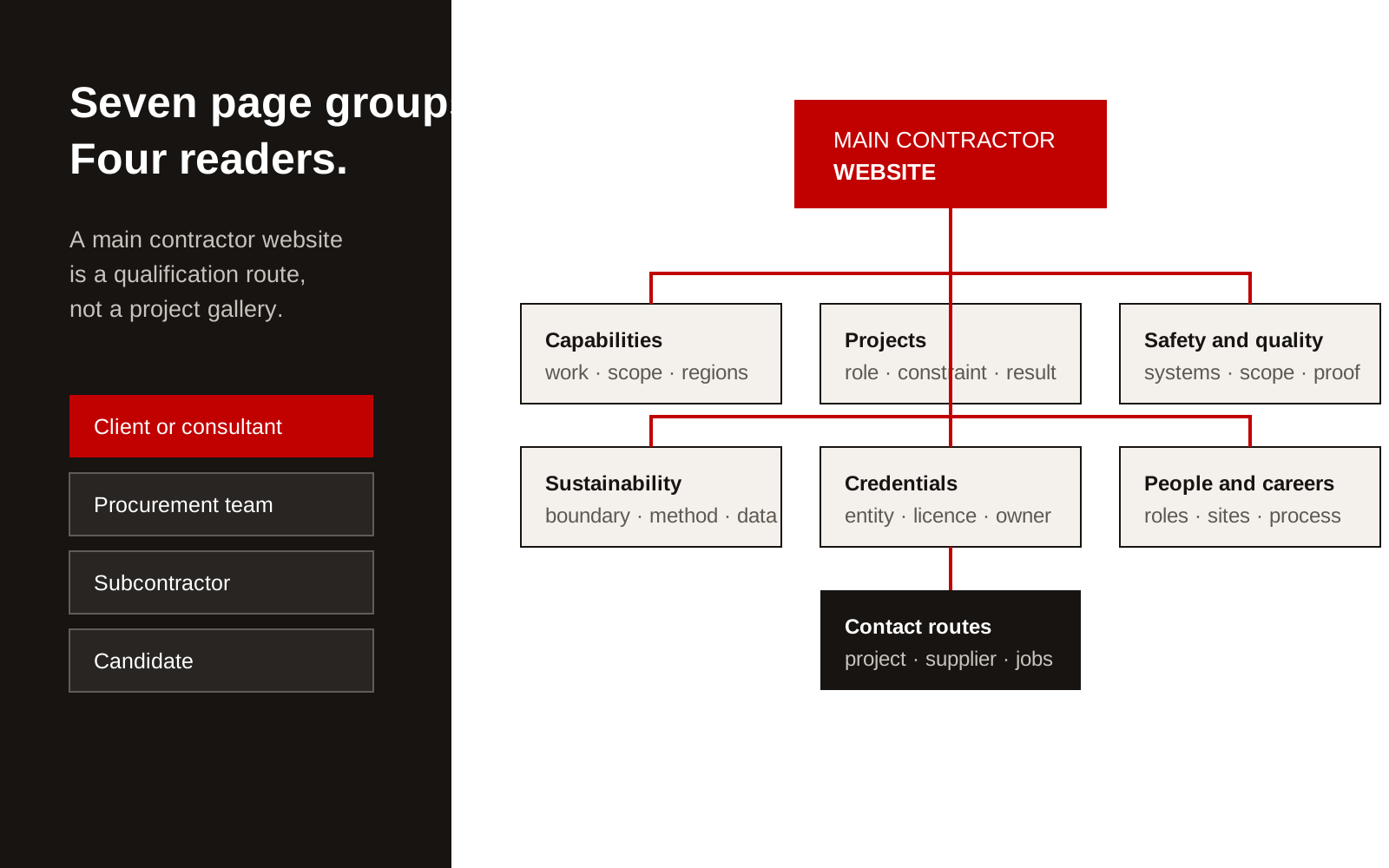
Website page map for a main contractor covering capabilities, projects, safety, people and contact routes.
Build the sitemap around four readers
The same page cannot lead every reader through every question.
| Reader | First questions | Best next page |
|---|---|---|
| Client or consultant | Have you delivered comparable work? At what scale and in what role? | Capability and relevant project |
| Procurement team | Are registrations, systems and evidence current? | Credentials, safety and downloadable company information |
| Subcontractor or supplier | Where are you working and how do we engage? | Project, supplier information and contact route |
| Candidate | What would I work on, where and with whom? | Careers, project teams and open roles |
This prevents a common failure: making every reader begin on a generic "About us" page.
1. Capabilities and markets
Describe work in the terms clients use to scope it. Separate project types, delivery roles and specialist capabilities where the distinction changes whether the firm is suitable.
Each capability page should state:
- work undertaken and excluded
- typical project or package context
- geography and service coverage
- delivery role
- relevant licences, registrations or management systems
- two or three comparable projects
- contact for technical or commercial questions
Avoid a list such as "civil, commercial, residential, infrastructure" with the same paragraph under every heading. The reader needs to know what changes between them.
2. Project evidence
A project page needs more than a finished photograph. Record the client or client type, location, scope, contractor role, constraints, programme context and verified result. If contract terms prevent naming the client or value, say what can be said without trying to imply more.
A practical project structure is:
- what the client needed
- what made the job difficult
- the contractor's exact responsibility
- how the work was delivered
- the approved outcome
- relevant capabilities and people
Filters can help when there are enough projects, but do not hide all evidence behind a filter interface. Give important sectors and capabilities crawlable landing pages with descriptive links.
Our construction capability statement guide shows how to keep project and company evidence consistent across the website and tender documents.
3. Safety, quality and delivery systems
Clients need to understand the system and its scope. A row of certificate logos does not explain which legal entity, activity or period each certificate covers.
Create one clear section for:
- safety responsibilities and reporting routes
- management-system scope
- certification details and current status
- quality planning and inspection
- subcontractor controls
- incident and corrective-action process at a safe summary level
- digital information or document-control approach
Do not publish live incident records, personal data or security-sensitive procedures. Provide controlled documents during qualification through the agreed route.
For a Singapore contractor, registration claims should match the Building and Construction Authority record. BCA's Contractors Registration System explains that registration is required for public sector construction tenders and sets out workhead classifications and application evidence. Link to the official register or source where it helps a buyer verify the claim.
4. Sustainability and environmental evidence
Keep this page tied to work. State the reporting boundary, period and measurement method for every figure. Separate company operations from project outcomes and product claims.
Useful content includes:
- policies with owner and review date
- project requirements the contractor has delivered against
- materials, waste, energy or carbon measures with definitions
- approved case studies showing the baseline and result
- recognised certifications with scope
Do not use an image of trees to stand in for evidence. If the data is not ready, describe the process and publish the figure after it has an owner and review.
5. Company credentials and ownership
The company page should help someone verify who they may contract with. Include legal name, operating locations, leadership, history where relevant, core registrations and the relationship between parent, subsidiary and regional entities.
If several entities share one brand, state which entity performs which work. This matters to procurement teams comparing licences, insurance and project records.
Keep a downloadable company profile only if someone owns the update. A stale PDF can contradict the website for months. Put a revision date on it and use one source for repeated facts.
6. People and careers
A careers page should explain work, locations, employment routes and the application process. Candidates want to know which projects they may join, what roles exist and what the working arrangement looks like.
Useful pages include:
- professional and technical roles
- site and trade roles
- internships, graduates or apprenticeships where offered
- locations and mobility expectations
- current vacancies
- recruitment privacy and scam warning
Use real project environments and team information with permission. Stock images of people in unused protective equipment weaken trust.
7. Contact and enquiry routes
Separate at least four routes: project enquiry, subcontractor or supplier contact, careers and media or general contact. Ask only for information needed to route the message.
A project enquiry may need location, project stage, intended scope and timing. It does not need a 20-field tender form on first contact. State how the information will be used and what happens next.
On mobile, test phone numbers, maps, file uploads and confirmation messages. A site manager or consultant may be using the page from a project location, not a desk.
A main contractor website content checklist
Before design starts, confirm that the team can supply:
- current company and registration details
- capability definitions and boundaries
- 8 to 12 representative projects
- approved project facts and images
- current certificates and their scope
- safety, quality and sustainability owners
- leadership and careers information
- regional office and enquiry routes
- privacy wording for forms and recruitment
- one person responsible for keeping each repeated fact current
Missing content is not a reason to fill the layouts with general claims. It is a sign that the website project must include interviews, evidence review and approval time.
Creatif Work designs construction websites around client review, qualification and recruitment rather than a standard agency sitemap. Our website service covers the structure, content and build needed to make those pages useful after launch.