

How Often Should a Business Website Be Redesigned?

A business website does not need a full redesign on a fixed schedule. Redesign when the structure, technology, brand or operating model prevents the site from doing its job. Otherwise, targeted improvement may be faster and less disruptive.
Age is a prompt to review the site, not a reason to replace it.
How often should a business website be redesigned?
Review the website at least annually and after major business change. Redesign only when evidence shows that the information architecture, content model, interface, platform or brand cannot support current users and goals through reasonable improvement.
| Signal | Likely response |
|---|---|
| Outdated facts or weak pages | Content audit and rewrite |
| Slow templates or accessibility defects | Technical and design improvement |
| New service or market | Add or restructure relevant journeys |
| Editors cannot maintain content | CMS and content-model improvement |
| Repeated integrations failing | Architecture review |
| Business and site structure no longer match | Structural rebuild or redesign |
| Brand has materially changed | Design-system and content revision |
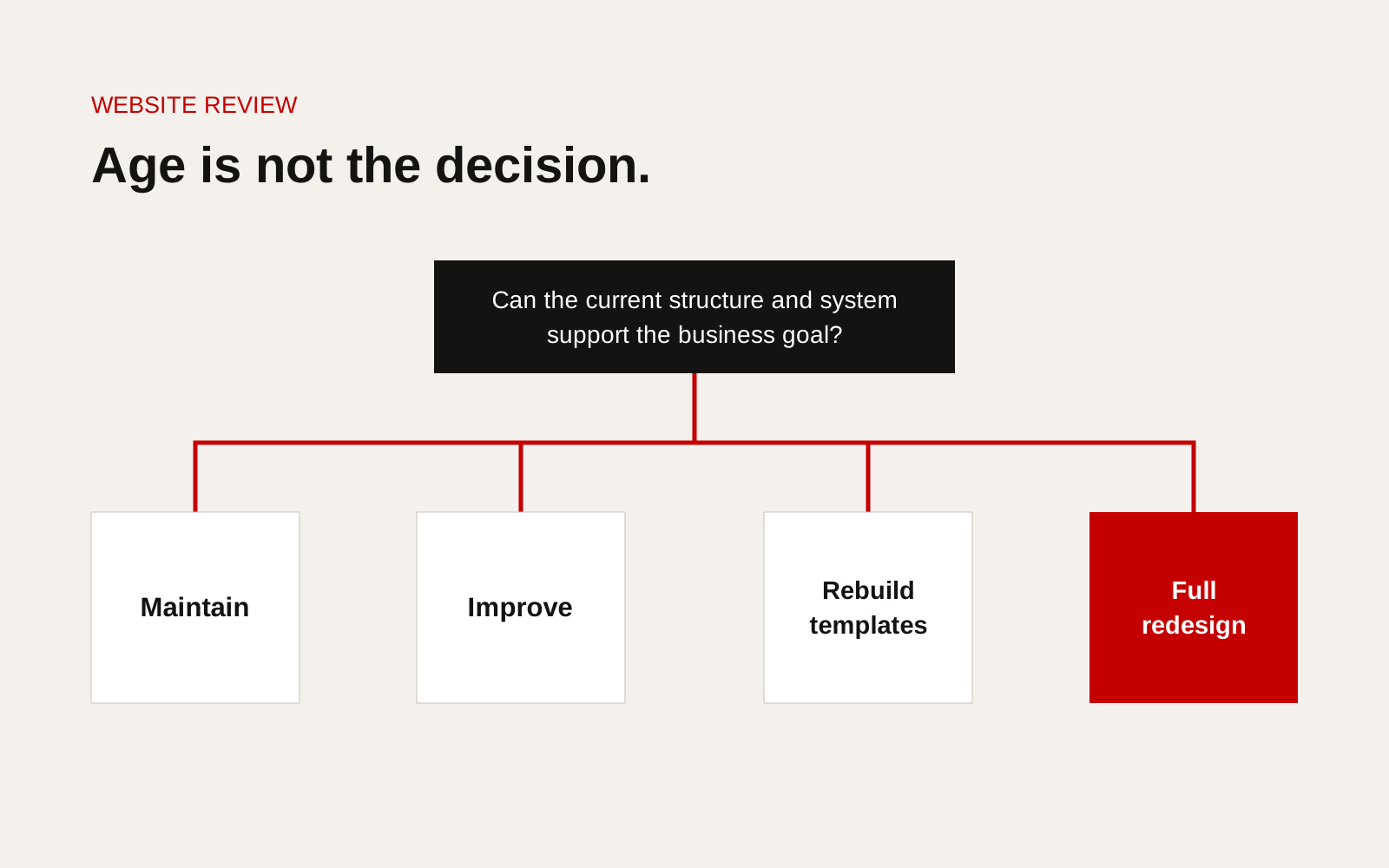
Website intervention decision tree comparing maintenance, targeted improvement, structural rebuild and full redesign.
Separate visual age from business failure
A site can look dated but still be clear, fast and useful. It can also look new while hiding services, confusing buyers and producing weak enquiries.
Review:
- whether priority users find the correct page
- whether services and products match the current business
- whether projects prove claims
- whether forms capture useful context
- whether staff can publish safely
- whether search systems can understand the content
- whether performance and accessibility meet requirements
- whether ownership and maintenance are clear
Use evidence from real journeys
Combine analytics with interviews, enquiry quality, search data, content inventory and user testing. A fall in traffic does not automatically mean design is the cause. Search demand, tracking, seasonality and content can also change.
Test a few important tasks:
- find the right service for a stated problem
- confirm the company works in a market
- inspect comparable evidence
- locate a specification or document
- submit an enquiry with enough context
Observe the failure before proposing the intervention.
Choose the smallest useful intervention
Maintain
Use routine maintenance when the structure works and the issue is currentness, minor defects or regular content.
Improve
Use targeted improvement for a weak service section, project library, navigation, form or performance problem.
Rebuild templates
Rebuild page types when the content model is wrong but the wider brand and platform remain suitable.
Full redesign
Use a full redesign when several foundations fail together: brand, information architecture, content model, interface system, technology or ownership.
Our guide to website redesign versus continuous improvement compares these routes in more detail.
Include the migration cost
A redesign must preserve or deliberately replace useful URLs, metadata, content, documents, analytics and integrations. Inventory current pages and their value before removing them.
Google's site move guidance explains planning for URL changes and redirects. A visual redesign does not require changing every URL.
Review the platform separately
Do not replace the CMS simply because the interface is changing. Test editing, updates, security, integrations, exports and ownership. A new front end may work with the existing content system, or a platform change may be needed even when the visual design remains.
Set a post-launch improvement plan
Launch is a new baseline. Define metrics and a review cadence for content, performance, enquiries, accessibility and technical health. A site that is never reviewed will become outdated regardless of how complete the redesign was.
Audit ownership before changing design
List who owns the domain, DNS, hosting, source code, CMS, analytics, consent tools, media and third-party accounts. A redesign can expose access gaps that need resolving before migration.
Confirm export and backup routes. Do not discover during launch week that forms, redirects or historic content depend on an account controlled by a former supplier.
Set a content freeze and change process
For larger sites, agree when the migration inventory is captured and how later edits are carried across. Record new pages, changed files and deleted content. Without a change process, the new site can launch with older information than the live one.
Test before replacing
Run priority journeys with real users on a preview. Test search, forms, downloads, keyboard access, mobile layouts and analytics. Verify redirects and important indexed URLs.
A launch checklist cannot guarantee results, but it can separate known risk from avoidable omissions. Keep the old environment recoverable for the agreed period instead of deleting it immediately.
Redesign decision checklist
- Business and user changes documented
- Content inventory and evidence quality reviewed
- Priority journeys tested
- Technical and accessibility issues measured
- Platform problems separated from design problems
- Maintain, improve, rebuild and redesign options compared
- Migration and redirect scope understood
- Ownership and editing workflow included
- Success measures set before work begins
- Post-launch review plan agreed
Hold a quarterly website decision review
Use a one-page dashboard rather than waiting for a redesign discussion. Track task completion for the main journeys, qualified enquiries, search landing pages, accessibility defects, performance, publishing time, security and maintenance status. Add a short list of business changes the site does not yet represent.
For each problem, choose one response: content update, component improvement, technical repair, information architecture change or full replacement. Name an owner and expected measure. A redesign becomes reasonable when several high-value journeys share structural problems that smaller fixes cannot resolve, or when the platform blocks necessary security, governance or integration work. Keep the evidence from each review. It prevents the decision from being driven by visual fatigue and gives the eventual redesign a clear brief. The same record also shows when steady improvement is working and replacement would create more migration risk than value.
Creatif Work's website service begins with the business, buyer decisions and evidence before recommending a redesign. Use our diagnostic if the current site feels wrong but the cause is still unclear.